Cockpit panorama fans
If you want more horizontal screen space, check that your game supports it, how the HUD is displayed and whether you have room for a wider monitor.


Choose a monitor for space battles based on what matters most to you. A wider 21:9 or 32:9 picture is only a good fit if your specific game displays the field of view and HUD properly. For dark scenes, consider a 16:9 OLED monitor, while in fast-paced combat the frame rate you can actually achieve is what counts. If you play for long sessions with static on-screen displays, check the OLED care guidance and warranty terms too. A high resolution or maximum refresh rate won’t guarantee that you’ll see more of the game or achieve the same frame rate in-game.
If you want more horizontal screen space, check that your game supports it, how the HUD is displayed and whether you have room for a wider monitor.
If dark areas and contrast are your priorities, OLED is worth considering. Just be sure to check the care guidance for displaying static elements over long periods.
If clear motion and low input lag matter to you, choose a monitor to suit the frame rate your gaming platform can actually achieve.
A good fit if: You want a wider cockpit view on PC and your specific game displays the resolution, field of view and HUD properly.
Consider: The screen and stand need more width, and a high resolution can also put more demands on your graphics hardware.
A good fit if: Dark areas matter more to you than extra screen width, and you’re able to follow the care guidance for static displays.
Consider: Protective features don’t guarantee that burn-in won’t occur. Read the care guidance and warranty terms for the specific model.
A good fit if: You often use static cockpit displays and OLED care requirements or warranty terms aren’t right for the way you play.
Consider: The F.A.Z. Buying Guide particularly highlights OLED’s deep blacks and contrast; the right screen format still depends on the game.
The F.A.Z. Buying Guide recommends choosing a refresh rate and response performance to suit your graphics card and game. So don’t just compare monitor specifications: also consider your preferred operating mode and the performance of your gaming platform.
| What matters when buying | What to check | Particularly important for |
|---|---|---|
| Cockpit view and format | Check the game’s resolution and HUD, and measure the screen and stand to make sure they’ll fit where you plan to set them up. | If you want a wider cockpit view in a space game, check that the field of view and on-screen displays work in your chosen format. Around 29% of consumers put cockpit visibility first. |
| Dark scenes and contrast | Compare tests of the specific model and read its OLED care guidance and warranty terms. | If you want to see more detail in dark space scenes, weigh the contrast against the requirements for static on-screen content. Around 29% of consumers prioritise the display of dark scenes. |
| Motion and frame rate | Check the frame rate in your own game, along with the connection and supported operating mode. | If you want smooth motion in fast-paced combat, what matters is the frame rate your PC or console can actually output in-game. Around 21% of consumers make motion clarity their main priority. |
| Long sessions with static displays | Check the care guidance and warranty terms for the specific model. | If cockpit instruments stay on screen for long periods, the care requirements and warranty cover should suit how you use the monitor. Around 21% of consumers particularly value hassle-free long-term use. |
Your frame rate needs to suit your graphics card and game. The developer of Star Citizen points out that graphics settings and hardware requirements affect the performance you can achieve.
Check how your gaming platform performs at your preferred resolution, then make sure your monitor supports the operating mode you want.
A 21:9 or 32:9 panel tells you the monitor’s format, but not how every game will display its field of view and cockpit controls.
Check your specific game at your preferred resolution, and measure the screen and stand where you plan to set them up before buying.
MSI describes its care features and panel refresh cycle as protective measures, not as proof that the monitor is risk-free in every usage scenario.
Read the care guide and warranty terms for the exact model, especially if cockpit instruments stay on screen unchanged for long periods.
The LG UltraGear 34GN850P-B is a 34-inch, 21:9 IPS model for buyers who want more horizontal screen space without opting for OLED.
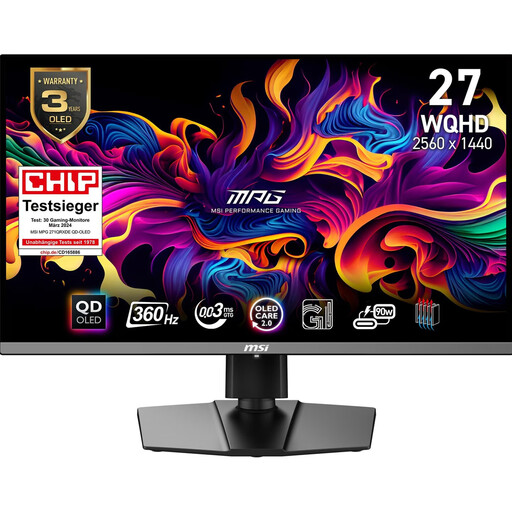
The MPG 271QRXDE QD-OLED offers a 16:9 WQHD OLED option with a high maximum refresh rate.
According to the German manufacturer’s spec sheet, the Odyssey OLED G81SF LS27FG814SUXEN combines a 27-inch screen, 4K resolution and a 240 Hz refresh rate in a 16:9 format.
The ROG Strix OLED XG27AQWMG is a 16:9 QHD OLED model for buyers weighing up contrast and refresh rate.
This selection includes wide 21:9 and 32:9 monitors, as well as 16:9 OLED models for cockpit width, dark scenes and fast-paced combat. With ultrawide monitors, check how your specific game is displayed, and make sure your gaming platform can match the maximum frame rate.
 No image available
For an extra-wide cockpit format. Check beforehand that your game displays the field of view and HUD properly.
The product details list a resolution of 5120 × 1440, a 165 Hz refresh rate, 1500R curvature, HDMI 2.1 and DisplayPort 1.4. The stand is height-adjustable.
 No image available
For a wider cockpit view and for buyers considering OLED for dark scenes too. Check how the HUD appears in your own game.
The product details list a 34-inch screen, UWQHD resolution, a 21:9 format, a 175 Hz refresh rate and OLED Care 2.0. Follow the OLED care guidance, especially if static images stay on screen for long periods.
 No image available
For dark scenes and fast-paced combat in a 16:9 format. The frame rate you can achieve in-game still depends on your source.
The product details list a resolution of 2560 × 1440, a 360 Hz refresh rate and OLED Care 2.0. Follow the care recommendations when displaying static content for long periods.
 No image available
For dark scenes at high resolution and fast motion, provided your gaming platform supports the resolution and frame rate you want.
The product details list a resolution of 3840 × 2160, a 240 Hz refresh rate, 0.03 ms, HDMI 2.1, DisplayPort 2.1a and USB-C with 98 W Power Delivery. Check the OLED care guidance and the requirements of 4K gaming.
 No image available
For a wider 21:9 cockpit view and fast-paced combat. Check how your game displays the format and cockpit controls.
The product details list a 34-inch screen, a resolution of 3440 × 1440, a 180 Hz refresh rate, 1 ms MPRT and a VA panel. FreeSync Premium and ELMB are also listed.
Check the resolution you want to use in your specific game, along with the visible field of view and the position of cockpit displays. A monitor’s 21:9 specification alone doesn’t guarantee that the game or HUD will be displayed properly.
Connect your graphics output to an input that supports the operating mode you want, then check the resolution and refresh rate. For Star Citizen, the developer recommends adjusting graphics settings and the displayed video memory requirements to suit your available hardware.
Follow the care guidance for your specific model. MSI describes a panel refresh cycle and OLED Care 2.0 for the MPG 271QRXDE. A voluntary manufacturer’s warranty is separate from your statutory rights against the seller.
For most online purchases from traders in the EU, you generally have 14 days from delivery to cancel; some statutory exceptions may apply. The EU’s Your Europe consumer information service also explains that faulty goods are covered by a minimum two-year legal guarantee. A manufacturer’s warranty is separate.
No. The German Environment Agency explains that waste electrical equipment must be collected separately from unsorted household waste (as at 13 December 2023). Check with your local authority for suitable collection points, and see whether your retailer offers a take-back scheme.