
Lieferung heute & morgen

Qualitätsgarantie

Willkommens-Angebote freischalten: KOSTENLOSE Lieferung | Bis zu 80 % RABATT | Kostenlose 30-Tage-JoyPlus-Testphase
App herunterladen
Choosing the right gaming mouse and keyboard can be the difference between victory and defeat. However, the market is flooded with marketing buzzwords and technical specs that confuse more than they clarify. Many gamers invest in expensive peripherals only to find they've fallen for exaggerated claims. As your Joybuy Product Recommendation Officer, I'll help you identify the common pitfalls and make an informed decision based on facts, not hype.
Before we look at the crucial features, let's uncover the most common marketing traps that often lead to costly mistakes.
To avoid these traps, focus on the following objective, measurable criteria.
Two factors are critical for a mouse for PC gaming: the sensor and the weight.
For keyboards, the switches and layout define the functionality.
Here are some recommendations tailored to specific user needs that avoid the pitfalls mentioned.
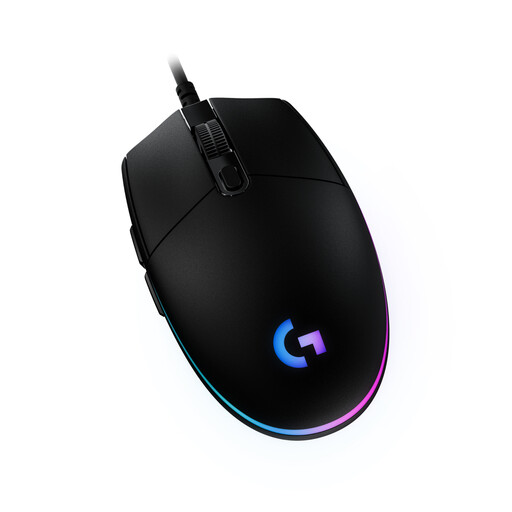
Why This Fits Their Persona: Ideal for beginners looking for a reliable and precise mouse from an established brand without a large budget. The classic design is suitable for many hand sizes and provides a solid foundation for all game genres.
This mouse bypasses the DPI myth. Its sensor, with up to 8,000 DPI, is more than sufficient for precise tracking without advertising unrealistic numbers. The focus is on proven performance.
Offers a gaming-grade sensor and customisable LIGHTSYNC RGB lighting. The 6 programmable buttons are easy to configure via the Logitech G HUB software.
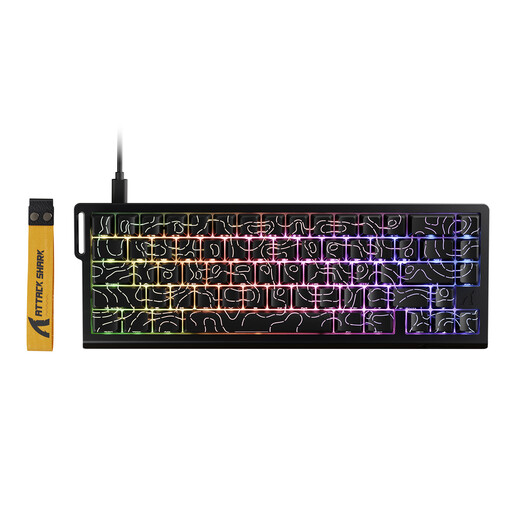
Why This Fits Their Persona: Designed for players who want to leverage every millisecond in fast-paced games like CS2 or Valorant. The special switch technology offers a tangible advantage for rapid, repeated inputs.
This keyboard avoids the trap of vague switch specifications. It doesn't just advertise "mechanical" but the specific Rapid Trigger technology, with an adjustable actuation point from 0.1 mm to 3.4 mm.
The magnetic switches enable an extremely fast response time. The 8000 Hz polling rate ensures nearly latency-free signal transmission to the PC.
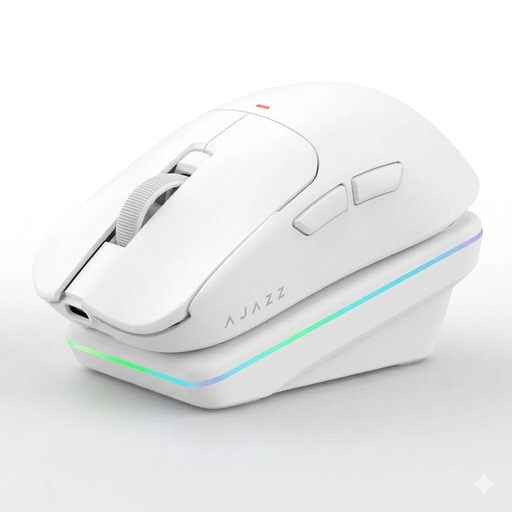
Why This Fits Their Persona: Perfect for users who value a clean, wireless work and gaming environment but refuse to compromise on performance. The tri-mode connectivity allows for seamless switching between a PC, laptop, and other devices.
This mouse escapes the trap of vague wireless promises. It offers clearly defined connection modes (USB-C, 2.4G, Bluetooth) and a polling rate of up to 1000 Hz in 2.4G mode for low latency.
The high-performance PAW3311 sensor ensures precise tracking. The included magnetic charging dock offers great convenience and keeps the desk tidy.
We have compiled a complete, real-time updated list of products that fully meet our strict selection criteria and safety standards.
What is the difference between a mechanical and a membrane keyboard? A mechanical gaming keyboard uses an individual, physical switch for each key. This results in a more precise, tactile feel, greater durability, and faster response times. Membrane keyboards use a continuous rubber sheet under the keys, which makes them quieter and cheaper, but often results in a mushier typing feel and lower durability.
How important is the polling rate on a gaming mouse? The polling rate, measured in Hertz (Hz), indicates how often the mouse reports its position to the computer. A standard value of 1000 Hz means the position is updated 1000 times per second (every 1 millisecond). This ensures very smooth and responsive cursor movement, which is considered the industry standard for competitive PC gaming. Higher values (e.g., 8000 Hz) can further reduce latency but also require more processing power, and the noticeable difference is minimal for most users.
Do I need special software for my gaming mouse and keyboard? Most gaming peripherals work right out of the box (plug-and-play). However, to unlock their full potential, the manufacturer's proprietary software is often necessary. It allows you to customise RGB keyboard lighting, create macros, remap keys, and fine-tune your mouse's DPI levels.