Players who assign lots of skills
You want to trigger frequently used in-game actions with your thumb, and you check whether you can reach the buttons with your grip. SteelSeries lists a 12-button side panel for the Aerox 9 Wireless.


Choose based on the in-game actions you actually want to trigger with your thumb, then consider button reach, hand shape and desk space. A large button panel gives you more options to assign controls, but it needs to suit your grip. Fewer buttons keep things simpler, while wireless freedom comes with charging or battery management.
You want to trigger frequently used in-game actions with your thumb, and you check whether you can reach the buttons with your grip. SteelSeries lists a 12-button side panel for the Aerox 9 Wireless.
You use the same space for long periods, so you consider your grip, hand position and room to move. The German Federal Institute for Occupational Safety and Health highlights the importance of workstation design.
You leave most commands on the keyboard and want a mouse with just a few extra buttons. HyperX lists six programmable buttons for the wired Pulsefire Haste 2.
A good fit if: you want to assign several in-game actions directly to the mouse. SteelSeries and Razer each list a 12-button side or thumb panel for the Aerox 9 Wireless and Naga V2 HyperSpeed respectively.
The trade-off: The number of buttons alone doesn’t tell you whether you can reach them reliably. Check their position with your usual grip.
A good fit if: you want more controls than a six-button mouse offers, but don’t need a large thumb panel. SteelSeries lists nine programmable buttons for the Aerox 5 Wireless.
The trade-off: The number of buttons alone won’t tell you whether the side layout suits your thumb.
A good fit if: you leave most commands on the keyboard and only need a few mouse controls. HyperX lists six programmable buttons and a weight of 53 g for the wired Pulsefire Haste 2.
The trade-off: There are fewer buttons for assigning extra controls, and the cable needs space and a suitable route.
| Priority | What to check before buying | Who it matters to |
|---|---|---|
| Buttons within reach | Check the controls you need to access directly and where they sit with your usual grip. | If I want to trigger in-game actions directly with my thumb, reach is what matters to me. Around 33% of consumers prioritise button layout. |
| Fit at your desk | Consider the mouse shape, thumb reach and space beside the keyboard. | If I use the same mouse for work and gaming for long periods, I pay particular attention to grip and hand position. Around 27% of consumers say fit at their home-working desk matters most. |
| Connection and room to move | Check cable routing, a free port for a wireless receiver and charging options. | If I want to keep the mouse area clear, I check which connection type suits my desk. Around 20% of consumers prioritise connection and room to move. |
| Simple controls | Compare only the extra buttons you need, along with the weight and your preferred cursor sensitivity. | If I use the keyboard for most commands, I want a mouse that’s straightforward to use. Around 20% of consumers prioritise simple controls over having as many features as possible. |
A 12-button panel gives you more options for assigning controls, but it doesn’t tell you which buttons you’ll be able to reach reliably with your grip.
Before buying, decide which commands matter most and check that the button positions suit you.
For the HyperX Pulsefire Haste 2, the manufacturer lists a weight of 53 g for the wired version and 61 g for the Wireless version.
Compare the full model name and the details for the specific connection type.
With a wireless mouse, charging or replacing the battery is part of using it. The details depend on the model.
The maximum sensor resolution alone won’t tell you whether the shape, room to move and cursor sensitivity suit your desk.
Check that you can adjust the sensitivity to suit you, and consider how you use the mouse rather than focusing only on the maximum figure.
Changing your mind and finding a fault involve different rights and processes.
Before buying, check the cancellation and returns policy. If a product is faulty, check your statutory rights separately.
The Aerox range includes models with large or mid-sized side button panels.
The Naga V2 HyperSpeed is aimed at buyers looking for a large thumb panel and wireless connectivity. The Naga Pro comes with interchangeable side panels.
The Pulsefire Haste 2 is available as a wired option with six buttons or as a Wireless version.
The wired G502 X is worth considering if you want an adjustable DPI switch and a dual-mode scroll wheel.
This Joybuy selection includes wired and wireless gaming mice with different button layouts and connection options, for arena matches at your home-working desk.
 No image available
A wired option if you want several controls at your fingertips and can make room for a USB cable on your desk.
35,000 DPI, 11 programmable buttons and a USB connection, according to the product name; listed as a right-handed design.
 No image available
A wireless gaming mouse for anyone who wants to use their mouse area without a cable permanently in the way.
Before buying, check that the button layout and connection and charging options you need suit the way you’ll use it.
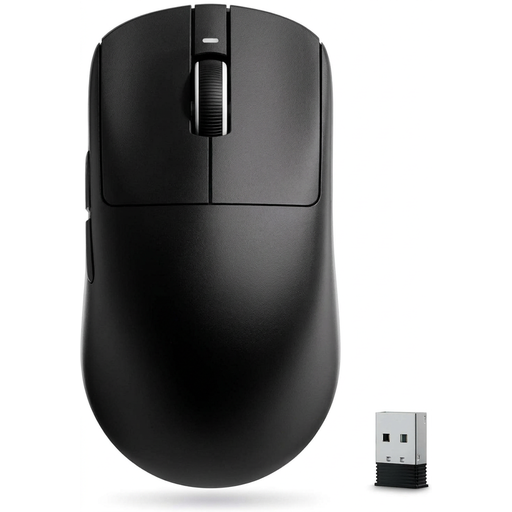 No image available
A wireless R1 SE+ option to consider if you’re looking for a gaming mouse without a cable permanently in the way.
Compare the connection options and programmable buttons on this specific model with what you need.
 No image available
A wireless option with five programmable buttons if you want several connection options and a relatively simple button layout.
The product name lists 62 g, a PAW3311 sensor, 2.4 GHz, Bluetooth and USB-C. Check which connection you actually want to use.
 No image available
For assigning lots of controls to your thumb: Razer lists a 12-button thumb panel for this model.
The manufacturer also lists 2.4 GHz wireless and Bluetooth. According to the product description, wireless use requires an AA battery.
No. Think about the commands you actually want to trigger directly with your thumb, and check that you can reach the buttons. SteelSeries lists a 12-button side panel for the Aerox 9 Wireless; the HyperX Pulsefire Haste 2 has six programmable buttons in total.
Check that you have a suitable free port for the 2.4 GHz dongle, or that you can connect a compatible device via Bluetooth. HyperX says you can use the Pulsefire Haste 2 Wireless with a cable while it’s charging.
Set up your mouse and workspace so you can assess the grip and controls without forcing your hand into an awkward position. With a wireless mouse, charging or replacing the battery is part of using it. A quoted battery life doesn’t tell you how long the battery will last with the way you use it.
For a typical online purchase from a business seller, you generally have a 14-day right to cancel, starting from the day you receive the goods; exceptions and return costs may apply. Your rights if the product is faulty are separate. The EU’s Your Europe information states that goods bought in the EU are covered by a minimum two-year legal guarantee; check which rules apply to your specific purchase.
No. The German Environment Agency recommends disposing of old electrical equipment separately. Remove the batteries before returning the mouse if you can do so easily, and take them separately to an appropriate collection point.