
Lieferung heute & morgen

Qualitätsgarantie

Willkommens-Angebote freischalten: KOSTENLOSE Lieferung | Bis zu 80 % RABATT | Kostenlose 30-Tage-JoyPlus-Testphase
App herunterladen
Choosing the right gaming mouse can be the difference between victory and defeat. But the market is flooded with marketing promises and tech specs that confuse more than they help. Many gamers invest in features they'll never use, or discover after a few weeks that the mouse is uncomfortable. This guide will help you identify the crucial features and sidestep common purchasing traps.
Before we dive into the important specifications, let's shed light on the most common marketing traps that often lead to buyer's remorse.
Focus on the following three aspects to make an informed decision tailored to your needs.
The sensor is the heart of any gaming mouse. A high-quality optical sensor ensures precise and flawless tracking of your movements. Instead of just looking at the maximum DPI number, it's more important to choose a mouse with high DPI adjustability.
The choice between a wired and a wireless mouse depends on personal preference and your setup.
An ergonomic gaming mouse is designed for comfort and control. Look for a shape that suits your hand and grip style. Additional programmable buttons can provide a significant advantage by mapping complex commands or macros to a single click. This is especially useful in MMO or MOBA games.
Here are some recommendations tailored to different requirements and budgets.
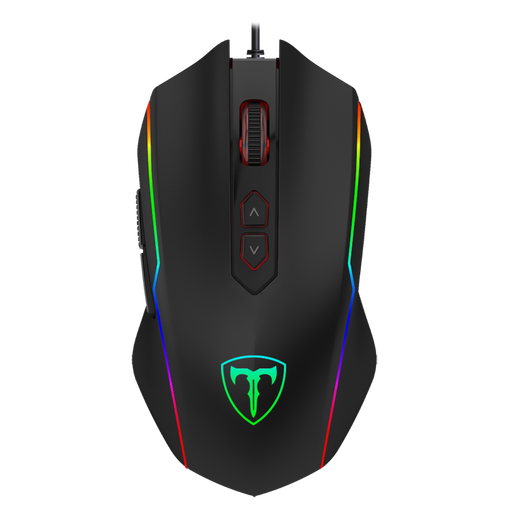
Why This Fits Their Persona: Ideal for gamers seeking solid performance without the high cost. It offers all the essential features for getting started in PC gaming, including adjustable DPI and programmable buttons.
This mouse focuses on the essentials. Instead of an exaggerated DPI value, it offers a practical, adjustable range up to 7200 DPI and skips expensive, unnecessary extras.
8 programmable buttons and a dedicated rapid-fire key provide functional value that isn't a given in this price range. Its ergonomic shape is suitable for long sessions.
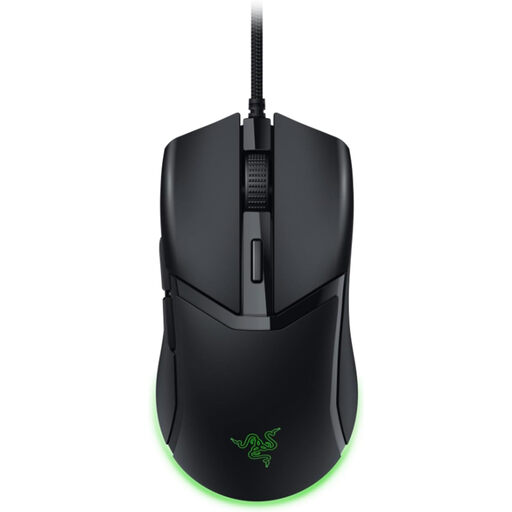
Why This Fits Their Persona: Engineered for speed and precision. Perfect for players of fast-paced shooters who need quick, unimpeded mouse movements and value a low weight.
This lightweight gaming mouse, at just 58 grams, avoids the trap of over-the-top design. The focus is clearly on weight reduction and agile handling, not unnecessary gimmicks.
Razer's 3rd-gen optical mouse switches offer high durability and a 0.2ms actuation time. The Speedflex cable minimises drag for frictionless movements.
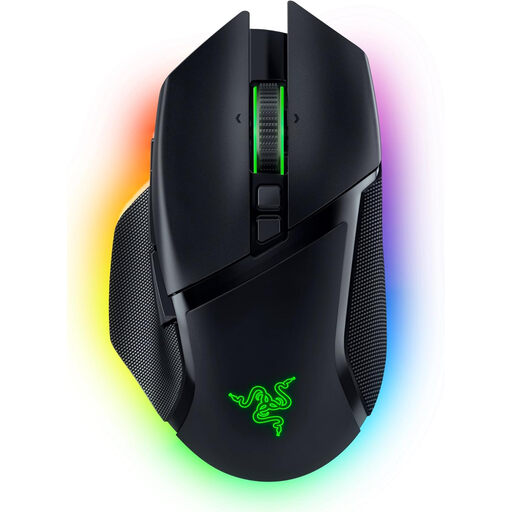
Why This Fits Their Persona: For demanding gamers who want maximum customisability, wireless freedom, and high performance in one package. This Razer mouse is a versatile tool for various game genres.
Although it boasts a high DPI of 30,000, this isn't just a marketing gimmick. Razer's Focus Pro 30K sensor offers intelligent features for truly flawless tracking. The RGB lighting is functionally zoned and customisable.
Tri-mode connectivity (HyperSpeed Wireless, Bluetooth, Wired) and the HyperScroll Tilt Wheel with adaptive modes offer tremendous flexibility. 10+1 programmable buttons allow for deep personalisation.
We've compiled a complete, up-to-date list of products that fully meet these strict selection criteria and all relevant safety regulations.
The DPI number indicates the mouse's sensitivity. An extremely high value isn't necessary for most gamers. What's more important is a high-quality sensor and the ability to adjust the DPI in multiple steps to suit your preferences and the specific game. A range of 800 to 3,200 DPI is sufficient for most scenarios.
Modern wireless gaming mice often offer a battery life of over 40 hours, with some even exceeding 100 hours, especially if the RGB lighting is disabled. Many models can also be used while charging via a cable, so no interruption to your game is necessary.
Not necessarily. There are many entry-level and mid-range models that offer solid performance, good ergonomics, and durable switches. More expensive models often justify their price with premium sensors, additional customisation options, wireless technology, or particularly lightweight materials. Define your priorities to find the right model for your budget.