
Lieferung heute & morgen

Qualitätsgarantie

Willkommens-Angebote freischalten: KOSTENLOSE Lieferung | Bis zu 80 % RABATT | Kostenlose 30-Tage-JoyPlus-Testphase
App herunterladen
The search for the right gaming mouse can quickly become overwhelming. Manufacturers advertise ever-higher DPI counts, aggressive designs, and a flood of features. But not every new feature is a genuine advantage. Often, exaggerated marketing promises lead to poor purchases, with shortcomings that only become apparent after a few weeks of use.
Before you make a decision, it's important to understand the most common pitfalls, which are often hidden behind glossy ad banners:
To avoid these problems, you should focus on the technical specifications that truly make a difference.
A well-informed purchase decision is based on objective criteria, not advertising slogans. When making your choice, pay attention to the following three core aspects to find a PC gaming mouse that meets your needs.
The sensor is the heart of any gaming mouse. Modern optical sensors offer high precision on most surfaces. Instead of being dazzled by the maximum DPI number, look for stable and flawless tracking across the DPI range that is relevant to you. A mouse that delivers clean performance between 400 and 8,000 DPI is more than sufficient for almost all use cases—from precise shots in FPS games to fast navigation on the desktop. More important is the ability to adjust the DPI levels easily and quickly.
The choice between a wired gaming mouse and a wireless model depends on your personal priorities.
The best technology is of little use if the mouse doesn't fit well in your hand. An ergonomic gaming mouse is adapted to the natural posture of the hand and prevents fatigue. Weight also plays a role: a lightweight gaming mouse (under 80g) facilitates fast, sweeping movements, while heavier models are often perceived as more substantial.
Additionally, many models offer a mouse with programmable buttons. These allow you to assign complex commands or macros to individual buttons, which can provide a strategic advantage in many games.
Based on these objective criteria, we have identified a few models that represent a suitable solution for different user profiles.
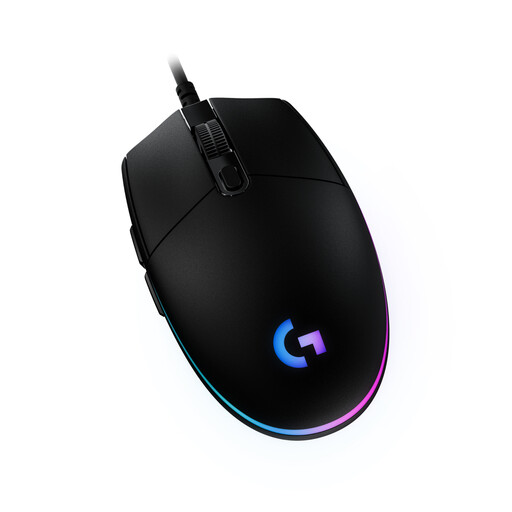
Why it's a good fit: It offers the reliable performance of an established brand without unnecessary and expensive extras. Ideal for starting out in the world of gaming or for players looking for a solid, straightforward device.
It focuses on a field-tested 8,000 DPI sensor instead of exaggerated numbers. The wired connection guarantees lag-free input without latency risk.
Proven, classic design with six buttons and customisable RGB gaming mouse lighting via the Logitech G HUB software.
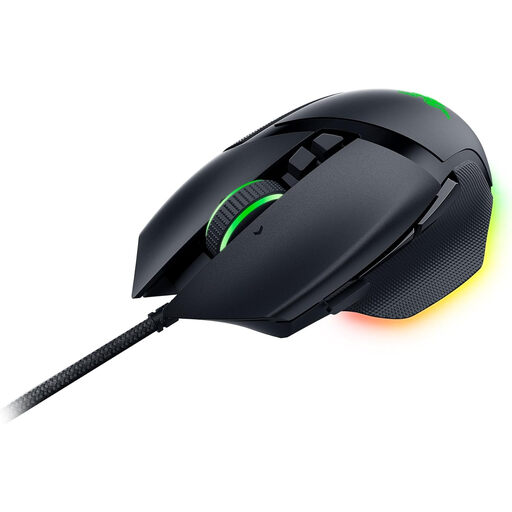
Why it's a good fit: It offers maximum customisation and precision for demanding games. The extensive features are aimed at users who want to fine-tune their equipment to their exact playstyle.
The proven ergonomic shape with a thumb rest ensures comfort during long sessions. The focus is on functional advantages like the 11 programmable buttons and the HyperScroll wheel, not just on aesthetics.
Razer Focus+ 26,000 DPI sensor for high precision, 2nd-gen optical switches for fast response times, and 11 programmable buttons including a multi-function trigger.
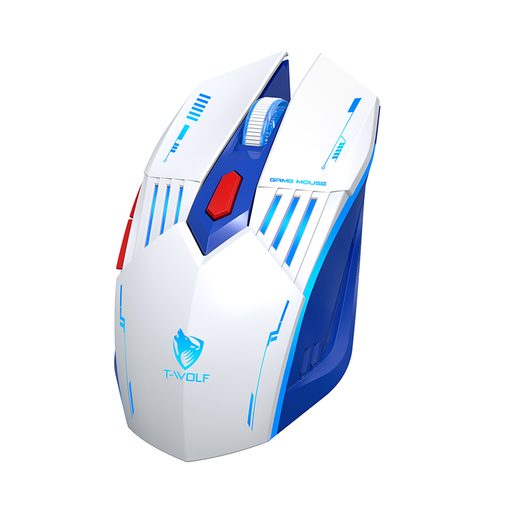
Why it's a good fit: It combines gaming features with the flexibility to switch seamlessly between a PC, laptop, and tablet. Ideal for users who want a single device for both work and play.
It offers a stable wireless connection (2.4G for gaming, Bluetooth for other devices), thus bypassing the latency issues of cheap, Bluetooth-only mice. The battery is rechargeable via USB-C.
Tri-mode connectivity (2.4G, Bluetooth, wired) and a rechargeable battery offer maximum flexibility for various devices and use cases.
A suitable mousepad is just as important for precision. An RGB gaming mousepad like the IQ Powered KALI not only provides a smooth cloth surface for precise tracking but also visually complements your setup.
We have compiled a complete, up-to-date list of products that fully meet these strict selection criteria.
For most users and screen resolutions (up to WQHD), an adjustable range between 800 and 3,200 DPI is perfectly sufficient. Higher values are often only relevant for very specific setups with multiple 4K monitors. The quality and flawlessness of the optical sensor are far more important than a high maximum DPI number.
Modern, high-quality wireless mice that use 2.4 GHz wireless technology show virtually no noticeable latency compared to their wired counterparts. The decision ultimately comes down to personal preference: unrestricted freedom of movement versus the convenience of never having to charge the mouse.
Disconnect the mouse from the computer before cleaning. Use a slightly damp, lint-free microfibre cloth for the housing. For hard-to-reach areas like the scroll wheel or crevices, compressed air can be helpful. Cloth mousepads can often be gently hand-washed with mild soap and water and then air-dried. An RGB gaming mousepad should always be disconnected from power before cleaning.