
Lieferung heute & morgen

Qualitätsgarantie

Willkommens-Angebote freischalten: KOSTENLOSE Lieferung | Bis zu 80 % RABATT | Kostenlose 30-Tage-JoyPlus-Testphase
App herunterladen
Choosing a new gaming mouse can be a challenge given the vast array of models and technical specifications. Whether for competitive esports training, casual gaming nights, or as a precision tool for daily work, the right mouse is a crucial factor for performance and comfort. This guide provides an objective overview to help you select a model that meets your needs for precision, ergonomics, and functionality.
As your Joybuy Product Recommendation Officer, I have compiled information on various models to provide you with a solid basis for making an informed decision.
Before we look at specific models, it's helpful to understand the key features that define a good PC gaming mouse.
The sensor is the heart of every mouse. Modern optical sensors offer high tracking accuracy, which is essential for fast and precise movements in-game. While manufacturers often advertise high DPI (Dots Per Inch) values, most competitive players use settings between 400 and 1600 DPI. More important than a maximum DPI value are flawless tracking without acceleration or smoothing, and a stable polling rate, which should ideally be 1000 Hz.
The weight and shape of the mouse directly impact handling and comfort during long sessions. A lightweight gaming mouse allows for quicker reactions and changes in direction, which is particularly advantageous in fast-paced action or FPS games. An ergonomic gaming mouse is adapted to the natural posture of the hand and can help reduce fatigue. The choice between a symmetrical and an ergonomically shaped mouse depends on your hand size and preferred grip style (e.g., Palm, Claw, or Fingertip Grip).
Today, the decision between a wired and a wireless gaming mouse is primarily a matter of personal preference. Modern 2.4 GHz wireless technologies offer latency and stability comparable to wired connections, making them a fully viable option for esports. Wireless models provide maximum freedom of movement, while wired mice have the advantage of never needing to be charged and often come with a lower price tag.
Here is a selection of models that cater to different requirements and playstyles.
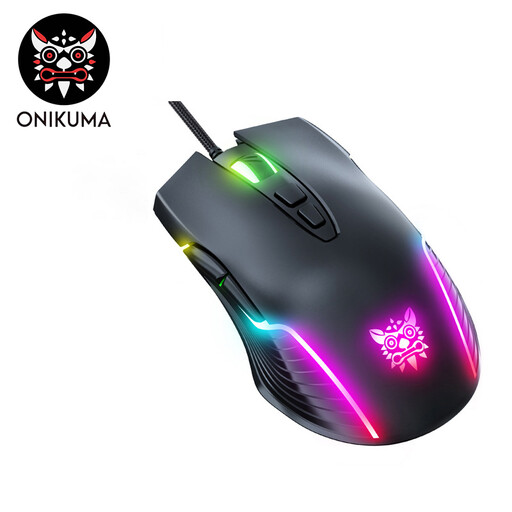
Why it stands out: The ONIKUMA CW905 is a functional entry-level model that bundles essential gaming features into an accessible package. It features seven programmable buttons and adjustable RGB gaming mouse lighting. The DPI levels can be switched directly on the mouse at the press of a button, allowing for quick adaptation to different in-game situations.
Pros:
Who it's for: This model is a great choice for budget-conscious gamers and beginners looking for a reliable wired mouse with basic gaming features and customizable lighting.
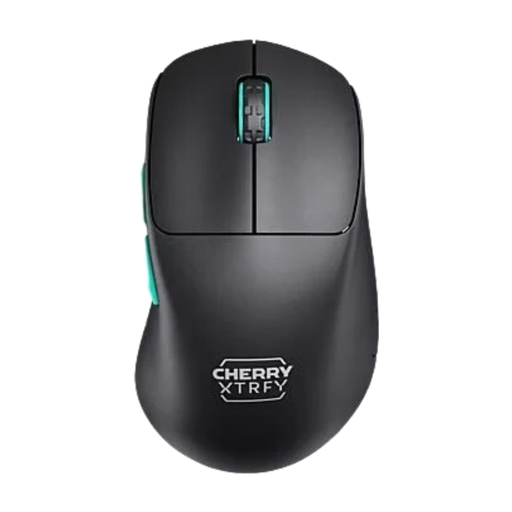
Why it stands out: The CHERRY XTRFY M64 is designed as an esports mouse, focusing on low weight and precise control. At just 53 grams, it is extremely light. Its ergonomic right-handed design with a low front allows you to position your fingers closer to the mousepad, improving control during fast movements. The stable 2.4 GHz wireless connection ensures tournament-grade performance.
Pros:
Who it's for: Ideal for competitive players, especially in FPS titles, who prefer an ultra-lightweight, wireless, and ergonomic gaming mouse for right-handers.
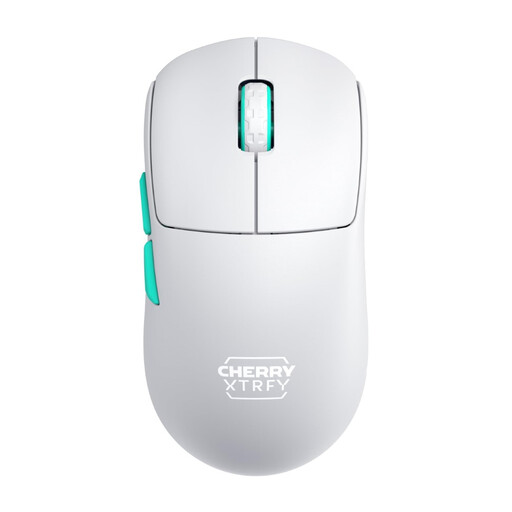
Why it stands out: Similar to the M64, the CHERRY XTRFY M68 is a lightweight gaming mouse at just 53 grams. The main difference lies in its symmetrical shape, which makes it suitable for a wider range of grip styles and for both right- and left-handed users (with limited button functionality). The low front also promotes precise control.
Pros:
Who it's for: This wireless gaming mouse is aimed at esports athletes and ambitious players who prefer an ultra-lightweight, symmetrical design for maximum flexibility and control.
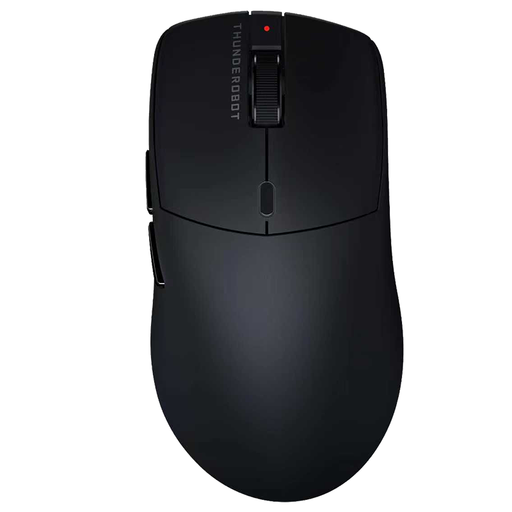
Why it stands out: The Thunderobot ML6PRO is a versatile model that stands out with its tri-mode connectivity: it can be operated via cable, 2.4 GHz wireless, or Bluetooth. This makes it a flexible solution for gaming, office work, and mobile use. The solid, lightweight shell and the powerful PAW3395 sensor complete the package.
Pros:
Who it's for: Perfect for hybrid users who want a single, high-performance mouse for their gaming setup, workplace, and on the go, without compromising on a top-tier sensor.
Didn't find the right model for you among these recommendations? There is a wide variety of other mice with different shapes, weights, and features.
? Discover a wider selection of gaming mice and other gear in our Sports Accessories category.
DPI stands for "Dots Per Inch" and describes the sensitivity of the mouse sensor. A higher DPI value means the cursor moves further across the screen with a smaller physical movement of the mouse. While high DPI values are often advertised, most competitive players prefer lower settings (typically 400–1600 DPI) for better control and precision.
Yes. In the past, wireless mice were considered unsuitable for competitive gaming due to latency issues. However, modern models using a 2.4 GHz wireless connection offer a response time and stability that is on par with wired mice. Many professional esports athletes now use a wireless gaming mouse.
The right shape depends on your hand size and grip style.