
Lieferung heute & morgen

Qualitätsgarantie

Willkommens-Angebote freischalten: KOSTENLOSE Lieferung | Bis zu 80 % RABATT | Kostenlose 30-Tage-JoyPlus-Testphase
App herunterladen
The search for the right gaming mouse can quickly become overwhelming. Manufacturers advertise ever-higher DPI counts, spectacular RGB lighting, and a multitude of buttons. But not every advertised feature leads to a better gaming experience. Often, it's these exaggerated specifications that lead to buyer's remorse. As your Joybuy Product Recommendation Officer, I'll help you identify the crucial factors and avoid marketing traps.
Two common pitfalls that cost gamers money and frustration are:
RGB Gaming Mouse might look great on your desk, but if the shape doesn't fit your hand and grip style, discomfort and fatigue are the result. Long-term comfort is more important than short-lived aesthetics.To make an informed decision, you should focus on the technical parameters that directly impact your performance and comfort.
The sensor is the heart of any PC Gaming Mouse. It determines how precisely your movements are translated to the screen. Instead of just looking at the maximum DPI count, two other values are crucial:
For most players, from casual gamers to aspiring esports pros, an adjustable DPI range between 400 and 6400 is perfectly sufficient.
The weight and shape of the mouse have a significant impact on handling. A lightweight gaming mouse (under 70 grams) allows for fast, fatigue-free movements and is ideal for FPS games. Heavier mice, on the other hand, offer more stability and control, which can be advantageous in other genres.
An ergonomic gaming mouse is adapted to the natural posture of the hand and supports common grip styles like the Palm Grip, Claw Grip, or Fingertip Grip. Look for a shape that suits your hand size and preferred grip to ensure long-term comfort.
The choice between a wired and a wireless mouse depends on personal preference.
Here are some recommendations tailored to different user profiles that specifically avoid the pitfalls mentioned.
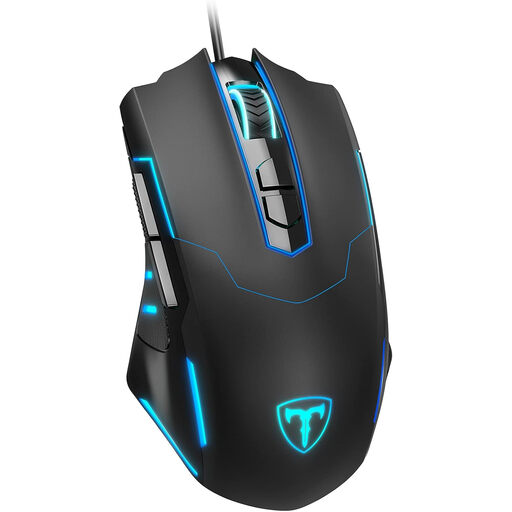
Why This Fits Their Persona: Ideal for gamers looking for a reliable and functional mouse without a large budget. It offers all the essential gaming features for a solid start.
This mouse avoids the DPI trap by offering a practical, adjustable DPI range up to 7200 DPI. It focuses on a solid ergonomic shape rather than superfluous marketing gimmicks.
7 programmable buttons and an adjustable polling rate up to 1000 Hz offer customisation options that aren't a given in this price range.
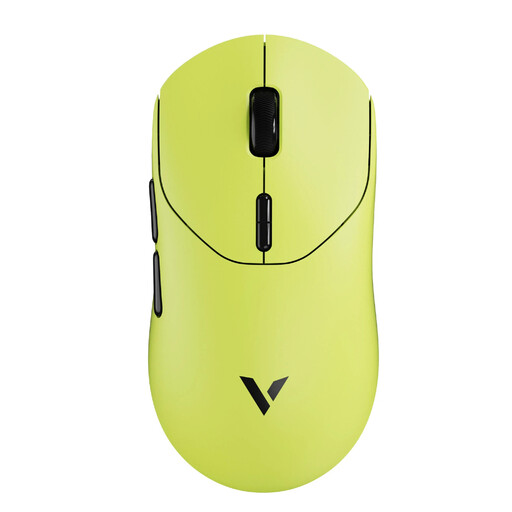
Why This Fits Their Persona: Designed for gamers who demand maximum performance and responsiveness without compromise. The combination of low weight and state-of-the-art wireless technology is built for competitive play.
This mouse focuses on measurable performance rather than empty promises. At just 53 grams, it's extremely lightweight and avoids the ergonomics compromise with a shape optimised for quick reactions.
The native 8K wireless polling rate ensures extremely low latency. According to the manufacturer, the energy-efficient chip allows for a battery life of up to 750 hours at 1000 Hz.
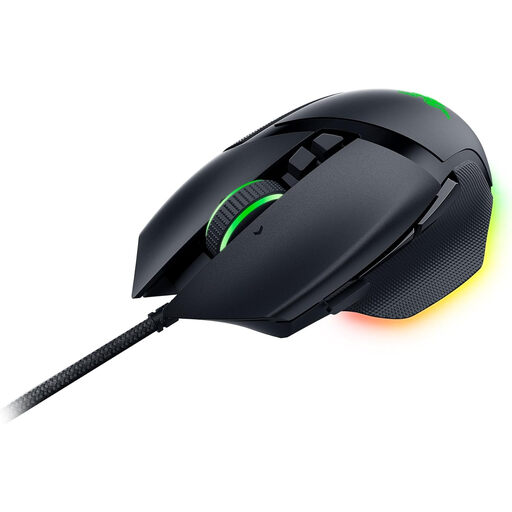
Why This Fits Their Persona: Perfect for users who need a versatile mouse for both gaming and productivity. The high number of programmable buttons and its proven ergonomics make it a flexible tool.
This mouse sidesteps the ergonomics compromise with its iconic, right-handed optimised shape featuring a thumb rest. The Focus+ Sensor with up to 26,000 DPI is powerful, but its strength lies in precision, not the raw number.
11 programmable buttons and the HyperScroll tilt wheel with two modes (tactile and free-spin) offer exceptional customisation for complex commands in games and applications.
We have compiled a complete, up-to-date list of products that fully meet these strict selection criteria and all relevant safety standards.
For most users and games, 400 to 3200 DPI is sufficient. Professional players often use settings between 400 and 1600 DPI for maximum precision. A mouse with an adjustable range up to 6400 DPI offers enough flexibility for all scenarios. Higher values are rarely practical.
Yes, modern wireless gaming mice using a 2.4 GHz connection achieve latency times of 1 millisecond (1000 Hz polling rate), which matches the standard for wired models. For the human eye and reaction time, the difference is imperceptible.
Disconnect the mouse from your computer. Use a microfibre cloth lightly dampened with water or a mild cleaning solution to wipe down the body. For hard-to-reach areas like the gaps between buttons, a cotton swab or a soft brush works well. Make sure no liquid gets inside the mouse.