
Lieferung heute & morgen

Qualitätsgarantie

Willkommens-Angebote freischalten: KOSTENLOSE Lieferung | Bis zu 80 % RABATT | Kostenlose 30-Tage-JoyPlus-Testphase
App herunterladen
The search for the right gaming mouse can quickly become overwhelming. The market is filled with technical jargon, marketing promises, and a huge selection of models. Many gamers invest in features they never use or regret purchases that only show their flaws after a few weeks. As your Joybuy Product Recommendation Officer, I'll help you navigate the common pitfalls and make an informed decision.
Before you spend any money, you should be aware of the three most common marketing traps:
Instead of being swayed by marketing buzzwords, you should focus on the technical parameters that directly impact your in-game performance.
The sensor is the heart of every PC gaming mouse. It is responsible for accurately translating your movements to the screen. Rather than just looking at the maximum DPI (Dots Per Inch), the quality of the sensor is crucial. Models from renowned manufacturers like PixArt (e.g., the PAW series sensors) are an indicator of reliable tracking without unwanted acceleration or smoothing.
While a gaming mouse with high DPI adjustment options is standard, it's more important to have a sensor that works flawlessly at the low DPI values you actually use (typically 400–1600). A good mouse allows you to easily switch DPI levels on the fly to adapt to different in-game situations.
The weight of a mouse has a direct impact on your handling. A lightweight gaming mouse (often under 70 grams) allows for fast, sweeping movements and quick direction changes, which is particularly advantageous in fast-paced FPS games like Valorant or CS:GO. Heavier mice, on the other hand, can provide a feeling of more control and stability.
The shape must match your hand size and grip style:
The decision between a wired and a wireless mouse depends on your budget and priorities.
Here are some recommendations tailored to different needs and budgets that avoid the pitfalls mentioned above.
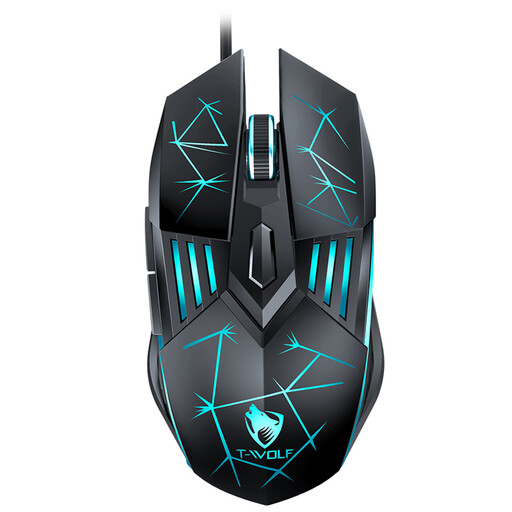
Why This Fits Their Persona: This model offers all the essential features to get started in PC gaming without breaking the bank. The wired connection ensures stable, latency-free performance sufficient for any game genre.
It focuses on the essentials. Instead of exaggeratedly high DPI values, it offers a practical range up to 3600 DPI, which is sufficient for most games and screen resolutions. As a wired mouse, it bypasses the potential connection issues of cheap wireless mice.
Reliable plug-and-play functionality without driver installation. The ergonomic design is built for longer sessions, and the subtle RGB gaming mouse lighting adds to the atmosphere.
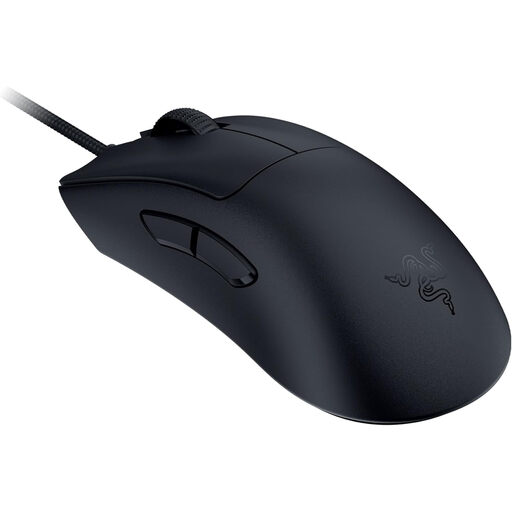
Why This Fits Their Persona: This esports mouse is engineered for maximum speed and control in competitive play. The extremely low weight and high-precision sensor are tailored to the demands of professional gamers, where every millisecond counts.
It focuses on uncompromising performance rather than unnecessary frills. The weight of just 59 grams and the 8000 Hz HyperPolling technology demonstrate that a wired connection remains a top-tier choice for minimal latency and maximum responsiveness.
Ultra-lightweight design for quick manoeuvres and a Razer Focus Pro 30K optical sensor for supreme precision. A true professional gaming mouse.
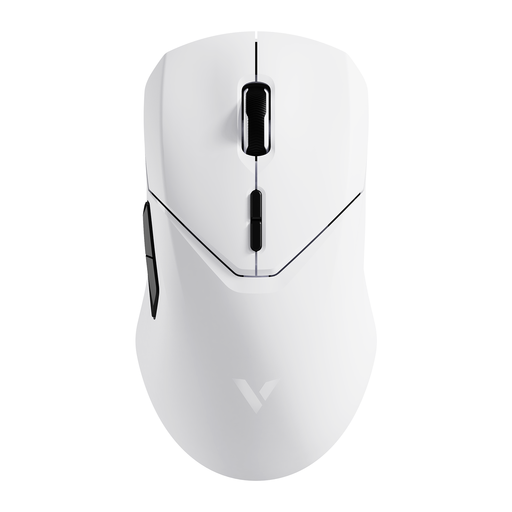
Why This Fits Their Persona: It offers the freedom of a wireless mouse without the performance compromises common in cheaper models. Ideal for gamers who appreciate a clean desk setup but still demand high performance for gaming and daily tasks.
It demonstrates how modern wireless technology solves latency issues. With a 4K polling rate in wireless mode and a high-quality PAW 3398 sensor, it's indistinguishable from a wired mouse in terms of response time. The long battery life of up to 180 hours prevents constant recharging.
High-performance wireless with a 4K polling rate, a low weight of 68 grams, and 10 programmable buttons for maximum flexibility in games and applications.
We've compiled a complete, real-time updated list of products that fully meet these strict selection criteria and safety regulations.
For most gamers and screen resolutions (including WQHD), a range between 800 and 1,600 DPI is ideal. Higher values often lead to uncontrollable mouse movements. More important than a high maximum value is a high-quality sensor that works precisely at low DPI settings and allows you to save multiple stages for different use cases (e.g., quick turns vs. precise aiming).
Yes, absolutely—provided it's a modern model with a dedicated 2.4 GHz wireless connection and a high polling rate (1000 Hz or higher). These technologies offer latency that is indistinguishable from a wired connection to human perception. However, cheaper models that rely solely on Bluetooth can have noticeable lag and are less recommended for fast-paced games.
The ideal shape is highly subjective. Consider your hand size and preferred grip style (Palm, Claw, or Fingertip). If you're unsure, symmetrical mice are often a safe starting point as they work for various grip styles and for both right- and left-handed users (as long as the side buttons don't interfere). A specifically ergonomic gaming mouse is usually optimised for right-handed users with a palm grip, offering the highest comfort for that style.