
Lieferung heute & morgen

Qualitätsgarantie

Willkommens-Angebote freischalten: KOSTENLOSE Lieferung | Bis zu 80 % RABATT | Kostenlose 30-Tage-JoyPlus-Testphase
App herunterladen
Choosing a new gaming mouse can be overwhelming, given the countless technical specs and marketing promises. Many gamers invest in features that don't improve their performance or choose a model that becomes uncomfortable after a short time. As your Joybuy Product Recommendation Officer, I'll help you understand the crucial criteria and avoid common buying traps.
Before we dive into the technical details, it's important to recognise the marketing myths that often lead to poor purchasing decisions.
Focus on the following three core aspects in your selection process to find a model that truly enhances your performance.
The sensor is the heart of any gaming mouse. A high-quality optical sensor delivers precise 1:1 tracking of your hand movements on the screen, without unwanted corrections like angle snapping (movement straightening) or hardware-based acceleration.
The polling rate, measured in Hertz (Hz), indicates how often the mouse reports its position to the computer. A standard value of 1000 Hz (1-millisecond response time) is sufficient for most gaming applications. Some high-end models in the esports mouse category offer 4000 Hz or even 8000 Hz for even lower latency, though this also demands more CPU power.
These three factors are inextricably linked and are crucial for comfort and control.
Today, the choice between a wired and a wireless gaming mouse is less about performance and more about personal preference.
Here are some recommendations tailored to different requirements and playstyles.
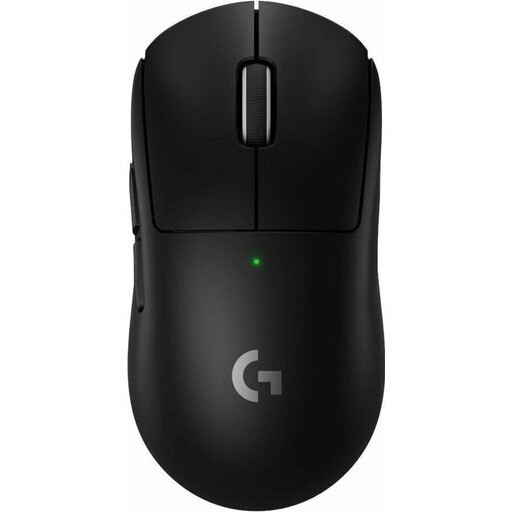
Why This Fits Their Persona: This model was developed in collaboration with esports pros. It is extremely lightweight and designed for maximum responsiveness, ideal for fast, precision-dependent games like FPS shooters.
The focus is clearly on performance metrics like its low weight of 60 grams and the precise HERO 2 sensor, not on superfluous RGB lighting or an unrealistically high DPI value.
Extremely low weight for swift manoeuvres and a long battery life of up to 95 hours despite its high performance.
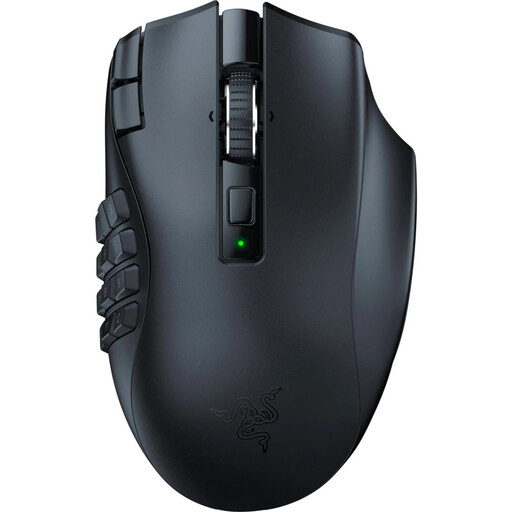
Why This Fits Their Persona: For players of MMOs and MOBAs who need quick access to a multitude of abilities and macros, a thumb grid with numerous buttons is essential. This model is specifically designed for that purpose.
The high number of buttons is not a gimmick here, but a core feature tailored to a specific use case. The ergonomics are designed to make these buttons efficiently operable.
19 programmable buttons for maximum control and a dual-mode HyperScroll wheel for fast or precise scrolling.
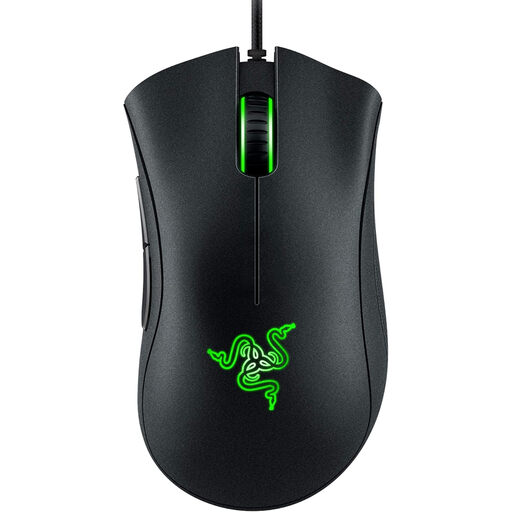
Why This Fits Their Persona: This model offers the core features of a solid gaming mouse at an accessible price point. It's ideal for newcomers or gamers looking for reliable performance without expensive extra features.
It forgoes high DPI numbers and RGB effects, focusing instead on the essentials: a proven ergonomic shape and a solid optical sensor with 6,400 DPI, which is more than enough for most gamers.
One of the most iconic ergonomic shapes on the market, offering comfort for many hand sizes and grip styles. Durable switches rated by the manufacturer for up to 10 million clicks.
We have compiled a complete, up-to-date list of products that fully meet these strict selection criteria and rigorous safety standards.
A high-quality gaming mouse pad is a critical component. It provides a consistent and smooth surface that allows your mouse's sensor to track movements precisely and without dropouts. Cloth pads offer more control, while hard plastic or metal pads provide a faster glide. The choice depends on your personal preference.
Battery life varies greatly depending on the model, usage, polling rate, and lighting. Some models, like the Logitech Gaming Mouse G305, offer over 200 hours of runtime with RGB lighting disabled. Others, designed for maximum performance, may need to be charged every few days but often include a fast-charging feature.
Not necessarily. While high-end models from brands like Razer or Logitech offer specialised features such as extremely low weight or a high number of programmable buttons, there are many models in the entry-level and mid-range segments that deliver excellent core performance. A mouse like the Razer DeathAdder Essential proves that a reliable and ergonomic gaming mouse doesn't have to be expensive.