
Lieferung heute & morgen

Qualitätsgarantie

Willkommens-Angebote freischalten: KOSTENLOSE Lieferung | Bis zu 80 % RABATT | Kostenlose 30-Tage-JoyPlus-Testphase
App herunterladen
The search for the right gaming mouse can quickly become overwhelming. Manufacturers advertise ever-higher DPI counts, countless buttons, and spectacular lighting. However, not every advertised feature leads to a better gaming experience. As your Joybuy Product Recommendation Officer, I'll help you identify the crucial features and avoid common purchasing pitfalls, ensuring your investment pays off in the long run.
Many buyers focus on marketing buzzwords and overlook fundamental flaws that only become apparent after a few weeks of use. Here are three common traps:
To avoid making the wrong choice, you should focus on a few crucial technical parameters. These determine the performance and longevity of your mouse far more than inflated marketing numbers.
The sensor is the most important component for precise tracking. A high-quality optical sensor ensures flawless 1:1 tracking of your movements without unwanted acceleration or smoothing. Instead of just looking at the maximum DPI value, the sensor's consistency across the entire DPI range is what's critical. DPI (Dots Per Inch) indicates how sensitive the mouse is to movement. A higher value means the cursor travels a greater distance on the screen for the same physical movement. For most use cases, a solid sensor that performs reliably in the 400 to 3,200 DPI range is more than sufficient.
The choice between a wired and a wireless mouse depends on your personal preferences and your setup.
The weight and shape of the mouse have a direct impact on handling and comfort.
Programmable buttons can offer an advantage in many games by mapping complex actions to a single click. Extra thumb buttons are especially useful in MMOs or MOBAs. Subtle RGB mouse lighting can visually enhance your setup, but it shouldn't be the main criterion.
Here are some recommendations tailored to different needs and budgets, taking the above criteria into account.
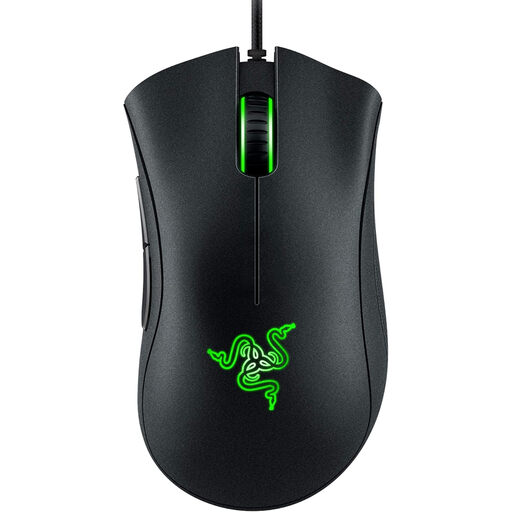
Why this model is a great fit: It offers the core features of a solid gaming mouse at an accessible price point. The proven ergonomic shape and reliable sensor are ideal for beginners looking for a durable and comfortable mouse for all game genres.
This model forgoes an exaggerated DPI value and instead focuses on a proven, comfortable shape and a solid 6,400 DPI sensor, which is more than sufficient for most gaming situations.
Proven ergonomic shape for high comfort; durable mechanical switches rated for up to 10 million clicks according to the manufacturer.
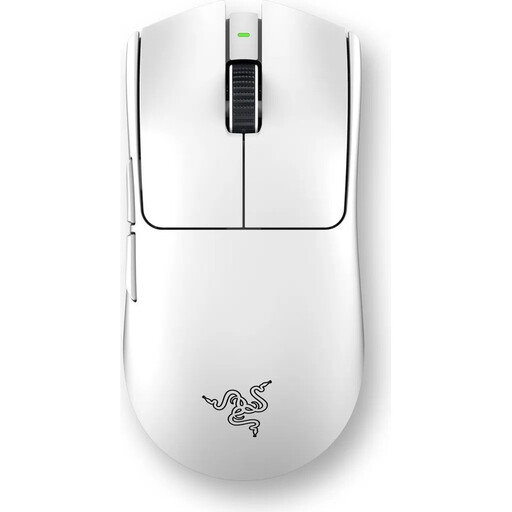
Why this model is a great fit: This ultra-lightweight esports mouse in white is engineered for maximum performance. Its low weight of 55g allows for extremely fast reactions, while the 8000 Hz polling rate minimises latency—a critical factor in competitive play.
It debunks the myth of the slow wireless mouse by delivering measurably low latency, optimised for esports, through a combination of low weight, a precision sensor, and 8000 Hz HyperPolling technology.
Ultra-lightweight 55g design for rapid movements; Razer 8000Hz HyperPolling technology for extremely low wireless latency.
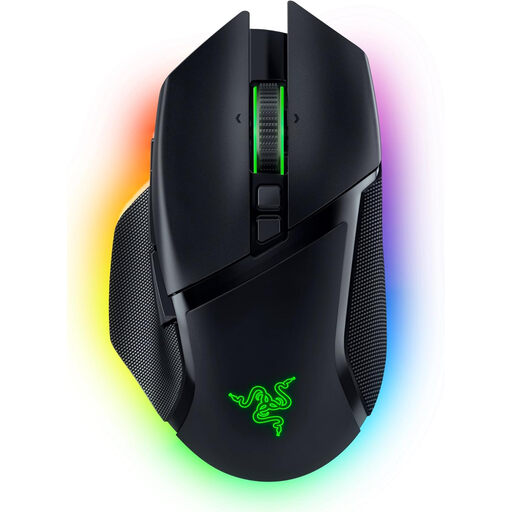
Why this model is a great fit: A true all-rounder for gamers who enjoy various genres. Its numerous programmable buttons, versatile scroll wheel, and tri-mode connectivity make it extremely adaptable for FPS, MMOs, and productivity tasks.
It combines customisable aesthetics (Chroma RGB) with genuine functional benefits. The ergonomic shape and thoughtful features like the HyperScroll Tilt Wheel ensure the mouse not only looks good but also enhances comfort and control.
Tri-mode connectivity (HyperSpeed Wireless, Bluetooth, Wired); 10+1 programmable buttons and a smart scroll wheel for maximum customisation.
If you want to compare more models based on a precision sensor, you'll find a suitable selection here. We have compiled a list of products that meet strict selection criteria.
The lifespan of a gaming mouse heavily depends on the intensity of use and the build quality. A good indicator of durability is the built-in switches. Entry-level models are often rated for 10 million clicks, while high-end mice have switches that, according to manufacturers, can withstand 70 to 90 million clicks. With average use, a quality gaming mouse can easily last 3 to 5 years or more.
Yes, modern, high-quality wireless gaming mice are on par with their wired counterparts in terms of performance. Technologies like Razer HyperSpeed or Logitech Lightspeed use a stable 2.4 GHz connection with high polling rates (1000 Hz and up), resulting in latency that is imperceptible to humans. For the vast majority of gamers, including esports professionals, a wireless gaming mouse is an excellent choice that offers more flexibility.
Most gamers do not need extremely high DPI values. Professional gamers in fast-paced shooters often use settings between 400 and 1600 DPI, as this allows for more precise control when aiming. A high DPI setting causes the cursor to fly across the screen with the slightest hand movement, making aiming more difficult. More important than a high maximum value is a quality sensor that operates precisely and flawlessly at your preferred, lower DPI settings.