Joybuy Insights

Gaming Mouse Buyer’s Guide: Find the Right Model for Your Setup

Choosing the right gaming mouse can be the difference between victory and defeat. But the market is flooded with marketing buzzwords and technical specs that confuse more than they clarify. Many gamers invest in features that don't improve their performance or, worse, a mouse that becomes uncomfortable after just a few months due to design flaws. This guide will help you avoid the common pitfalls and make an informed decision.

The 3 Most Common Mistakes When Buying a Gaming Mouse

Before we dive into the important specifications, let's expose the most common marketing traps that often lead to purchase regret.

  1. The DPI Myth: Manufacturers often advertise extremely high DPI (Dots Per Inch) values, sometimes exceeding 20,000. In practice, even professional gamers rarely use more than 1,600 to 3,200 DPI. An extremely high number is not a sole indicator of quality and often serves only a marketing purpose. A high-DPI mouse is only useful if the sensor behind it operates with precision and without errors.
  2. Underestimating Ergonomics: A flashy RGB mouse with an aggressive design might look great, but it's useless if it leads to hand cramps after an hour of gameplay. The shape, weight, and balance are crucial for comfort and control. An ill-fitting ergonomic gaming mouse can negatively impact your aim and reaction time.
  3. Outdated Connectivity Prejudices: The assumption that a wireless gaming mouse inherently has higher latency than a wired gaming mouse is obsolete. Modern 2.4 GHz wireless technologies now offer a virtually lag-free connection, indistinguishable from their wired counterparts. However, cheap wireless mice not optimised for gaming can still cause issues.

What Really Matters: The Core Parameters Explained

Focus on the following three aspects to find a mouse that truly matches your playstyle.

Sensor, DPI, and Polling Rate

The sensor is the heart of any gaming mouse, responsible for accurately translating your hand movements to the screen.

  • Sensor Type: Optical sensors, especially models from PixArt (e.g., the PAW series), are considered the industry standard for their reliability and precision, free from unwanted acceleration or smoothing.
  • DPI (Dots Per Inch): This value indicates how sensitive the mouse is. Instead of focusing on the maximum value, it's more important that the mouse allows for flexible adjustments in meaningful increments. For most gamers, values between 400 and 3,200 DPI are relevant.
  • Polling Rate: Measured in Hertz (Hz), this value indicates how often the mouse reports its position to the computer. A standard of 1000 Hz (1-millisecond response time) is sufficient for most gaming applications. Some high-end esports models offer 4000 Hz or even 8000 Hz for an even more direct transmission.

Weight and Form Factor

The weight and shape of the mouse directly impact handling and fatigue.

  • Weight: A lightweight gaming mouse (under 70 grams) is particularly advantageous in fast-paced FPS games like Valorant or CS2, as it facilitates quick directional changes and precise "flicking." For other genres, a heavier weight can provide more stability.
  • Ergonomics and Grip Style: Your hand size and grip style (Palm, Claw, or Fingertip Grip) determine which mouse shape is comfortable for you.
    • Palm Grip: The entire hand rests on the mouse. Larger, ergonomically shaped mice are often more comfortable here.
    • Claw Grip: The palm touches the back of the mouse while the fingers are arched. Shorter, symmetrical, or slightly ergonomic mice are well-suited for this.
    • Fingertip Grip: Only the fingertips touch the mouse. Small and very lightweight mice are ideal here.

Connectivity and Buttons

The connection method and number of buttons should match your setup and the games you play.

  • Wired vs. Wireless: Wired mice offer a constant power supply and an interference-free connection. Modern wireless mice with 2.4 GHz technology provide the same performance with maximum freedom of movement. Tri-mode mice, which also offer Bluetooth, are versatile, but for competitive gaming, the 2.4 GHz mode should always be preferred.
  • Programmable Buttons: While 5-6 buttons are often sufficient for an FPS mouse, players of MMOs or MOBAs benefit from a higher number of programmable buttons for macros and abilities. A programmable mouse can significantly speed up your workflow.

Top Picks by Player Profile

Here are some recommendations tailored to different needs and budgets.
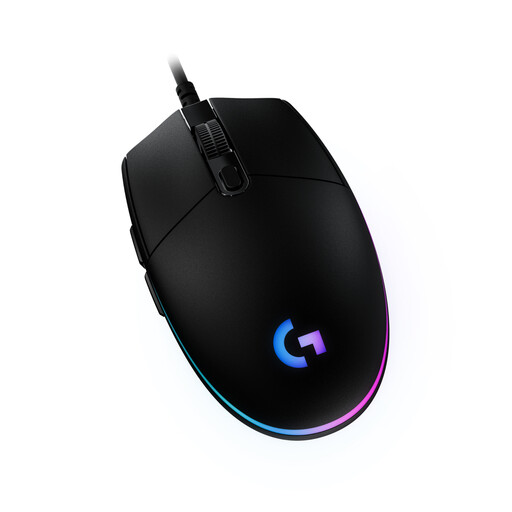
IDEAL FOR: BUDGET-CONSCIOUS BEGINNERS
Logitech G203 LIGHTSYNC Gaming Mouse, RGB, USB, Black

Logitech G203 LIGHTSYNC Gaming Mouse

Why it's a great fit: The G203 delivers solid performance for casual gamers and beginners. It combines a proven design with a reliable sensor and customisable RGB lighting without breaking the bank.

How it avoids the trap

It focuses on the essentials. The 8,000 DPI sensor is more than sufficient and avoids distracting with over-the-top marketing numbers. Its classic shape is suitable for a wide range of hand sizes and grip styles.

Key Advantages

Reliable sensor for precise tracking; classic, proven design; customisable LIGHTSYNC RGB lighting.
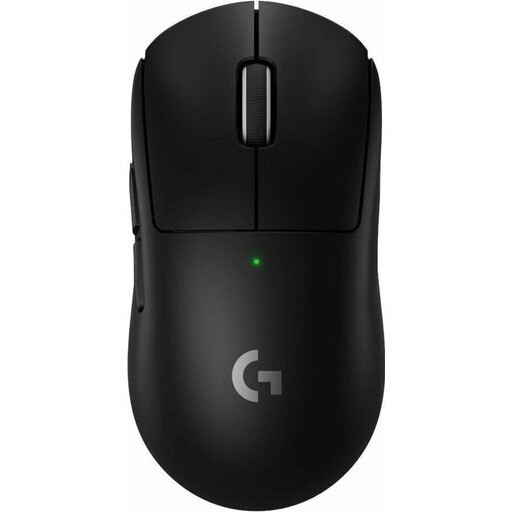
IDEAL FOR: COMPETITIVE ESPORTS PLAYERS
Logitech G PRO X SUPERLIGHT 2 LIGHTSPEED Wireless Gaming Mouse

Logitech G PRO X SUPERLIGHT 2

Why it's a great fit: This mouse was developed in collaboration with esports pros. It's extremely lightweight, wireless, and equipped with a high-precision sensor to ensure maximum speed and accuracy.

How it avoids the trap

It shatters the latency prejudice against wireless mice with its LIGHTSPEED technology. The extremely low 60g weight and the simple, performance-optimised shape prioritise function over unnecessary design gimmicks.

Key Advantages

Only 60g in weight; HERO 2 sensor for high precision; lag-free LIGHTSPEED wireless connection; long battery life of up to 95 hours.
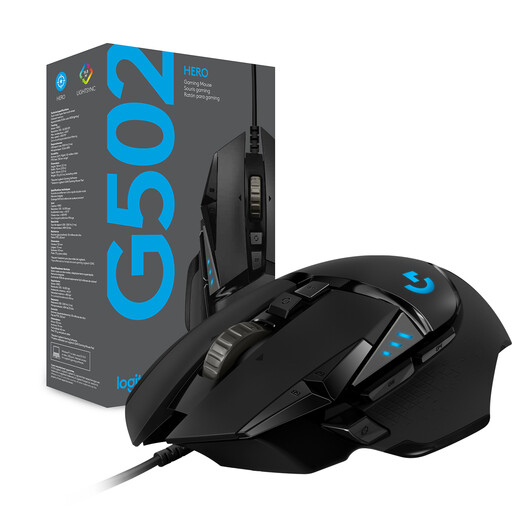
IDEAL FOR: ALL-ROUNDERS & CUSTOMISATION FANS
Logitech G G502 Hero High Performance Gaming Mouse

Logitech G502 HERO Gaming Mouse

Why it's a great fit: The G502 HERO is a versatile workhorse. With 11 programmable buttons, a tunable weight system, and a comfortable ergonomic shape, it's suitable for a wide range of games, from FPS to MMOs.

How it avoids the trap

Instead of fixating on a single feature, it offers a balanced overall package. Ergonomics are front and centre, and the tunable weight system allows users to adapt the mouse to their personal preferences rather than being forced into a rigid design.

Key Advantages

11 programmable buttons; tunable weight system with five 3.6g weights; precise HERO 25K sensor; proven ergonomic shape with a thumb rest.

Looking for more options?

We've compiled a complete, up-to-date list of products that fully meet these strict selection criteria.

Frequently Asked Questions (FAQ)

How much DPI does a good gaming mouse really need?

For most gamers and game genres, DPI values between 800 and 2,400 are perfectly sufficient. Higher values can be useful for high-resolution monitors, but the sensor's precision and flawlessness are far more important than an extremely high maximum DPI value. Focus on a high-quality optical sensor and the ability to adjust the DPI in increments that are comfortable for you.

Is a wireless gaming mouse as good as a wired one?

Yes, modern wireless gaming mice that use a 2.4 GHz radio connection offer performance that is indistinguishable from wired models. The latency is so low it's humanly imperceptible. Models that rely solely on Bluetooth are less suitable for competitive gaming, as Bluetooth has higher latency.

How do I find the right mouse for my hand size and grip style?

Measure your hand from the tip of your middle finger to the base of your wrist. As a rough guideline: Small hands (< 17 cm), medium hands (17-20 cm), and large hands (> 20 cm). Manufacturers often provide the dimensions of their mice. Shorter, lighter mice are often suitable for Fingertip and Claw grips, while Palm grip benefits from larger, more ergonomically shaped mice. Ideally, you should try out different shapes to find the one that is most comfortable for you.