
Lieferung heute & morgen

Qualitätsgarantie

Willkommens-Angebote freischalten: KOSTENLOSE Lieferung | Bis zu 80 % RABATT | Kostenlose 30-Tage-JoyPlus-Testphase
App herunterladen
The search for the right lightweight wireless gaming mouse can quickly become overwhelming. Manufacturers advertise impressive technical specs, but not all of them are relevant to actual in-game performance. To make an informed decision, it's crucial to distinguish the features that matter from mere marketing promises. This guide will help you navigate the most common pitfalls and find a mouse that meets your demands for precision and comfort.
Many buyers focus on specifications that offer little practical benefit. Three common marketing traps often lead to a bad purchase:
To make a well-informed choice, you should focus on the following three technical parameters. These are the key determinants of the performance and comfort of a professional gaming mouse.
The sensor is the heart of any gaming mouse. Instead of focusing on the maximum DPI value, you should prioritize tracking accuracy. A high-quality optical sensor, like one found in a gaming mouse with 30K DPI, offers flawless 1:1 tracking without unwanted corrections like angle snapping or mouse acceleration. This is especially critical for a gaming mouse for FPS (First-Person Shooter) titles, where precise and consistent movements are essential for aiming. Look for specifications like a high IPS (Inches Per Second) and moderate to high G-acceleration, which ensure that even the fastest movements are captured accurately.
For a lag-free wireless mouse, a stable 2.4 GHz connection is the industry standard. Technologies like Razer HyperSpeed or comparable proprietary protocols are designed to ensure a constant and fast signal transmission, even in interference-heavy environments, putting them on par with wired mice. The polling rate, measured in Hertz (Hz), indicates how often the mouse reports its position to the computer. A value of 1000 Hz is the established standard for competitive gaming.
Weight directly affects agility and fatigue. A lightweight wireless gaming mouse under 70 grams allows for rapid directional changes and reduces strain on the wrist during long gaming sessions. The shape is at least as important. An ergonomic gaming mouse should fit your hand size and grip style (Palm, Claw, or Fingertip Grip). A well-designed shape provides sufficient stability and comfort even at a low weight, making it a suitable esports mouse.
Here are a few models tailored to specific user profiles that meet the criteria mentioned above.
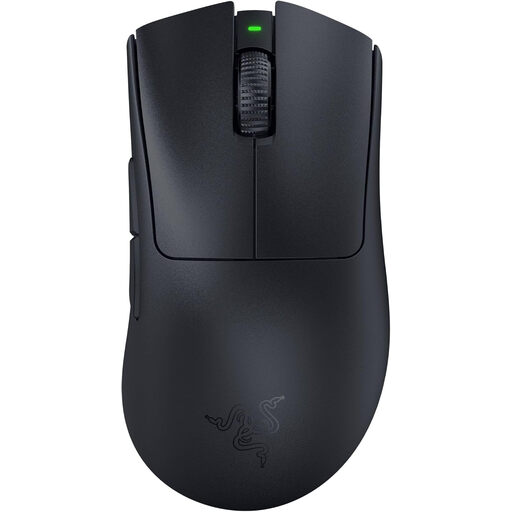
Why This Fits Their Persona: This model is engineered from the ground up for maximum esports performance. Its extremely low weight of 63g and ergonomic shape, optimized in collaboration with pros, enable fast, precise maneuvers without fatigue.
The mouse avoids the unstable connection trap with its Razer HyperSpeed Wireless technology. Furthermore, its low weight is achieved not through a fragile build, but through an optimized internal and external design.
The Razer Focus Pro 30K Optical Sensor ensures flawless tracking on various surfaces. 3rd-gen optical mouse switches offer an extremely short actuation time with no debounce delay.
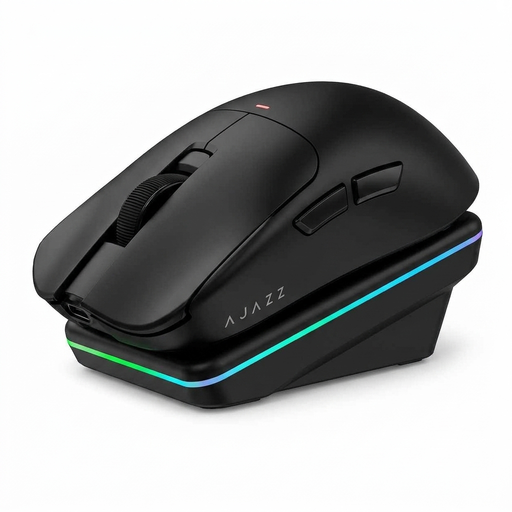
Why This Fits Their Persona: Ideal for users who need a high-performance mouse for both gaming and productivity. The tri-mode connectivity (2.4G, Bluetooth, Wired) and magnetic charging dock offer maximum flexibility for different devices and scenarios.
This model offers a dedicated 2.4 GHz mode with a 1000 Hz polling rate for low-latency gaming, thus avoiding the drawbacks of a Bluetooth-only connection. The PAW3311 sensor focuses on proven precision rather than exaggerated DPI figures.
The combination of tri-mode connectivity and a convenient charging dock is a clear unique selling point. Its low weight of 65g and ergonomic shape for medium to large hands ensure comfort.
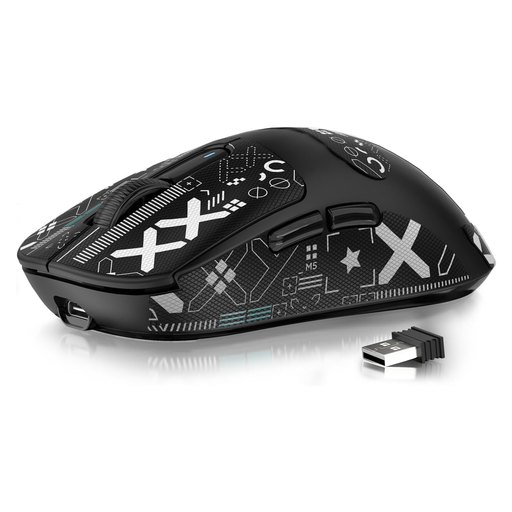
Why This Fits Their Persona: For ambitious gamers who want competitive-grade features like an extremely low weight and a top-tier sensor, but without the premium price tag. At just 49g, it's one of the lightest options on the market.
Despite its low weight, it incorporates the PAW3395, a proven high-end sensor that ensures precise tracking. The tri-mode connectivity also provides a reliable 2.4 GHz option for demanding gaming sessions.
The standout feature is its weight of just 49 grams combined with the high-performance PAW3395 sensor. This delivers exceptional agility typically found only in significantly more expensive models.
We have compiled a complete, real-time updated list of products that fully meet these strict selection criteria and rigorous safety standards.
1. Is a wireless mouse really as fast as a wired one for competitive gaming? Yes, modern wireless gaming mice using high-quality 2.4 GHz technology and a 1000 Hz polling rate offer latency that is humanly indistinguishable from a wired connection. Technologies like Razer HyperSpeed are specifically designed to guarantee a stable and responsive connection.
2. How long does the battery of a lightweight wireless gaming mouse last? Battery life varies greatly depending on the model, usage, and lighting settings. Many high-end models like the Razer DeathAdder V3 Pro offer up to 90 hours of use on a single charge, according to the manufacturer. Models with power-saving features can last even longer. Most mice can also be charged via a USB-C cable while in use.
3. What is the ideal weight for an FPS gaming mouse? There is no single "ideal" weight, as it comes down to personal preference. However, a trend towards very light mice has emerged in the competitive FPS scene. Models under 75 grams are considered lightweight, while those under 65 grams are classified as ultralight. A lower weight allows for faster mouse movements and micro-adjustments, which can improve responsiveness and aiming precision.