
Lieferung heute & morgen

Qualitätsgarantie

Willkommens-Angebote freischalten: KOSTENLOSE Lieferung | Bis zu 80 % RABATT | Kostenlose 30-Tage-JoyPlus-Testphase
App herunterladen
By the Joybuy Product Recommendation Officer, August 28, 2026
Choosing a new gaming mouse can quickly become overwhelming. Manufacturers advertise ever-higher DPI counts, spectacular RGB lighting, and ergonomic promises. But not every feature touted on the box actually leads to a better gaming experience. In fact, these exaggerated marketing claims often lead to buyer's remorse.
This guide will help you identify the crucial features and avoid the typical pitfalls. We focus on the technical facts that truly make a difference, so you can make an informed decision for your next PC mouse.
Before we dive into the important specifications, let's look at the three most common marketing traps that often lead to disappointment:
To find the right mouse for gamers, you should focus on a few crucial technical features. These determine precision, responsiveness, and comfort.
The sensor is the heart of any gaming mouse. A high-quality optical sensor ensures precise and flawless tracking of your movements on the mousepad. Pay less attention to the maximum DPI number and more to a proven sensor type.
The weight and shape of the mouse have a direct impact on handling and comfort during long gaming sessions.
For competitive gaming, a stable and fast connection is essential.
Here are some recommendations tailored to different needs and budgets, taking the above criteria into account.
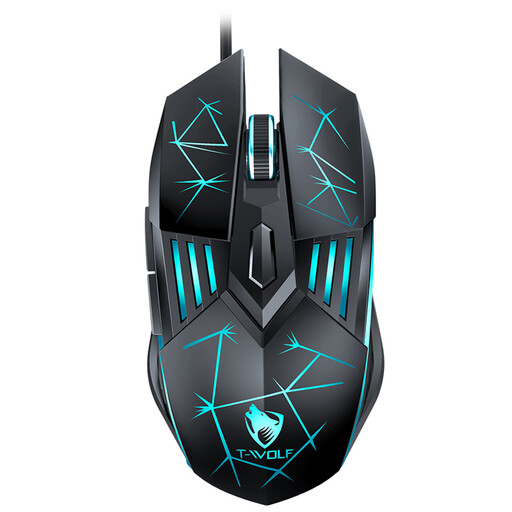
Why it's a good fit: This model offers the essential features needed to get started in PC gaming, such as adjustable DPI levels and extra buttons, without breaking the bank. It's a solid choice for casual gamers and beginners looking to upgrade their setup.
The mouse avoids the "RGB Distraction" trap by offering functional lighting but keeping the focus on core performance features like four customisable DPI levels (up to 3600) and an ergonomic design suitable for many hand sizes.
Plug-and-play functionality without driver installation and a reinforced, braided cable for greater durability compared to standard plastic cables in this price range.
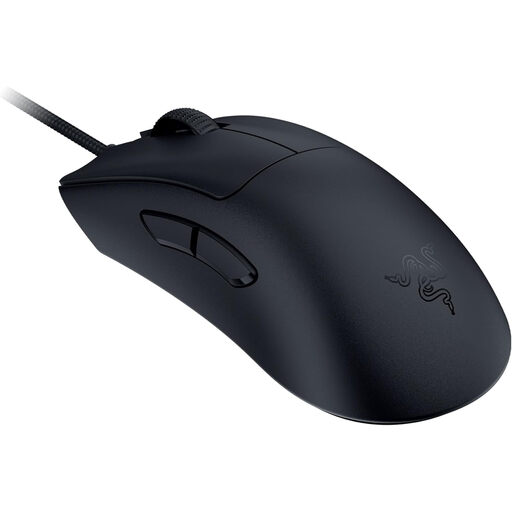
Why it's a good fit: This model is uncompromisingly designed for performance. Its extremely low weight, high-precision sensor, and 8000 Hz polling rate are specifically engineered for gamers where every millisecond and every precise movement counts.
It avoids the "DPI Trap" by not just relying on the high 30,000 DPI figure, but by offering verifiably high tracking accuracy with the Razer Focus Pro sensor. Unnecessary gimmicks like elaborate RGB lighting are sacrificed in favour of weight and performance.
The weight of just 59 grams combined with 8000 Hz HyperPolling Technology provides extremely responsive and near-zero latency control, which can be decisive in competition.
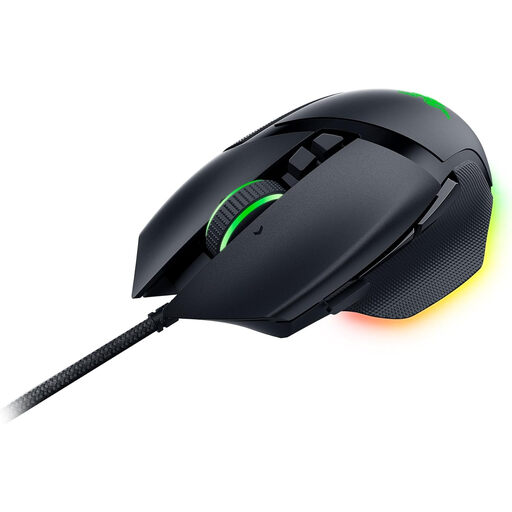
Why it's a good fit: The Basilisk V3 is an all-rounder that combines high performance with extensive customisation options. With 11 programmable buttons, a versatile scroll wheel, and comprehensive RGB lighting, it is suitable for both demanding gaming and productive tasks.
Here, the RGB lighting is not a distraction but a well-thought-out feature. The 11 lighting zones complement a mouse that already boasts a high-performance sensor (26,000 DPI), durable switches, and a proven ergonomic shape. Functionality comes first.
The Razer HyperScroll Tilt Wheel, which can switch between a free-spin and a tactile mode, and the 11 programmable buttons offer a high degree of flexibility for various games and applications.
We have compiled a complete, up-to-date list of products that fully meet these strict selection criteria and German safety regulations.
Start with a medium setting (e.g., 800 or 1600 DPI) and adjust it in small increments. Test the setting in your favourite game. The right DPI setting is highly subjective: you should be able to comfortably turn 180 degrees in-game by moving the mouse a distance on your mousepad that feels natural to you. Many players combine a lower DPI setting with a higher in-game sensitivity for precise control.
The lifespan heavily depends on the intensity of use and the quality of the components. An important indicator is the rated durability of the mouse buttons, often specified in millions of clicks (e.g., 10, 50, or 90 million clicks). With daily, intensive use, you can expect a quality model to last two to five years before signs of wear and tear, such as double-clicking issues or an inaccurate scroll wheel, appear.
Not necessarily. A lightweight mouse reduces fatigue and allows for quick movements, which is advantageous in fast-paced shooters. However, some players prefer the feel of a heavier mouse as it can provide more stability and control, especially at low DPI settings. The choice ultimately depends on personal preference and the game genres you primarily play.