
Lieferung heute & morgen

Qualitätsgarantie

Willkommens-Angebote freischalten: KOSTENLOSE Lieferung | Bis zu 80 % RABATT | Kostenlose 30-Tage-JoyPlus-Testphase
App herunterladen
A gaming mouse should offer more than a high DPI count, RGB lighting or eye-catching product copy. For PC gamers, FPS players and users of CS2, Valorant or Apex Legends, reliable tracking, a suitable shape, low weight and a connection that fits your setup are what really matter.
However, there are several common pitfalls to watch out for when buying:
DPI describes how many screen points the mouse can represent per inch of movement. In practice, many players use considerably lower settings and adjust the sensitivity in-game as well. For FPS games, controllable DPI steps and consistent tracking are therefore more important than the highest possible maximum value.
The polling rate indicates how often the mouse reports its position to the computer:
You should also check the maximum tracking speed in IPS and the maximum acceleration. These figures are particularly relevant for fast, wide movements. Specifications such as 300 IPS, 650 IPS or more than 888 IPS come from the respective product data and should not be interpreted as a guarantee of better gaming results.
A lightweight gaming mouse typically weighs between around 47 and 65 grams. This can be comfortable when using low sensitivity and making large mouse movements. Models weighing around 80 to 102 grams, on the other hand, often offer more surface area, additional buttons or an adjustable weight system.
Check the following before buying:
An ergonomic gaming mouse is generally designed for a particular hand. Symmetrical models can be more flexible for left- and right-handed users, but they will not feel equally comfortable for every hand.
A wireless gaming mouse generally uses 2.4 GHz wireless technology with a USB receiver. This connection is designed for gaming, while Bluetooth is mainly suitable for laptops, tablets or office use. A wireless gaming mouse with a tri-mode connection can switch between USB, 2.4 GHz and Bluetooth.
USB-C is now a practical option for charging, but on its own it says nothing about battery life. Check the manufacturer’s stated battery life for the relevant mode and bear in mind that RGB lighting can reduce runtime. Programmable buttons, macros and profiles often require the manufacturer’s software. On work computers or locked-down systems, built-in memory can be an advantage.

Why this product suits the profile: This model combines a weight of 54 g, a PAW3311 sensor with up to 24,000 DPI and three connection options. Two replaceable 300-mAh batteries can be useful for longer periods of use.
The selection is based not only on the maximum DPI, but also on weight, connection options and replaceable batteries. The polling rate is up to 1,000 Hz.
Tri-mode connection, USB-C, 24,000 DPI and a low weight of around 54 g.
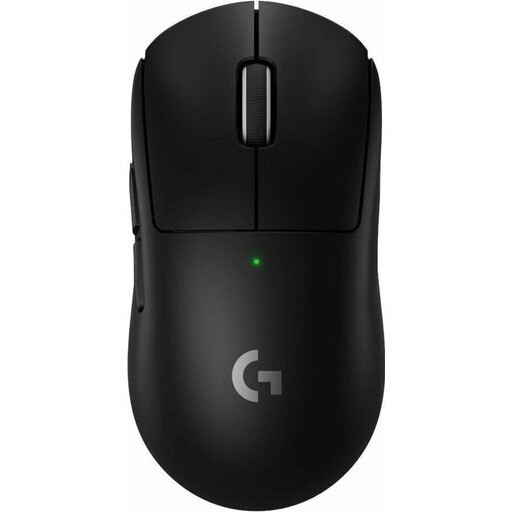
Why this product suits the profile: This wireless gaming mouse is aimed at users looking for a low weight of 60 g, USB-C and an optional 8K polling rate in a streamlined design.
The 8K function is not assumed to be included as standard: according to the product specifications, it requires the separately available PRO LIGHTSPEED RECEIVER.
HERO-2 sensor with up to 44,000 DPI, up to 95 hours of battery life and PTFE mouse feet.

Why this product suits the profile: This right-handed ergonomic wireless gaming mouse offers plenty of controls for streaming, strategy games and productivity software, along with a stated battery life of up to 140 hours.
The higher weight of 102 g is clearly explained by the feature set. If you need lots of buttons, you do not have to choose an ultra-light FPS model.
13 programmable buttons, RGB lighting, USB-C and up to five saveable profiles.
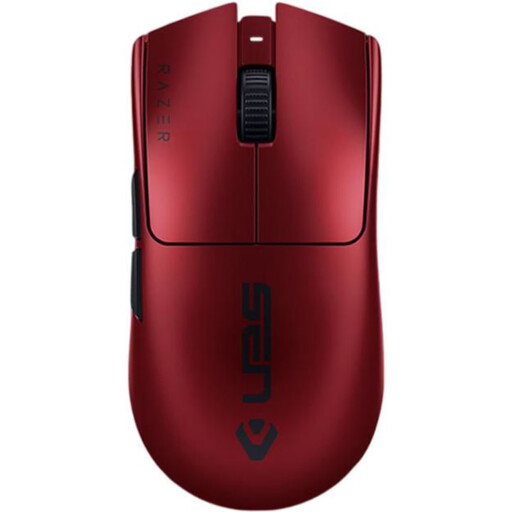
Why this product suits the profile: This 54 g model combines a Focus Pro sensor with up to 35,000 DPI, an 8,000 Hz polling rate and six programmable buttons.
The high polling rate is complemented by a wired USB-C option. This means the mouse remains usable even when the battery is empty or the wireless environment is incompatible.
54 g weight, USB-C cable, 8K polling rate and up to 95 hours of stated battery life.
We have put together a complete, regularly updated list of products that fully meet these strict selection criteria and the safety regulations applicable in the EU.
There is no single recommendation. Many FPS players use lower sensitivity and move the mouse across a larger area. Start with a moderate DPI setting, test your aim control and then adjust the in-game sensitivity. The key is for the sensor to perform consistently during fast movements.
Bluetooth works well for office use, travel and switching between devices, but depending on the system it can have higher or less consistent latency than 2.4 GHz wireless. For competitive gaming, a wireless gaming mouse with a USB receiver is generally the more suitable choice. A tri-mode model offers both options, as well as USB-C.
Battery life depends on the battery, polling rate, RGB lighting and how long you use the mouse. Manufacturer figures such as 95, 100 or 140 hours are guidelines for specific operating modes. For extended use, USB-C charging, a charging dock or a replaceable battery can be practical. You should also ensure that the integrated battery is disposed of properly at a suitable collection point.