
Lieferung heute & morgen

Qualitätsgarantie

Willkommens-Angebote freischalten: KOSTENLOSE Lieferung | Bis zu 80 % RABATT | Kostenlose 30-Tage-JoyPlus-Testphase
App herunterladen
The search for the right gaming mouse can quickly become overwhelming. The market is flooded with technical specs, marketing buzzwords, and a seemingly endless selection. Many gamers invest in models whose advertised features offer little practical advantage or even lead to disadvantages like fatigue. Before you make a decision, it's crucial to know the most common pitfalls to avoid a bad investment.
As your Joybuy Product Recommendation Officer, I'll help you find objective criteria for your choice. This guide focuses on the facts and shows you which features truly matter.
The 3 most common pitfalls when buying a gaming mouse:
wireless gaming mouse, impressive battery life figures are often quoted. However, these values are frequently measured under ideal conditions—usually with the RGB gaming mouse lighting disabled and a low polling rate. During intensive use, the actual battery life can be significantly shorter.To make an informed decision, you should focus on the technical fundamentals that directly impact your performance and comfort.
The heart of any gaming mouse is its optical sensor. Instead of just looking at the maximum DPI, sensor precision is what's crucial. A high-quality sensor delivers flawless 1:1 tracking of your movements without unwanted acceleration or smoothing. Models with proven sensors, like those from PixArt, are often a reliable choice.
Closely related is the Polling Rate, measured in Hertz (Hz). It indicates how often the mouse reports its position to the computer. A standard value of 1000 Hz (1-millisecond response time) is sufficient for most gaming applications and ensures smooth cursor movement. Some esports mouse models offer higher rates of 4000 Hz or even 8000 Hz, which further minimizes latency but also consumes more system resources.
The weight of a mouse is a critical factor that is often underestimated. A lightweight gaming mouse (often under 70 grams) allows for fast, sweeping movements with less effort, which is particularly advantageous in fast-paced FPS games. Heavier mice, on the other hand, can provide a feeling of more control and stability.
The shape must fit your hand and your grip style:
An ergonomic mouse specifically shaped for right-handers often offers more comfort during long sessions than a symmetrical design.
The choice between a wired and a wireless gaming mouse depends on personal preference.
Here are some recommendations tailored to specific user profiles that purposefully avoid the pitfalls mentioned.
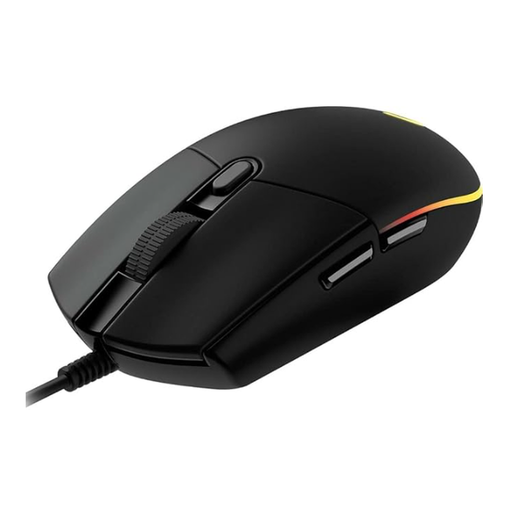
Why it's a great fit: Ideal for gamers looking for a reliable, straightforward mouse without unnecessary features. It offers solid performance for entering the world of PC gaming or as an upgrade from a standard office mouse.
This model avoids the DPI trap by offering a practical sensor with up to 8,000 DPI, which is more than sufficient for most users. The focus is on reliability rather than marketing numbers.
Classic, proven design that is suitable for many hand sizes and grip styles. Offers a good balance of function and price with 6 programmable buttons and customizable LIGHTSYNC RGB lighting.
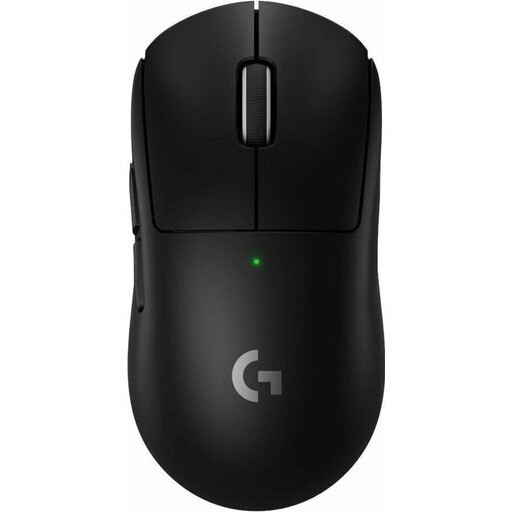
Why it's a great fit: Designed for professional gamers where every millisecond and every gram counts. The mouse is engineered for maximum performance and minimal distraction.
It sidesteps the ergonomics illusion with an extremely low weight of just 60 grams and a simple, symmetrical shape that enables quick reactions and minimizes fatigue during long tournaments.
Equipped with the HERO 2 sensor and latency-free LIGHTSPEED wireless technology for precise tracking. The battery life of up to 95 hours (according to Logitech) is reliable even with intensive use.
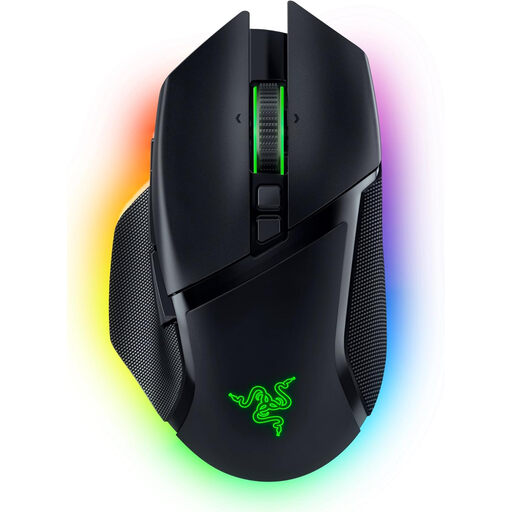
Why it's a great fit: For users who need one mouse for both demanding gaming and productive work. It combines comfortable ergonomics with a high degree of customisation.
It avoids the battery trap with tri-mode connectivity (HyperSpeed Wireless, Bluetooth, Wired). This allows you to switch between maximum performance and long battery life depending on your needs.
The HyperScroll Tilt Wheel with an adaptive mode and 10+1 programmable buttons offer extensive customisation options for games and applications. The ergonomic shape for right-handers ensures comfort.
Besides mice, other PC gaming accessories are crucial for an immersive experience. For racing simulation fans, a high-quality sim racing steering wheel like the MOZA Racing GS V2P GT Steering Wheel could be a worthwhile addition, providing a realistic driving feel with magnetic shifters and programmable buttons.
We've compiled a complete, up-to-date list of products that fully meet these strict selection criteria and UK safety regulations.
The actual battery life depends heavily on usage. Factors like the brightness of the RGB lighting, the set polling rate (1000 Hz consumes more than 500 Hz), and the intensity of use play a major role. Manufacturer specifications often refer to operation without lighting. With normal gaming use including lighting, it's realistic to expect 30% to 50% of the maximum stated battery life.
Not necessarily. The number of buttons you need depends on the games you play. For FPS games, the standard buttons and two thumb buttons are often sufficient. For MMOs or complex strategy games, additional buttons for macros and commands can be very useful. More important than the sheer number is the ergonomic accessibility of the buttons without having to change your grip.
For the vast majority of users and games, a DPI value above 10,000 is not necessary. Most professional players use significantly lower settings because they allow for more precise control. A high maximum DPI can be an indicator of a modern sensor, but it should not be the main criterion for your purchase decision. Instead, focus on tracking accuracy and the absence of sensor issues like jitter or angle snapping.