
Lieferung heute & morgen

Qualitätsgarantie

Willkommens-Angebote freischalten: KOSTENLOSE Lieferung | Bis zu 80 % RABATT | Kostenlose 30-Tage-JoyPlus-Testphase
App herunterladen
A gaming mouse needs to offer more than just a high DPI figure. For PC gamers, e-sports players and ambitious casual gamers, sensor performance, weight, grip style, button layout and the right connection technology are equally important. Programmable buttons and a reliable wireless connection can also be useful for working from home and staying productive.
Many disappointing purchases result from three common marketing traps:
The DPI figure describes how strongly the cursor responds to a particular movement. A gaming mouse with high DPI offers flexible settings, but more DPI does not automatically mean greater precision. For many users, finely graduated profiles between around 800 and 3,200 DPI are more practical than an extremely high setting used permanently.
The polling rate is also important. It indicates how often the mouse sends its position data to the computer. 1,000 Hz corresponds to data being sent approximately every millisecond. Models with 8,000 Hz can transmit data more frequently, but require compatible hardware and software. When choosing an esports mouse, buyers should therefore check whether their system and game can make sensible use of this setting.
A lightweight gaming mouse weighing between 54 and 70 grams can be appealing for fast, sweeping movements. Heavier models weighing 80 to 100 grams, on the other hand, often provide additional buttons, a more pronounced palm rest or an adjustable weight system.
Your grip style should be taken into account before buying:
An ergonomic gaming mouse is not automatically suitable for every hand size or for both hands. Specifications for length, width, height and orientation are therefore more useful than general promises of comfort.
If you need macros, media controls or frequently used commands, pay attention to the number and position of the programmable buttons. A gaming mouse with many side buttons can be practical for strategy games, role-playing games, productivity and browser-based workflows. At the same time, too many buttons can make operation more difficult if they are pressed accidentally.
There are usually three connection options to choose from:
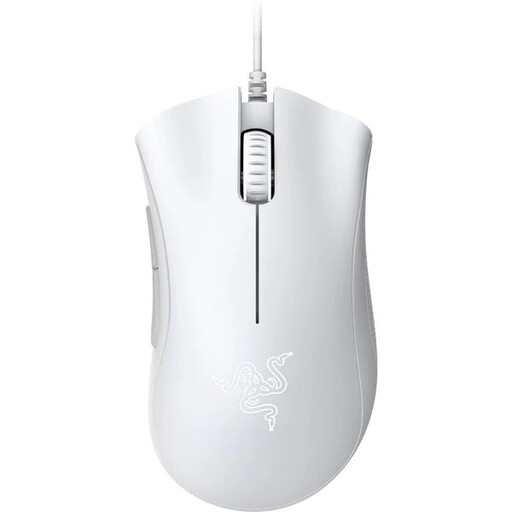
Why this product suits this profile: The wired design requires no battery and offers an easy introduction to gaming with an ergonomic shape and five programmable buttons.
The buying decision does not depend on an extreme DPI figure: the optical sensor offers up to 6,400 DPI, while the USB cable eliminates charging breaks.
Optical sensor with 6,400 DPI, five programmable buttons and an ergonomic design according to the product description.
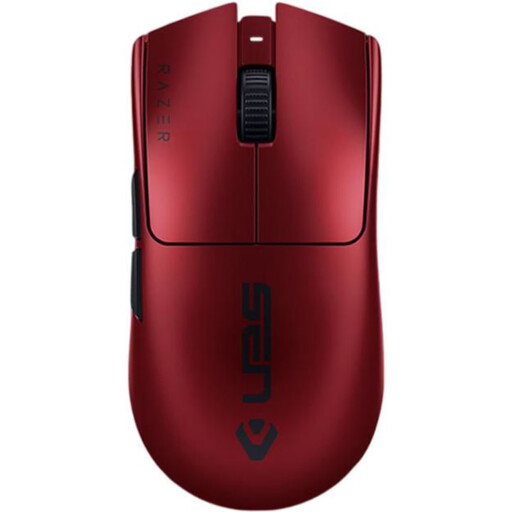
Why this product suits this profile: This model combines low weight with 2.4 GHz wireless, USB-C operation and extensive settings for ambitious gaming.
Wireless use is not limited to a single mode: if the battery runs out, the mouse can continue to be used via USB-C. According to the product description, maximum battery life is up to 95 hours.
54 g weight, up to 35,000 DPI, 8,000 Hz polling rate and six programmable buttons according to the manufacturer's specifications.

Why this product suits this profile: The combination of 2.4 GHz wireless, Bluetooth 5.1 and USB is ideal for users who switch between a gaming PC, notebook and other compatible devices.
The connection is not limited to Bluetooth. A USB cable and six programmable buttons are also available.
61 g weight, up to 26,000 DPI, Bluetooth 5.1 and up to 100 hours of battery life in Bluetooth mode according to the product description.

Why this product suits this profile: For games and workflows involving numerous commands, this wired mouse offers extensive button customisation and an adjustable weight system.
The high number of buttons is complemented by specific customisation options. The weight can be adjusted with up to five 3.6 g weights.
11 programmable buttons, RGB lighting, adjustable weights and a HERO sensor with up to 25,600 DPI.
We have put together a complete, regularly updated list of products that fully meet these strict selection criteria and the safety regulations applicable in the EU.
For most games, several adjustable profiles in the low to medium DPI range are sufficient. A high maximum resolution is mainly useful when combined with clean sensor processing and practical software customisation. The key is being able to switch between DPI levels quickly.
A wireless gaming mouse can be suitable for competitive gaming if it offers a stable 2.4 GHz connection, a suitable receiver and low transmission latency. Buyers should also check battery life, charging options and whether USB operation is available. Bluetooth alone is not designed for the same purpose in every model.
Its lifespan depends on the switches, cable or battery, transport, cleaning and daily use. Manufacturer specifications such as “up to 10 million clicks” refer to the specified switch design and are not a guarantee of a particular service life. Dust, liquids and sharply bending the cable can affect performance. For models with an integrated battery, you should also follow the manufacturer's charging and disposal instructions.