
Lieferung heute & morgen

Qualitätsgarantie

Willkommens-Angebote freischalten: KOSTENLOSE Lieferung | Bis zu 80 % RABATT | Kostenlose 30-Tage-JoyPlus-Testphase
App herunterladen
A gaming mouse needs to offer more than just a high DPI count or flashy lighting. For PC and Mac gamers, the most important factors are a comfortable shape, a stable connection and clear, reliable technical specifications. Especially in FPS and esports titles, unnecessary weight, an ill-fitting shell or a weak wireless solution can seriously affect your gameplay comfort.
Before buying a gaming mouse, you should therefore be aware of three typical marketing pitfalls:
DPI describes how many on-screen points the sensor registers for a given movement. A gaming mouse with high DPI offers more adjustment headroom, but the maximum DPI number alone is not a sufficient selection criterion.
Also pay attention to:
For FPS games, many players choose a lower sensitivity and move the mouse across a larger area. For strategy games, desktop use or high-resolution monitors, a higher setting can be more practical.
The polling rate indicates how often the mouse reports its position to the computer. At 1,000 Hz, the transmission occurs up to 1,000 times per second; at 4,000 Hz or 8,000 Hz, it happens correspondingly more often.
A gaming mouse with a 4K or 8K polling rate can be interesting for competitive players. In practice, however, you should check:
A high polling rate does not replace a suitable sensor or an ergonomic shape. For many everyday users, 1,000 Hz remains a straightforward setting.
An ultralight gaming mouse weighs around 50 to 70 grams depending on the model. This can feel comfortable during large sweeping movements. Heavier models, on the other hand, often offer additional buttons, a pronounced palm rest or more material in the shell construction.
In terms of shape, there are differences between:
For the connection, you usually have the choice between USB cable, 2.4 GHz wireless and Bluetooth. A wireless gaming mouse with a USB receiver is often more practical for gaming than Bluetooth, while Bluetooth can be advantageous for laptops and Macs without a free USB port. A rechargeable gaming mouse should also be usable while charging or offer a sufficiently long battery life.
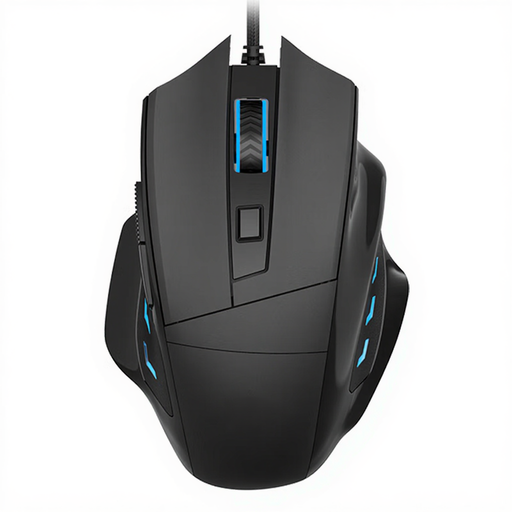
Why this product fits the profile: This wired model is aimed at users looking for a simple PC gaming solution without a battery or wireless receiver. It offers 3,200 DPI and a right-handed ergonomic design.
The wired connection requires no battery maintenance and reduces potential wireless or charging interruptions.
USB connection, 3,200 DPI and a right-handed shape for an affordable entry point.
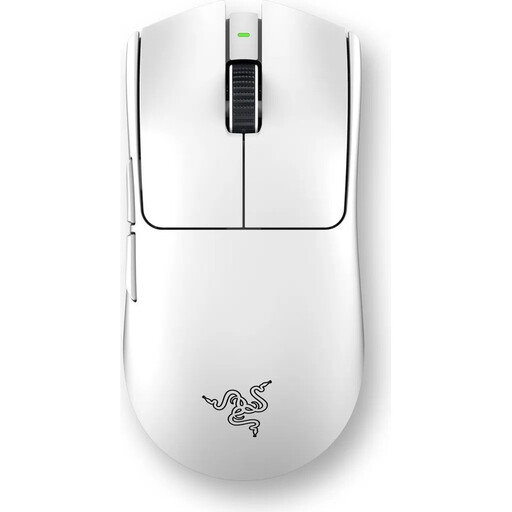
Why this product fits the profile: This wireless gaming mouse combines a symmetrical shell with 2.4 GHz wireless, USB-C charging, onboard memory and a stated battery life of up to 95 hours.
The technical specifications list concrete polling levels from 1,000 to 8,000 Hz as well as five programmable profiles, rather than just a single maximum value.
54 grams, up to 35,000 DPI according to product specifications, 8,000 Hz HyperPolling and six programmable buttons.
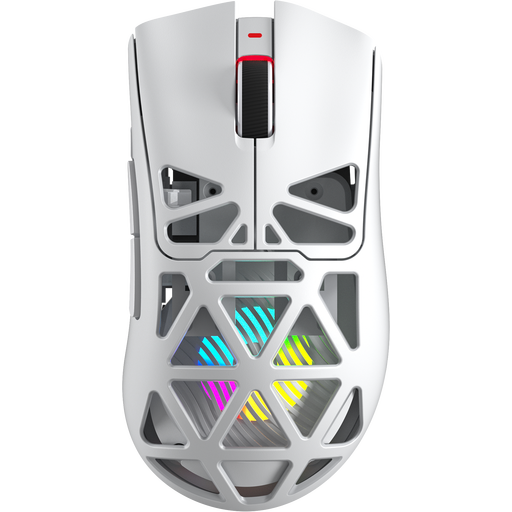
Why this product fits the profile: The SC620 offers Bluetooth 5.0, 2.4 GHz wireless and USB-C. At 67 grams, with seven programmable buttons, RGB lighting and a 400 mAh battery, it is designed for changing usage scenarios.
Three connection types reduce reliance on a single port. The polling rate and DPI can be adjusted to suit the task at hand.
PixArt PAW3311 sensor, up to 12,000 DPI according to product specifications, seven buttons and RGB gaming mouse features.
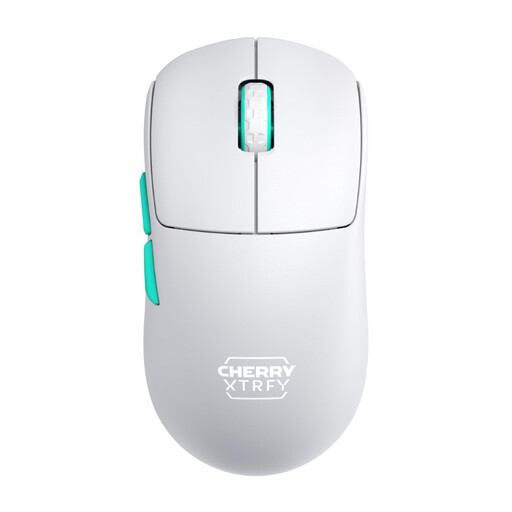
Why this product fits the profile: The symmetrical low-front design and weight of 53 grams are geared towards fast movements and different grip styles. The 2.4 GHz connection is made via a USB dongle.
The low weight is combined with a clearly described shell shape and selectable polling rates from 125 to 1,000 Hz.
53 grams, rechargeable battery with up to 75 hours of runtime, symmetrical shape and usability while charging.
We have compiled a complete, regularly updated list of products that fully meet these strict selection criteria and the safety regulations in force in the EU.
A gaming mouse for PC and Mac should be compatible not only with the operating system but also with the available ports. On a MacBook, a USB-A receiver may require an adapter or a docking station. Bluetooth is often simpler in this case, but it doesn't always offer the same settings on every model as a 2.4 GHz connection.
With wireless models, there are also ongoing considerations such as:
With wired mice, there is no battery to worry about, but the cable length, flexibility and strain relief should suit your desk setup. Clean the sensor with a dry, soft cloth and do not use any liquids.
For most games, a range that can be finely adjusted is sufficient. High maximum values are mainly relevant if you want to save different profiles for games, desktop use and high-resolution monitors. What matters is the sensor behaviour and usability, not just the number on the box.
A 2.4 GHz wireless gaming mouse with a USB receiver can be suitable for FPS games, provided the connection, battery and polling rate are compatible with your system. Check before buying whether the receiver can be plugged in directly and whether the mouse works while charging.
The lifespan depends on the switches, cable or battery, mouse feet and daily wear and tear. Manufacturer figures for click counts are laboratory or product data and not a guarantee of a specific lifespan. Dry storage, regular cleaning and careful handling can help reduce wear and tear.