
Lieferung heute & morgen

Qualitätsgarantie

Willkommens-Angebote freischalten: KOSTENLOSE Lieferung | Bis zu 80 % RABATT | Kostenlose 30-Tage-JoyPlus-Testphase
App herunterladen
A gaming mouse should translate movements precisely, feel comfortable in your hand and suit your individual playing style. In practice, however, many buyers focus first on high DPI figures, RGB lighting or exceptionally low weight. While these features can be relevant, they alone reveal little about whether a mouse is truly suitable for everyday use.
Anyone looking for a gaming mouse for PC gaming, streaming or esports should avoid three common pitfalls before buying: exaggerated DPI claims, unsuitable ergonomics and misconceptions about wireless technology.
A gaming mouse with a high DPI rating can offer a broad adjustable sensitivity range. For actual control, however, sensor tuning, surface, polling rate and the sensitivity used in-game are equally important. Values such as 30,000 or 44,000 DPI are technical maximum specifications; many users play with considerably lower settings in everyday use.
You should therefore look for a sensor with customisable DPI steps, saved profiles and intuitive software. Multiple profiles can be useful when switching between games, while casual players can often manage perfectly well with just a few DPI settings.
A lightweight gaming mouse can make rapid movements easier, but it is not ideal for every hand size or grip style. Length, width, height, shape and side-button placement are all important. A mouse that is too small can lead to a cramped posture, while one that is too large or heavy may make quick changes of direction more difficult.
Before buying, check whether the shape suits your preferred grip:
A wireless gaming mouse can connect via 2.4 GHz wireless, Bluetooth or both. For competitive gaming, a dedicated wireless receiver is generally the more practical option, while Bluetooth is advantageous for laptops and multiple devices. Also check battery life, charging port, receiver placement and whether the mouse can continue to be used with a cable while charging.
With a wireless gaming mouse, the receiver should be positioned as close to the mouse pad as possible. USB extension cables or the included adapters can help avoid unnecessary signal paths.
Do not compare only the maximum figure; also consider the usable range and software features. According to the product specifications, the Logitech HERO 2 sensor used in the PRO models supports 100 to 44,000 DPI. Depending on the model, the Razer Focus Pro sensors in the DeathAdder series offer up to 30,000 DPI. These figures are objective specifications, but they are not a blanket indication of a better gaming experience.
The polling rate describes how frequently the mouse reports its position to the computer. 1,000 Hz corresponds to an interval of approximately 1 millisecond; 8,000 Hz theoretically reduces the interval to around 0.125 milliseconds. The actual impact also depends on the game, display, processor, USB port and system configuration.
For many PC gamers, 1,000 Hz is sufficient. An 8K polling gaming mouse may primarily appeal to users who have specifically optimised their hardware for minimal input latency.
A gaming mouse with programmable buttons is suitable for macros, alternative functions or frequently used commands. However, more buttons also increase the mouse’s size and weight. The Logitech G502 HERO is specified with 11 programmable buttons and an adjustable weight system. According to the product data, the G502 X LIGHTSPEED features 13 programmable controls.
An onboard memory is useful when switching between multiple PCs or tournament setups. It allows DPI profiles and button assignments to be stored directly on the mouse, provided the respective model supports this feature.
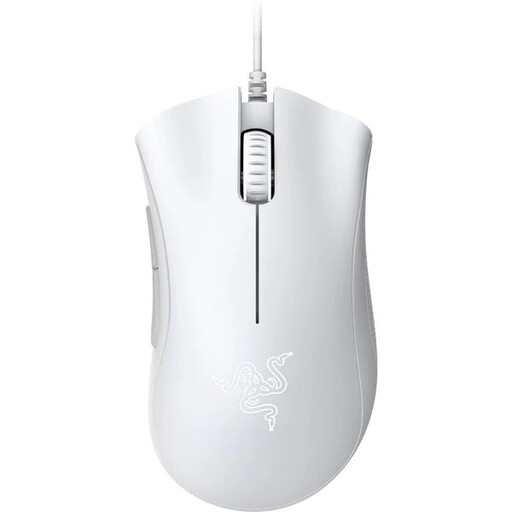
Why it fits: The wired design requires no battery and offers a straightforward setup for PC gamers who prefer a traditional USB connection.
This choice focuses on a well-balanced feature set rather than unnecessary extras or charging routines.
Optical sensor with up to 6,400 DPI, five programmable buttons and an ergonomic right-handed design.
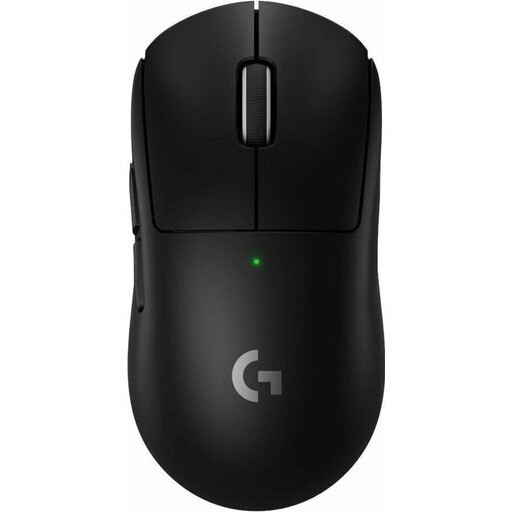
Why it fits: For users considering a lightweight wireless gaming mouse with USB-C and a high polling rate.
Weight, battery, charging port and wireless receiver are clearly specified in the product details.
60 g weight, HERO 2 sensor with up to 44,000 DPI, USB-C charging and up to 95 hours of battery life according to the specifications.
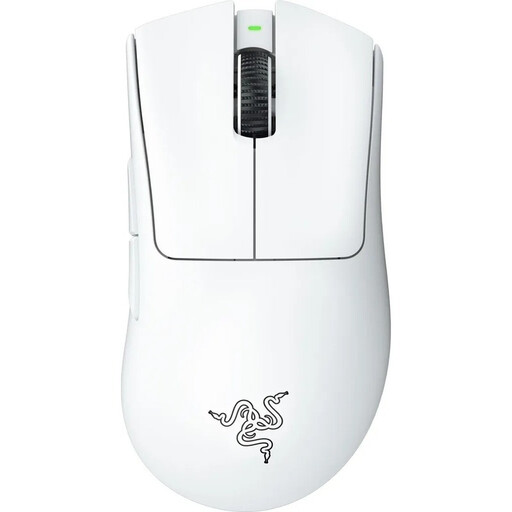
Why it fits: This model is designed for right-handed users who want to combine low weight with a 2.4 GHz wireless connection.
The fixed right-handed design is clearly stated, preventing an unsuitable choice for left-handed users.
64 g weight, Focus Pro sensor with up to 30,000 DPI, five saved DPI profiles and onboard memory.
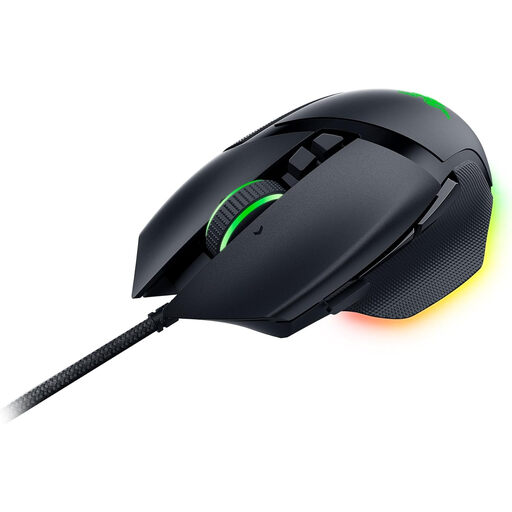
Why it fits: For right-handed users who want numerous programmable buttons, RGB lighting and a versatile scroll wheel.
The wired connection eliminates battery management, while the shape and orientation are clearly specified.
11 programmable buttons, 26,000 DPI, five profiles stored in onboard memory and 11-zone Razer Chroma RGB.
Joybuy offers an continually updated selection of gaming mice with different connection types, sensors and side buttons.
There is no single recommendation. Many players start with a moderate DPI setting and then adjust the sensitivity in the game itself. What matters is that the gaming mouse can store multiple profiles or DPI levels and that switching between them is easy.
Battery life depends on the battery, charging cycles, lighting and polling rate. Manufacturer claims such as “up to 95 hours” refer to specific conditions. With RGB lighting permanently enabled or a high polling rate selected, runtime may be shorter. A USB-C port and the ability to use the mouse while charging are practical advantages in everyday use.
No. RGB lighting does not affect sensor performance. It can enhance the look of your desk or synchronise with other hardware. If price, weight or battery life are your priorities, treat RGB as an optional extra and compare the core specifications first.