Who plays, and what do they need?

Players who like to survey the whole map

If you often move the pointer across large areas of the map, look for adjustable pointer speed and a scroll wheel that’s easy to control. Microsoft Support explains how to adjust mouse pointer speed in Windows.

Players who build for hours

If you play for longer sessions, choose a mouse shape and grip that suit your hand, and make sure there’s enough room on your desk for your arm and mouse movements. The Federal Institute for Occupational Safety and Health recommends leaving enough space for your mouse, keyboard and arm support.

Players who use shortcuts often

If you want to trigger recurring actions more quickly, check whether you can assign the game commands you need to easily reached extra buttons. The exact options depend on the game and configuration software.

What should you look for when buying?

Wired mouse with configurable scroll wheel

A good fit if: Your PC is close enough and you don’t want to think about charging.

The trade-off: You’ll need to position the cable so it doesn’t get in the way of mouse movements.

Wireless mouse with a few extra buttons

A good fit if: You don’t want a cable on your desk and can accommodate the receiver and charging.

The trade-off: A rechargeable battery means planning when to charge it; the fit still matters, whatever the connection type.

Mouse with a large array of side buttons

A good fit if: You want to trigger lots of recurring commands with your thumb, and the game supports those button assignments.

The trade-off: A high number of buttons doesn’t automatically give you an advantage in city-building games; consider how easy they are to reach and the risk of pressing the wrong one.

Priority What to look for when buying Who it matters most to
Pointer and scroll-wheel control Test pointer speed, DPI settings and scroll-wheel modes in your game; check your resolution and scaling first. If you want to navigate the map and select small targets accurately, you’ll need movements you can control. Around 33% of consumers put map control first.
Comfort during long sessions Try the grip and thumb rest if possible; make sure there’s room for your arm and mouse movements. If you spend a long time building, you’ll want a mouse that suits your hand and grip. Around 27% of consumers prioritise hand comfort.
Assignable extra buttons Check how easy they are to reach, what software you need and whether you can assign them in your specific game. If you want to trigger recurring actions conveniently, the commands you need should be easy to reach and assignable in the game. Around 20% of consumers prioritise shortcuts.
Wired or wireless Consider the distance to your PC, available ports, space for the receiver and charging options. If you want to keep the area around your mouse cable-free, make sure your setup also has room for the receiver and charging. Around 20% of consumers prefer a cable-free setup.

Avoid common buying mistakes

  • Assuming a larger screen means you need a specific DPI

    Resolution, scaling, pointer visibility and pointer speed are separate settings. The screen size alone doesn’t determine a particular DPI value.

    Start by checking your display and pointer settings, then test whether you can manage both long movements and small interface elements.

  • Assuming lots of extra buttons automatically give you an advantage

    A large array of side buttons is only useful if you can assign the commands you need in your specific game and reach the buttons comfortably.

    Choose based on the commands you’ll actually use, rather than the number of buttons alone.

  • Choosing a mouse labelled ergonomic without trying it

    An advertised shape doesn’t guarantee that the mouse will suit your hand and grip. COMPUTER BILD describes the hand position on the CHERRY XTRFY M50 Wireless it tested as somewhat cramped; fit is a personal matter.

    If possible, try the grip and check your arm position, and leave enough room on your desk for your mouse and keyboard. When shopping online, consider your statutory cancellation rights separately from any voluntary returns policy.

Brands to consider

Logitech G

The G502 models are aimed at players looking for a scroll wheel with multiple modes and customisable inputs. The G502 HERO is wired, while the G502 LIGHTSPEED is wireless.

  • Logitech G lists eleven programmable buttons and a two-mode scroll wheel for the G502 HERO.
  • COMPUTER BILD rates the G502 HERO’s extra buttons positively, but notes its fixed cable and right-handed design as limitations. This assessment applies to this model, not every mouse from the brand.

Razer

The wired Basilisk V3 35K is an option for players who want to use a configurable scroll wheel and extra buttons.

  • Razer describes three scroll modes and programmable controls for this model.
  • COMPUTER BILD rates its handling positively, but describes the mouse it tested as somewhat cumbersome and suitable only for right-handed users. The manufacturer’s features don’t prove it will offer an advantage in every city-building game.

SteelSeries

The Aerox 9 Wireless is worth considering if you’ll actually use lots of commands assigned to the thumb buttons.

  • SteelSeries lists twelve side buttons and 18 programmable buttons in total.
  • It’s positioned primarily for MMO and MOBA games; that doesn’t prove it offers a specific advantage in city-building games.

CHERRY XTRFY

The M50 Wireless is an option if you want to switch between wireless, Bluetooth and wired connections.

  • CHERRY lists a tilting 4D scroll wheel and five onboard profiles.
  • COMPUTER BILD highlights the three connection types, but also reports that the hand position on the model it tested felt somewhat cramped. You’ll need to check the fit for yourself.

Joybuy product selection

Joybuy product options for gaming mice suited to city-building games on large screens.

Razer Viper V3 Pro Wireless Esports gaming mouse in white

Razer Viper V3 Pro Wireless Esports gaming mouse, white

A wireless option if you’re looking for a lightweight mouse with customisable inputs.

The product name lists 54 g, a Focus Pro 35K sensor and 8000Hz HyperPolling.

View at Joybuy

Razer Basilisk V3 35K wired gaming mouse, black

Razer Basilisk V3 35K, wired, black

A wired option if you want to use scroll modes and assignable extra buttons.

The product name lists 35,000 DPI, eleven programmable buttons and a right-handed design.

View at Joybuy

Logitech G502 X Lightspeed wireless optical gaming mouse, white

Logitech G502 X Lightspeed, wireless, white

A wireless option if you’re looking for adjustable pointer movement and programmable inputs.

The product name describes it as an optical mouse with a right-handed design.

View at Joybuy

ATTACK SHARK X11 wireless gaming mouse, black

ATTACK SHARK X11 wireless gaming mouse, black

A wireless option if you want to assign recurring commands supported by your game to extra buttons.

The product name lists a PAW3311 sensor, 22,000 DPI, tri-mode connectivity, five programmable buttons and a weight of 62 g.

View at Joybuy
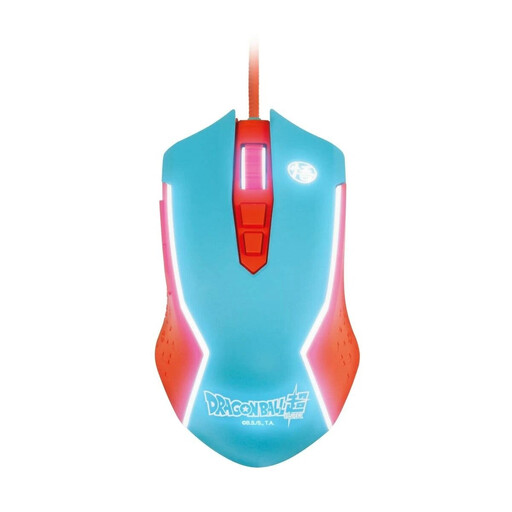
Blade Dragon Ball Goku wired PC gaming mouse

Blade Dragon Ball Goku gaming mouse, wired

A wired option if you’re looking for adjustable pointer speed.

The product name lists a USB connection and PC use.

View at Joybuy

Frequently asked questions

Do I need a mouse with a particularly high maximum DPI for a large screen?

No. The screen size alone doesn’t mean you need a particular minimum DPI. Check your resolution and scaling, then set the pointer speed so you can control both long movements and small interface elements. Windows offers settings for this.

How can I find the pointer more easily?

In Windows 10 and 11, you can change the pointer’s size and colour in the accessibility settings; you can also turn on pointer trails. These are system settings, so they’re not in themselves a reason to buy a new gaming mouse.

How do I set up extra buttons?

First, check which commands your specific game supports. You can assign commands to programmable buttons using the relevant manufacturer’s software; for the Basilisk V3 35K, Razer lists Synapse 4. Test your assignments in the game rather than assuming they’ll be compatible just because of the number of buttons.

What should I bear in mind during longer gaming sessions?

Make sure there’s enough room for your mouse and keyboard, and check that the mouse’s shape and size suit your hand. The guidance from the Federal Institute for Occupational Safety and Health relates to computer work and offers ergonomic advice; it isn’t evidence that a particular gaming model is effective.

What are my rights when returning an online purchase in Germany?

For a distance contract with a consumer, § 312g BGB generally provides a right of cancellation; § 355 BGB sets out a 14-day period. According to the Verbraucherzentrale, for ordered goods this period usually begins when you receive them. Statutory cancellation rights and a retailer’s voluntary returns policy are not the same thing; also check any statutory exceptions and the terms of your specific purchase.