Dedicated city-builders
If you spend long sessions placing and managing lots of items, look for easy-to-reach buttons, a comfortable grip and a scroll wheel that feels good to use. Ubisoft says that supported controls in Anno 1800 can be customised.


For long city-building sessions, start by choosing a mouse that fits your hand and has a scroll wheel that feels comfortable to use. Extra buttons are worthwhile if you can assign them to commands you use repeatedly in your game. If you share a room, quiet clicks are a separate consideration, even if you wear headphones – a standard mouse specifically designed for quiet use may have fewer gaming features. For a wireless mouse, make sure its connection and power supply suit your PC and how you plan to use it.
If you spend long sessions placing and managing lots of items, look for easy-to-reach buttons, a comfortable grip and a scroll wheel that feels good to use. Ubisoft says that supported controls in Anno 1800 can be customised.
If you want to assign recurring in-game commands to your mouse buttons, check that you can reach them comfortably with your grip and that the game itself lets you assign them. Razer, SteelSeries and Ubisoft describe relevant buttons or customisable controls for specific models or games.
If other people might hear your clicks, noise matters whether or not you wear headphones. CHERRY describes the six buttons on the STREAM MOUSE COMFORT as whisper-quiet. This is the manufacturer's claim, not the result of a measured comparison with gaming mice.
Start by checking the grip and scroll wheel, then consider which button assignments you’ll actually use. Click noise and wired or wireless connectivity are additional factors that may matter more depending on your room and desk.
| What matters | What to check | Who it matters most to |
|---|---|---|
| Grip and navigation | Try the mouse shape and button reach with your own hand; check the scroll wheel modes in your game. | If I play for a long time, I want to grip and navigate confidently without pressing buttons by accident. Around 36% of consumers would focus mainly on grip and navigation when making this choice. |
| Assigning commands | Check whether you can assign the commands you want in the game and the mouse software; the buttons need to be easy to reach. | If I use the same commands often, I want to assign them to buttons I can reach easily. Around 29% of consumers would prioritise assigning commands. |
| Click noise | Look for an explicit claim about quiet buttons and, if possible, assess the noise in your own surroundings. | If other people are in the room, I want to disturb them as little as possible with clicks while I play. Around 21% of consumers would consider quiet clicks their top priority. |
| Wireless freedom | Check the connection to your PC and how the specific model is powered; factor in charging or changing batteries. | If a cable gets in the way on my desk, I want a wireless connection that suits my setup and a reliable power supply. Around 14% of consumers would put going wireless first. |
Headphones help you hear the game, but they don’t automatically stop other people in the room from hearing your clicks.
If you share a room, treat noise as a separate buying consideration and weigh it against the extra buttons you need.
A large button panel is only useful if you can reach the buttons with your grip and assign the commands you want in the game.
First decide which commands you use often. Then check reach and programmability; Ubisoft says Anno 1800 supports customisable controls with compatible input devices.
A large array of buttons may take extra time to get used to.
Wireless models can differ in their connection options and power supply. Depending on the model, you may need to charge it or replace the batteries.
Check the specifications of the exact model against your PC, and decide whether charging or changing batteries suits the way you use it.
Models with similar names may differ in their connection type and features.
Compare the full model name, connection type and manufacturer's specifications before choosing a version.
The G502 X range includes wired and wireless models with different controls.
The wired Basilisk V3 and wireless Basilisk V3 X HyperSpeed differ in their connectivity and features.
The Aerox 9 Wireless is aimed at players who will make full use of its large thumb-button panel.
The SCIMITAR ELITE WIRELESS SE has an adjustable side panel for assigning plenty of commands directly to buttons.
The STREAM MOUSE COMFORT is a quiet everyday mouse for right-handed users, suited to situations where consideration for others in the room comes first.
The Joybuy options below include wired and wireless gaming mice with different button and scroll features.
 No image available
An option if you want programmable buttons and different scroll modes.
11 programmable buttons, optical sensor with 35,000 DPI and USB cable; right-handed shape.
Make sure the cable works with your desk setup.
 No image available
A wireless option if you want customisable controls and different scroll speeds.
Right-handed shape; white wireless optical gaming mouse.
Wireless use requires charging; the stated battery life is the manufacturer's claim.
 No image available
This could be a good choice if you want to assign lots of recurring commands to your mouse buttons.
19 programmable buttons, 2.4 GHz wireless and Bluetooth; optical Focus Pro 30K sensor.
The mouse needs one AA battery, so factor in the possibility of having to replace it.
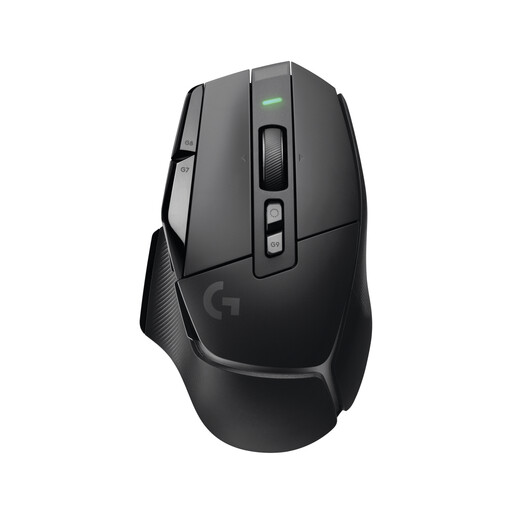 No image available
A wireless option if you want programmable controls and different scroll modes.
Wireless gaming mouse.
It needs charging; you can also connect it with a USB-C cable.
 No image available
An option if you’re considering customisable controls and different scroll modes.
Gaming mouse with USB connection.
Make sure you can route the cable to suit your desk setup.
Yes. According to Ubisoft, on PC you can change supported mouse and keyboard bindings under “Options” and “Controls”. Also check the mouse software for the command you want; support isn’t automatic in every other city-building game.
Check whether the specific model uses a USB receiver, Bluetooth or both, and whether it’s compatible with your computer. Also consider how it’s powered: for the Basilisk V3 X HyperSpeed, Razer lists two wireless modes and says the battery needs to be replaced.
In Germany, the seller’s statutory liability for faulty goods is separate from a voluntary manufacturer's guarantee. The Verbraucherzentrale says that new goods are generally covered by a two-year statutory warranty; online contracts usually come with a 14-day right to cancel, starting from the date you receive the goods. Check the terms of your specific purchase.
According to the Bundesnetzagentur, products covered by relevant EU harmonisation legislation must carry a CE marking. CE is not an independent quality mark for gaming performance or quiet operation, so check the marking on the specific device on offer.
No. The Umweltbundesamt says that old electrical equipment must be collected separately. Batteries and rechargeable batteries must not go in household rubbish either; if they can be removed easily, separate them before handing in the device.