What should you look for when buying?
Wired gaming mouse with a versatile scroll wheel
A good fit if: you play at a fixed desk and don’t want to charge a battery or replace batteries.
Things to consider: The cable needs to suit your setup, while grip and button reach will depend on your preferences.
Wireless gaming mouse
A good fit if: you want a desk without a mouse cable but still want gaming features.
Things to consider: Check the charging port and power supply, and make sure the buttons are easy to reach for your game.
Quiet office mouse
A good fit if: minimising clicking noises in a shared workspace matters more than having a wide range of programmable gaming buttons.
Things to consider: An office mouse isn’t automatically an equally good alternative for games that involve frequent commands you can assign to buttons.
Start by weighing up game controls and how the mouse feels in your hand. Then consider going cable-free, charging requirements and noise levels in relation to how you use your desk.
| What matters to you |
What to check when buying |
Who might find this especially important? |
| Scroll wheel and game commands |
Compare scroll modes, button positions and button-programming software with the control options in the game you play. |
If I often switch between map views or trigger recurring actions, the scroll wheel and accessible buttons matter to me. Around 36% of consumers say game controls are their main concern. |
| Comfort during long sessions |
Check how the shape and button reach work with your hand and desk setup. |
If I work and play at the same desk for long periods, I want to be able to hold and use the mouse comfortably. Around 29% of consumers say how a mouse feels in the hand is their top priority. |
| Going cable-free and power |
Check the connection type, whether a receiver is needed, the charging port and the power supply for the specific model. |
If I want to use my desk without a mouse cable, wireless connectivity matters more to me than charging a battery. Around 21% of consumers say going cable-free is their main concern. |
| Clicking and scroll-wheel noise |
If possible, try the clicks and scrolling for yourself, and check whether the available buttons are enough for your game. |
If other people work in the room or I want to avoid noise, I pay particular attention to clicking and scrolling. Around 14% of consumers put quiet operation first. |
Mice for game controls, cable-free setups and quieter workspaces
This selection includes wired and wireless gaming mice, as well as models designed for quieter clicks. For each model, check that the connection, buttons and handling suit your game and workspace.
 No image available
Razer Basilisk V3 35K Wired Gaming Mouse
A wired gaming mouse for a fixed desk setup, if you’re looking for a version with programmable buttons.
35,000 DPI; 11 programmable buttons.
Joybuy
 No image available
Logitech G502 X LIGHTSPEED Wireless Gaming Mouse, White
A wireless gaming mouse for anyone who doesn’t want a mouse cable on their desk.
Right-handed design; wireless operation with a built-in rechargeable battery.
Joybuy
 No image available
Logitech G PRO X2 SUPERSTRIKE LIGHTSPEED Wireless Gaming Mouse
A wireless gaming mouse for a setup where you want to play without a mouse cable. Before buying, check that the button layout on this particular model suits your game.
Joybuy
 No image available
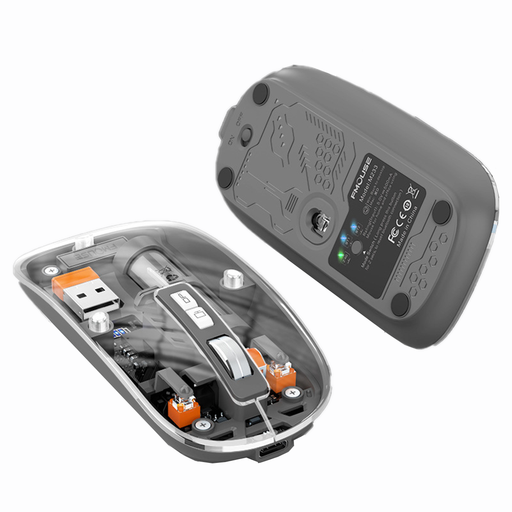
KINSI M233 Wireless Bluetooth Mouse
A wireless mouse for workspaces where quiet clicks matter; check whether its features are enough for your gaming needs.
Rechargeable; 1,600 DPI.
Joybuy
 No image available
ATTACK SHARK X11 Wireless Gaming Mouse
A wireless gaming mouse for players looking for programmable buttons and several connection options.
Five programmable buttons; 2.4 GHz, Bluetooth and USB-C; charging dock included.
Joybuy
Frequently asked questions
Do I need a particularly high DPI or side buttons for colony management?
Not necessarily. First, check which in-game actions you can assign to the mouse and whether you can reach the buttons without changing your grip. The button and scroll-wheel features of individual models don’t prove that they offer an advantage in a game whose controls aren’t specified.
How do I set up an adjustable scroll wheel?
Razer describes two scroll modes for the Basilisk V3; according to the manufacturer, automatic switching is enabled in Razer Synapse. Assign extra buttons based on the control options in your particular game, then check that you can still reach them comfortably with your usual grip.
What are my rights if I return a product or find a fault after buying online in Germany?
According to the German consumer advice centre, online purchases generally come with a 14-day right to cancel; you must notify the seller that you’re cancelling. If a product is faulty, your statutory rights against the seller are separate from any voluntary guarantee.
Does a wireless mouse need CE marking in Germany?
EU requirements apply to radio equipment, including requirements on safety and electromagnetic compatibility. The European Commission explains that the manufacturer is responsible for meeting the relevant requirements and applying the required CE marking; the mark is not an independent product assessment.
Does every wireless mouse need to be charged via USB-C?
No, not simply because it’s wireless. The EU rules that have applied since 28 December 2024 cover mice; however, the charging-port requirements apply to devices that can be recharged via a cable. So check the power supply and, for a rechargeable model, the charging port.


