What should you look for when buying?
First decide whether fit or controls matter more for your longer sessions. Then compare connectivity, power and any configuration software required for the specific model.
The proportions refer to consumers choosing a gaming mouse for deck-building games at a home-working desk; each person is counted only against their top buying priority.
| Priority |
What to check when buying |
Who is it important for? |
| Comfortable fit for longer use |
Handedness, grip, mouse dimensions and desk space; try it in your usual position if possible. |
If I use the same mouse for long periods at work and while gaming, I want a shape that suits my hand. Around 36% of consumers are likely to rank fit as their top priority. |
| Accessible buttons and navigation |
Compare your common commands, button positions, scroll wheel functions and any configuration software required for the exact model. |
If I want to assign recurring commands or navigate cards and documents comfortably, accessible controls matter. Around 29% of consumers are likely to put this first. |
| Flexible connectivity for a shared desk |
Check the ports, connection options, receiver and power supply for the specific version. |
If I rearrange my desk or use the mouse with different devices, I want to be able to choose a suitable connection. Around 21% of consumers are likely to rank connectivity flexibility as their top priority. |
| Easy to use |
Check what’s included, whether it uses a battery or rechargeable battery, and whether a charging cable or other charging accessories are supplied. |
If I want to keep charging and setup to a minimum for occasional card-playing sessions, the power supply should suit my day-to-day use. Around 14% of consumers are likely to put ease of use first. |
Joybuy products
These gaming mice include wired and wireless options, as well as a range of button and connectivity features for a desk shared between work and play.
 Image unavailable
Logitech G PRO X2 SUPERSTRIKE LIGHTSPEED Wireless Gaming Mouse
An option if you’re looking for programmable buttons and wireless use across your work and gaming setup.
It’s listed with five programmable buttons and LIGHTSPEED wireless connectivity. USB-C charging and up to 90 hours of battery life at 1,000 Hz are also quoted.
View at Joybuy
 Image unavailable
ATTACK SHARK X11, Black
Its multiple connection options and programmable buttons may suit a desk used for different purposes.
It’s listed with 2.4 GHz wireless, Bluetooth and USB-C, five programmable buttons, an RGB charging dock and a weight of 62 g.
View at Joybuy
 Image unavailable
AJAZZ AJ200 AI MC with charging dock
An option if you want to switch between connection types and customise button assignments.
Bluetooth, 2.4 GHz wireless and USB-C are listed, along with customisable button assignments and macros. The title gives a weight of 63 g and a PAW3311 sensor with 24,000 DPI.
View at Joybuy
 Image unavailable
AULA SC620, White
The seven programmable buttons and three connection options are useful if you want to customise frequently used commands and connect flexibly.
It’s listed with Bluetooth 5.0, 2.4 GHz wireless and USB-C, a PAW3311 sensor, a weight of 67 g and a 400 mAh battery.
View at Joybuy
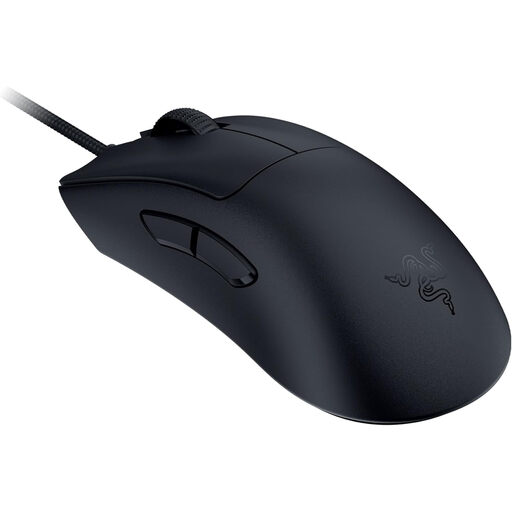 Image unavailable
Razer DeathAdder V3 Wired
A wired option if you’d rather not worry about a mouse battery at a fixed desk setup.
The product description lists USB connectivity and an ergonomic shape. It also gives a weight of 59 g, a Focus Pro 30K sensor and 8,000 Hz HyperPolling.
View at Joybuy
Frequently asked questions
Do I need the highest possible DPI for deck-building games?
No. A high DPI figure shouldn’t be your first consideration. Start with a shape that suits you and the controls you’ll actually use; product specifications don’t show that a maximum DPI setting offers any particular benefit for deck-building games.
Do programmed buttons work without additional software?
It depends on the model and the feature. CHERRY says profiles can be stored on the M50 Wireless after setup with CHERRY UTILITY; Razer lists Synapse 4 for configuring Smart-Reel mode on the Basilisk V3 35K. Before buying, check which software the exact model needs and whether it supports your operating system.
What should I check when choosing a mouse for work and gaming on a Mac?
Check basic connectivity and the configuration software for the specific model separately. Razer’s Synapse for Mac preview requires a Mac with Apple Silicon and macOS 15 or later; this requirement doesn’t apply to mice from other manufacturers across the board.
How should I set up my mouse and workspace for longer sessions?
Check that the mouse shape, the way you hold it and the space on your desk suit how you normally use it. The German Federal Institute for Occupational Safety and Health discusses hand and arm strain when working at a computer; this doesn’t mean that any particular mouse model has a medical benefit.
What are my rights when buying from a commercial online retailer in Germany?
For a consumer purchase from a commercial seller, the statutory guarantee generally lasts for at least two years from the date you receive the goods. Online purchases generally come with a 14-day right to cancel, although exceptions and the specific contract terms should be taken into account. The European Union’s Your Europe website explains the guarantee, while the Council of the European Union covers the right to cancel. A voluntary manufacturer’s guarantee is separate.


