Start by choosing a mouse whose shape and buttons feel comfortable to use, even during longer sessions. Then consider whether you prioritise a versatile scroll wheel, programmable commands or a cable-free desk. Extra buttons are only useful if you can assign them to actions that make sense in your game. With wireless models, you should also consider charging needs and connectivity options.
Who are the different options suited to?
Long-session desktop gamers
If you play for long stretches, first check that the shape, grip and button layout suit your hand. PC Games Hardware’s buyer’s guide points out that extra features are of little use if the mouse does not feel comfortable in your hand.
Players who use lots of commands
If you want to access frequently used actions directly from your mouse, button placement and useful customisation options matter. Ubisoft explains how to customise mouse and keyboard controls in Anno 1800; SteelSeries lists twelve side buttons on the Aerox 9 Wireless.
Home workers sharing a desk
If you use the same workspace for work and gaming, you can weigh up wired and wireless use, along with the charging involved. Sharkoon says the SKILLER SGM50W can also be used with the supplied cable while it charges.
What should you look for when buying?
| What matters |
What to check when buying |
Who is it important to? |
| Grip and button placement |
Mouse shape and feel in your hand; whether you can reach the side buttons without changing your grip. |
If I play for a long time, I want to handle the mouse comfortably and reach important buttons easily. Around 29% of consumers put hand comfort first. |
| Scrolling and navigation |
Notched and free-spin modes; if you want automatic switching, check whether it requires software. |
If I often switch between precise scrolling and moving quickly through content, the scroll wheel should suit the way I use it. Around 29% of consumers prioritise scrolling. |
| Programmable commands |
Number and layout of buttons; whether the game and mouse software support the assignments you want. |
If I want to trigger regular in-game actions directly, I need buttons that are easy to reach and can be assigned usefully. Around 24% of consumers put direct commands first. |
| Wired, wireless and charging |
Connection type and space for a wireless receiver; check whether the specific model can be used while charging. |
If I use my desk for both work and gaming, I want to know how cables and charging breaks will fit into my routine. Desk organisation is the main concern for around 18% of consumers. |
Common misconceptions
-
More buttons automatically mean better control
A cluster of side buttons is only helpful if you can reach them comfortably and assign them to useful actions in your game.
Start by noting the commands you use most often. Then check the button layout and customisation options rather than comparing button counts alone.
-
Mice with similar names are identical
For the Logitech G502 X LIGHTSPEED, the manufacturer’s website lists a HERO 44K sensor, while a Joybuy product page lists HERO 25K. The Basilisk V3 Pro and Basilisk V3 Pro 35K are also different model names.
Before buying, compare the full model name, sensor, connection type and specification on the relevant product page.
-
Optional wireless features are always included
According to PC-WELT, certain wireless charging and HyperPolling features of the Razer Basilisk V3 Pro 35K may require a Mouse Dock Pro, sold separately.
Check whether you actually want to use the extra feature and what accessories the exact model version requires.
You may need additional hardware to use these features.
A guide to the brands
Razer
Basilisk models offer a point of comparison for programmable buttons and different scroll wheel modes. The wired Basilisk V3 and wireless Basilisk V3 Pro 35K are different models.
- Razer lists 10+1 programmable buttons and notched and free-spin scrolling for the Basilisk V3. According to Razer, automatic switching must be enabled in Synapse.
- Check the exact model version and any required accessories if you want to use specific extra features.
Logitech G
The G502 X range is a useful point of comparison for buyers looking for extra customisation options and a choice of connection types.
- Logitech G’s German page for the G502 X LIGHTSPEED lists 13 configurable controls.
- Check the sensor details against the exact version: Logitech lists HERO 44K on the product page viewed, while a Joybuy product page lists HERO 25K.
SteelSeries
The Aerox 9 Wireless is a useful point of comparison for players who want to access lots of commands directly using a large side-button panel.
- SteelSeries lists 18 programmable controls, including twelve side buttons.
- The number of buttons alone does not tell you whether the layout is comfortable or gives you an advantage in the economic simulation game you play.
Sharkoon
The SKILLER SGM50W is a useful point of comparison for users who want wireless connectivity and the option to use the mouse wired while it charges.
- Sharkoon lists 2.4 GHz wireless connectivity, six assignable buttons and a supplied USB-C-to-USB-A cable, which lets you keep using the mouse while it charges.
- Six buttons may not be enough if you need lots of commands at your thumb; comfort will depend on how the shape suits you.
Joybuy product selection
The Joybuy products below include wired and wireless gaming mice with a range of button layouts and connection options.
 No image available
Razer Basilisk V3 35K Wired Gaming Mouse, Black
For a permanent desk setup where you prefer a wired connection and extra controls.
The product name lists an optical sensor with 35,000 DPI, 11 programmable buttons and a USB cable connection. It also specifies an adjustable scroll wheel and a tilt-click wheel.
View at Joybuy
 No image available
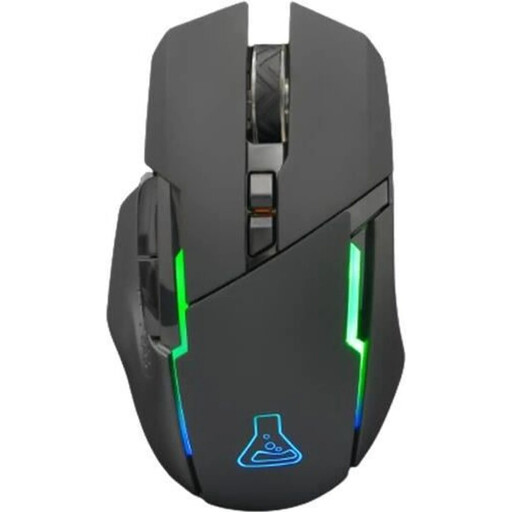
THE G-LAB Kult Caesium
A wireless option for consumers looking for a six-button mouse for gaming and everyday tasks.
The product name lists 2.4 GHz wireless connectivity, a rechargeable battery, 7,200 DPI, RGB lighting and six buttons.
View at Joybuy
 No image available
Logitech G G502 X LIGHTSPEED, White
For consumers considering a wireless gaming mouse designed for right-handed use.
The product name describes it as a wireless optical mouse for right-handed use. Check the sensor and specification details for the exact version before buying.
View at Joybuy
 No image available
ATTACK SHARK Wireless Gaming Mouse X11, Black
A wireless option for consumers considering several connection types and a charging dock.
The product name lists 2.4 GHz wireless, Bluetooth and USB-C, five programmable buttons and an RGB charging dock. It also specifies a PAW3311 sensor with 22,000 DPI and a weight of 62 g.
View at Joybuy
 No image available
Razer Naga V2 HyperSpeed
For consumers looking to compare a wireless mouse with plenty of programmable buttons and multiple scroll modes.
The product name lists 19 programmable buttons, 2.4 GHz wireless, Bluetooth, up to 250 hours of battery life and an optical Focus Pro 30K sensor. It uses an AA battery.
View at Joybuy
Frequently asked questions
How do I set up extra mouse buttons for an economic simulation game?
First decide which commands you use most often, then check whether the game and mouse software support the assignments you want. According to Ubisoft, in Anno 1800 you can customise mouse and keyboard controls for supported input devices under “Options” and “Controls”. The steps may differ in other games.
Can I keep using a wireless mouse while it charges?
It depends on the model. Sharkoon says the SKILLER SGM50W can be used while charging with the supplied USB-C-to-USB-A cable.
What applies if a product develops a fault: the manufacturer’s warranty or your statutory rights?
A voluntary warranty is in addition to your statutory rights in respect of defects. For standard claims relating to defects, § 438 BGB provides for a limitation period of two years from delivery; the requirements for each claim should be checked separately.
Can you put an old mouse in household waste in Germany?
No. The German Environment Agency explains that waste electrical equipment should be collected separately, so an old mouse should not go in household waste. If batteries can be removed easily, they should be disposed of separately.


