For long factory-building sessions, the right gaming mouse is one with buttons you can reach easily and scroll wheel modes that suit the commands you actually use. More buttons alone aren’t a reason to buy. You can customise controls in Factorio and Satisfactory. A wired mouse avoids the need to recharge, while a wireless one keeps cables off your desk but requires power and a suitable connection. Fit also matters during long sessions.
Which features are right for you?
Frequent builders who use shortcuts
If you often place and modify objects, easy-to-reach extra buttons can be useful for recurring commands. First, check which controls your game actually lets you reassign; the Official Factorio Wiki and Official Satisfactory Wiki explain how to customise controls.
Players who spend long hours at their desk
For long gaming and working sessions, hand size, grip and the position of your mouse and keyboard are important factors. The German Federal Institute for Occupational Safety and Health (BAuA) recommends choosing a mouse that fits your hand and highlights the importance of posture when working at a computer.
Players who switch between devices
If you want to use your mouse with several devices or without a cable on your desk, check the connection options for the specific model and make sure its receiver and power supply suit your setup.
What should you look for when buying?
Start by comparing the commands you actually need and how the mouse fits your hand. Then choose the connection and features to suit the way you use it at your desk.
| Buying priority |
What to look for |
Who is it most relevant to? |
| Easy-to-reach commands and scroll wheel |
Check that you can assign the game commands you need and easily reach the middle click, side buttons and scroll wheel modes. |
If you build frequently or repeat the same actions, extra inputs should work with your chosen bindings. Around 36% of consumers in this buying situation are likely to prioritise easy-to-reach commands and controlled scrolling. |
| Fit for extended use |
Consider the size and shape of the mouse, your grip and where it sits on your desk. |
For long gaming and working sessions, it’s important to choose a mouse that fits your hand; the BAuA recommends a suitably shaped mouse that isn’t too large. Around 29% of consumers are likely to prioritise comfort and fit during extended use. |
| Connection and power |
Check the connection you want, whether you need a receiver and how the mouse is powered. With a wired model, cable management matters too. |
If you’re planning a cable-free setup or want to use the mouse with several devices, its connection options need to work with your devices. Around 21% of consumers are likely to see connection and power as their most important considerations. |
| Features you actually need |
Decide which buttons, scroll functions and connections you’ll really use, then compare the specific model variant. |
If you don’t want to pay for features you won’t use, each feature should serve a specific purpose in your game or at your desk. Around 14% of consumers are likely to prioritise spending on features they’ll actually use. |
Avoid common buying mistakes
-
Assuming similarly named model variants are the same
The Logitech G502 HERO and G502 LIGHTSPEED differ in their connection type, among other things. The Razer Basilisk V3 35K shouldn’t be confused with a wireless variant either.
Before you buy, compare the full model name, connection type and specific features listed.
-
Assuming an ergonomic design is guaranteed to fit
A shape won’t automatically suit every hand. In a review of the CHERRY XTRFY M50 Wireless, COMPUTER BILD noted that it could cause a cramped hand position. The BAuA recommends choosing a mouse that fits your own hand.
Check the shape, size and button positions with your grip rather than relying on the product name alone.
-
Buying wireless without checking the features you need
Wireless models can offer different connection and charging options. The Logitech G502 LIGHTSPEED and CHERRY XTRFY M50 Wireless are examples of models with different features.
Check which connections your devices support and how you plan to power the mouse.
Key brands to consider
Razer
The wired Basilisk V3 35K is an example of a mouse with extra controls and several scroll wheel modes.
- Razer lists tactile and free-spinning scrolling for this model.
- According to Razer, certain customisation options are available through Synapse 4. The features alone don’t tell you whether the buttons will suit your hand.
Logitech G
The G502 HERO and G502 LIGHTSPEED are different variants in the same model family, one wired and one wireless.
- Logitech lists adjustable weights for the HERO, and wireless connectivity and POWERPLAY compatibility for the LIGHTSPEED.
- The model names aren’t interchangeable. The connection and features of the specific variant are what matter.
CHERRY XTRFY
The M50 Wireless is an option if you want to switch between wired, 2.4 GHz wireless and Bluetooth connections.
- CHERRY lists five on-board profiles and a scroll wheel that tilts to the side.
- COMPUTER BILD noted that this specific model could cause a cramped hand position. Be sure to check the fit for yourself.
SteelSeries
According to the manufacturer, the Aerox 5 Wireless combines a lightweight body with programmable buttons.
- SteelSeries gives this model a weight of 66 g and nine programmable buttons.
- Its weight alone doesn’t prove that it’s more comfortable or better suited to factory-building games.
Turtle Beach
The Kone II Air offers multiple inputs and two wireless connection types for your desk.
- The manufacturer’s information lists 12 buttons, a press- and tilt-enabled scroll wheel, and a switch for 2.4 GHz and Bluetooth.
- These details for the specific model don’t tell you whether the button positions will suit your hand.
Joybuy products for factory-building games
This selection includes wired and wireless gaming mice with features that may be useful when using frequent game commands or scrolling.
 No image available
Razer Basilisk V3 35K, wired gaming mouse
If you want to assign recurring commands to extra buttons, this wired variant may be worth comparing.
11 programmable buttons; 35,000 DPI optical sensor. Razer lists tactile and free-spinning scrolling for the Basilisk V3 35K.
View at Joybuy
 No image available
Razer Naga V2 HyperSpeed, wireless MMO gaming mouse
If you want to assign lots of recurring commands to buttons, check that their layout suits your hand and your chosen bindings.
19 programmable buttons; 2.4 GHz wireless and Bluetooth; powered by one AA battery.
View at Joybuy
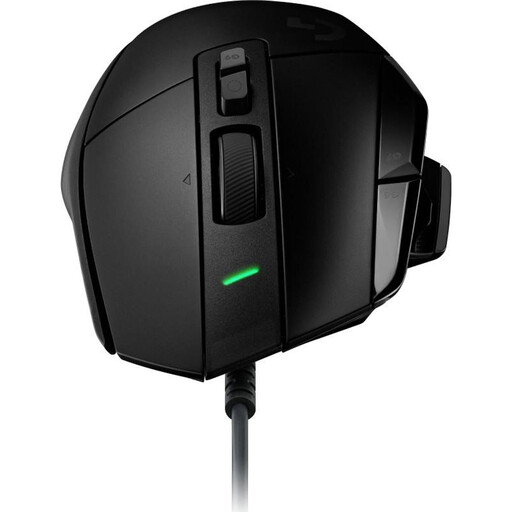 No image available
Logitech G502 X Mouse + G240 Mouse Pad, set 991-000489
This set may suit you if you’re looking for a G502 X as well as the included G240 Mouse Pad.
Set comprising a G502 X Mouse and G240 Mouse Pad; model/set number 991-000489.
View at Joybuy
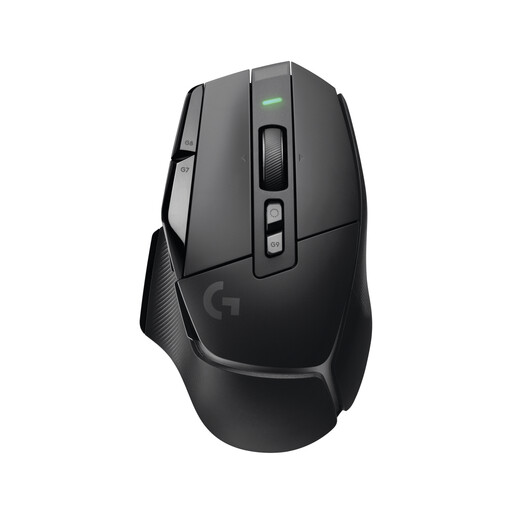 No image available
Logitech G G502 X LIGHTSPEED Wireless
This wireless variant may suit you if you want to keep cables off your desk. Before buying, check that its specific connection and power options suit your setup.
Wireless gaming mouse; the model name identifies it as the LIGHTSPEED variant.
View at Joybuy
 No image available
Logitech G G502 HERO
If you prefer a wired mouse and want adjustable weights, the G502 HERO is one variant worth comparing.
Logitech lists a wired connection and adjustable weights for the G502 HERO.
View at Joybuy
Frequently asked questions
Do I need a gaming mouse with lots of buttons for Factorio or Satisfactory?
Not necessarily. You can customise controls in Factorio and Satisfactory. First, check which commands you use frequently and whether extra mouse buttons are easy to reach.
What should I set up after connecting the mouse?
First, check your bindings for building and selecting, then test the middle click and scroll wheel. Position your mouse and keyboard so you can adjust your posture at your desk; the BAuA notes that good posture is important for ergonomics.
What should I check when buying a wireless gaming mouse?
Check the available connection types for the specific model, whether you need a receiver and how the mouse is powered. The Logitech G502 LIGHTSPEED and CHERRY XTRFY M50 Wireless show how features can vary between models.
What are my rights if I buy online or the product develops a fault?
According to the Verbraucherzentrale, online purchases generally come with a 14-day right to cancel. The Verbraucherzentrale also distinguishes between your statutory rights against the seller and a voluntary guarantee.


