Start by measuring the space you have to move the mouse, then check which shape suits your hand and grip. A high DPI figure alone won’t answer these questions. If a cable would get in the way, compare compact wireless mice, including their receiver and power requirements. If you want to reassign buttons often, check how easy they are to reach and what software you’ll need.
Who are the different features best suited to?
Players with limited mouse space
If you have little room alongside your keyboard and other devices, compare the mouse’s dimensions with the space available and the distance you need to move it. Logitech lists the G305 at 116.6 × 62.15 × 38.2 mm. Cable routing or space for a receiver can also matter on a small desk.
Players who enjoy longer sessions
If you play for longer periods, the shape should suit your hand and grip. CHIP highlights ergonomics as an important factor when choosing a mouse; a high DPI figure alone says nothing about comfort.
Players who want to reassign buttons
If you want to assign in-game actions to extra buttons, consider their position as well as their number, and check what software you’ll need. Logitech, Razer and HyperX each list six programmable buttons on the models discussed here.
What should you look for when buying?
Start with the space available for mouse movement and a grip that feels comfortable. Then compare button customisation, connection and power requirements.
| Factor |
What to look for |
Who is it most important for? |
| Space and freedom of movement |
Measure the space beside your keyboard and compare it with the mouse’s dimensions. Allow for the cable or receiver too; Logitech lists the G305 at 116.6 × 62.15 × 38.2 mm. |
If I play in a confined space, I want enough room for my usual mouse movements. Around 36% of consumers say available space is their main concern. |
| Hand shape and grip |
Check that the size, shape and button positions suit your hand and grip. A manufacturer’s recommended grip style is no guarantee of comfort. |
If I play for long periods, I want a mouse that fits my hand and feels easy to control with my grip. Around 29% of consumers say fit is their top priority. |
| Programmable extra buttons |
Check the number and position of the buttons, as well as any software required. Also make sure you can assign the action you want in the game you play. |
If I often perform the same in-game actions, I want easy-to-reach buttons that I can customise. Around 21% of consumers prioritise button customisation. |
| Connection and power |
Decide whether you’d prefer a cable, USB receiver or Bluetooth, and check that your computer has the right connection available. For wireless mice, find out whether the model uses a battery or a rechargeable battery. |
If I don’t want a cable on my desk, I need to make room for the receiver and plan for the power supply too. With a wired mouse, I want to route the cable so it doesn’t snag. Around 14% of consumers say connection and power are their main concerns. |
Which buying mistakes should you avoid?
-
Assuming the highest DPI means the mouse is the best fit
A sensor’s maximum figure won’t tell you whether the mouse will fit your desk or feel comfortable in your hand.
Check the available space, shape and button positions first. Compare sensor settings afterwards, if they matter for the way you play.
-
Looking only for “wireless” when choosing a wireless mouse
Depending on the model, you may need a USB receiver or use Bluetooth. Power requirements also vary. According to the manufacturer, the Logitech G305 needs a USB receiver and one AA battery.
Before buying, check which connection you prefer, which ports are available and what type of battery the specific model uses.
-
Choosing a wired mouse based on weight alone
Even a lightweight model needs its cable to be routed in a way that doesn’t get in the way on a small desk. The shape also needs to suit your hand and grip.
Plan the mouse’s movement and cable route together, and compare the shape with your preferred grip style.
Which brands are worth considering?
Logitech G
The G305 LIGHTSPEED is a documented example of a relatively short wireless gaming mouse with a USB receiver and AA battery.
- Logitech lists this model as 116.6 mm long, with six programmable buttons.
- The stated battery life of up to 250 hours applies to Performance mode, according to the manufacturer, and varies with use.
Razer
The Orochi V2 is a compact wireless option with 2.4 GHz connectivity and Bluetooth.
- Razer lists six programmable buttons and the choice of one AA or one AAA battery.
- The small shape needs to suit your hand; the manufacturer’s specifications don’t guarantee comfort for everyone.
Corsair
The wired KATAR PRO XT is a compact option that Corsair describes as suitable for claw and fingertip grips.
- Corsair lists a weight of 73 g and six programmable buttons.
- You’ll need to route the cable carefully on a small desk. The recommended grip style also doesn’t guarantee that the shape will suit every hand.
HyperX
The wired Pulsefire Haste 2 is a lightweight option with configurable buttons, provided you have a little more room for your mouse.
- HyperX lists the wired version at 53 g, with six programmable buttons.
- The advertised sensor and polling rates don’t demonstrate any extra benefit specifically for farming simulations.
SteelSeries
The 2022 Aerox 3 Wireless is a wireless option if low weight matters more to you than having an explicitly compact shape.
- SteelSeries lists this model at 68 g, with 2.4 GHz and Bluetooth connectivity.
- Protection and battery-life figures are the manufacturer’s claims; other Aerox generations have their own specifications.
Gaming mice at Joybuy
These models include wireless and wired options for small desks, as well as a range of shapes and button customisation options.
 No image available
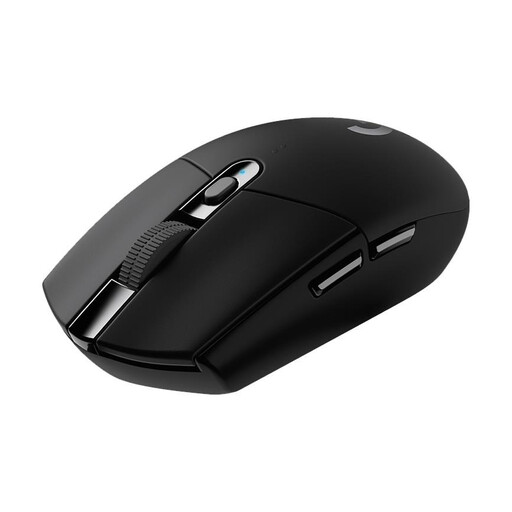
Logitech G305 LIGHTSPEED, black
A wireless option if you don’t want a mouse cable taking up limited desk space. Remember to allow room for the USB receiver and power supply.
Dimensions: 116.6 × 62.15 × 38.2 mm. Six programmable buttons. USB receiver and one AA battery; Logitech lists up to 250 hours in Performance mode, depending on use.
View at Joybuy
 No image available
AJAZZ AJ159 APEX
The product description says its symmetrical shape is designed for small to medium-sized hands. Still, check that it suits your grip and the space available.
PAW3950 sensor and three connection options: 2.4 GHz, Bluetooth and USB-C. Includes a magnetic charging dock; the product name lists up to 42,000 DPI.
View at Joybuy
 No image available
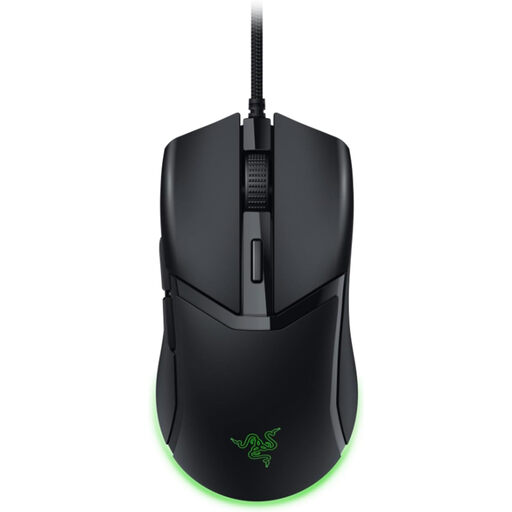
Razer Cobra, wired
A wired option if you don’t want to rely on a mouse battery. Check that you have a USB port available and route the cable so it doesn’t restrict movement.
The product name lists a weight of 57 g and Chroma RGB lighting.
View at Joybuy
 No image available
AJAZZ AJ200 AI MC
The product description says the shape is designed for medium to large hands. Compare the stated length with the space available on your desk and check that the shape suits your grip.
The product name lists a weight of 63 g and a PAW3311 sensor. The description lists a length of 12.7 cm, six buttons and 2.4 GHz, Bluetooth and USB-C connectivity; a charging dock is also included.
View at Joybuy
 No image available
HyperX Pulsefire Haste 2, wired, white
A wired option with six programmable buttons, as long as there’s room on your desk for the mouse and its cable.
Dimensions: 124.3 × 66.8 × 38.2 mm. Weight: around 52–53 g without the cable. Six programmable buttons; customisation via HyperX NGENUITY. The USB cable is 1.8 m long.
View at Joybuy
Frequently asked questions
How can I tell whether a mouse will fit on my small desk?
Measure the space beside your keyboard and allow for the area where you want to move the mouse. Then compare the model’s dimensions and cable routing. Logitech lists the G305 at 116.6 × 62.15 × 38.2 mm. A small footprint alone doesn’t guarantee enough room to move the mouse or a comfortable grip.
How do I set up extra buttons for my game?
First, check which button assignments the game itself supports. For advanced G305 settings, Logitech lists G HUB; Razer documents Synapse for the Orochi V2, and HyperX NGENUITY for the wired Pulsefire Haste 2. Then test your chosen assignment in the game.
What ongoing costs and rights should I consider when buying?
Mice with replaceable batteries may involve the cost of replacements; a wired mouse doesn’t need a mouse battery. The Verbraucherzentrale distinguishes the statutory guarantee against the seller from a voluntary manufacturer’s guarantee. Online purchases generally come with a 14-day right to cancel; check the terms that apply to your specific purchase.
How do I dispose of an old mouse and its battery in Germany?
Don’t put an old mouse in your household waste. The Umweltbundesamt recommends taking old devices to suitable local authority or retailer take-back points. Remove the battery, if possible, and put it in a separate battery collection box.


