People reviewing lots of long recordings
If you regularly navigate extensive tournament footage, check whether the scroll wheel’s functions work well with the commands in your application.


Choose a mouse based on the actions you actually repeat while reviewing footage. If you scroll frequently, the right scroll wheel matters; for repeated actions, easy-to-reach buttons that you can assign in your software are key. Also check the mouse’s shape and how easily you can reach the buttons. Wireless models keep a mouse cable off your desk, but need a suitable connection and power supply. A manufacturer’s specifications don’t prove that a mouse will save you time in your particular video workflow.
If you regularly navigate extensive tournament footage, check whether the scroll wheel’s functions work well with the commands in your application.
During long periods of screen work, the mouse’s shape, easy-to-reach buttons and your posture at your workstation matter just as much as its technical features. The German Federal Institute for Occupational Safety and Health notes that maintaining a static posture without breaks can lead to potentially awkward, constrained positions.
If you often carry out the same actions, look for buttons that are easy to reach and can be assigned commands supported by your software.
First decide whether you’ll mainly be scrolling through long recordings or triggering repeated commands. Then check how the mouse feels to use and how it connects at your workstation.
| What matters | What to look for | Who is this important to? |
|---|---|---|
| Navigation and scroll wheel | Check the scrolling increments, free-spin mode and, where available, tilt-wheel function in your playback or editing application. | If I often navigate through long recordings, I want the wheel to do what I need in my application. Around 36% of consumers prioritise navigation and the scroll wheel. |
| Mouse shape and ease of use | Check how the mouse fits your hand, your posture and whether you can comfortably reach the buttons you need. | For long work sessions, I want a mouse that suits my hand and desk setup. Around 29% of consumers prioritise ease of use and comfort. |
| Assignable buttons | Make a note of the actions you use most often and check whether your application supports assigning them to buttons. | If I repeat certain actions, I want to assign them to accessible buttons rather than pay extra for controls I won’t use. Around 21% of consumers prioritise shortcuts and button customisation. |
| Wireless use | Check the connection type, whether you need a receiver, how the mouse charges and which ports your computer has. | If I want to avoid a mouse cable at my workstation, the connection needs to suit my computer and charging needs to fit my routine. Around 14% of consumers prioritise a wireless setup. |
A button is only useful if you can reach it and your application supports the action you want it to perform.
Start by listing the commands you actually use often, then check that you can assign them and reach the buttons on the specific model.
Allow time to set everything up. Controls you don’t use won’t offer any extra benefit while you work.
Razer lists the Basilisk V3 and Basilisk V3 35K as separate models, each with its own specifications.
Compare the full model name, connection type and the scroll wheel functions you want against the specifications for that specific model.
When you spend a long time at a computer, your posture and workstation are part of the experience. Extra buttons and technical specifications won’t automatically compensate for a hand position or workstation setup that doesn’t suit you.
Consider grip, button reach and desk setup together, rather than relying on the product description alone to decide whether the mouse will fit you.
The wired G502 HERO may be worth considering if you use the same assignable commands repeatedly.
The wired Basilisk V3 35K could suit frequent navigation, thanks to its configurable scroll wheel.
The SCIMITAR ELITE WIRELESS MMO Gaming Mouse (EU) is aimed at people who regularly need an unusually large number of commands.
The wireless Aerox 5 Wireless combines a cable-free design with programmable buttons.
The products below include wired and wireless gaming mice suited to navigation or repeated commands. Check how the wheel and buttons work in the application you use to review footage.
 Image unavailable
The configurable scroll wheel may be useful for frequent navigation. Check how its inputs work in your application.
Razer lists tactile and free-spin scrolling, an automatic mode switch and a tilt wheel for this model.
Wired; the cable takes up space at your workstation.
 Image unavailable
If you want to assign repeated actions to buttons, the product name lists five programmable buttons. Check whether your application supports the assignments you need.
The product name lists 2.4 GHz, Bluetooth and USB-C connectivity, as well as a charging dock.
For wireless use, consider the connection and charging requirements at your workstation.
 Image unavailable
If you want to keep a mouse cable off your desk, check which connection type will work with your computer for this wireless model.
The product name lists Bluetooth, 2.4 GHz and USB-C connectivity, as well as a PAW3311 sensor.
According to the product information, driver software is available for button assignments and macros.
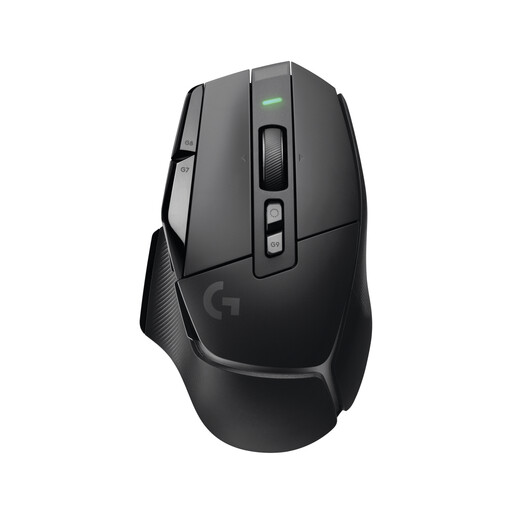 Image unavailable
If you’re looking for a wireless gaming mouse, check that its connection and charging options suit your workstation.
It runs wirelessly on a built-in battery, so you’ll need to allow time for charging.
 Image unavailable
If you want to assign repeated commands supported by your application, Logitech G lists eleven programmable buttons through G HUB for the wired G502 HERO.
Check that the buttons are easy to reach with your grip. The cable takes up space at your workstation.
First, check which commands your application supports. For supported Logitech G devices, Logitech explains how to assign buttons and set up app profiles in G HUB. Then test each assignment in your application rather than assuming it will integrate automatically with your video software.
Consider your mouse, hand position and workstation together, and try to avoid staying in the same static posture without a break. This doesn’t mean that any particular gaming mouse has proven medical benefits.
If newly purchased goods are faulty, consumers can generally exercise their statutory rights against the seller within two years of receiving them. The Verbraucherzentrale distinguishes these rights from any additional guarantee.
For relevant electronic and wireless products, the Bundesnetzagentur checks factors including CE marking, product identification, manufacturer details, German-language instructions and warnings, and the declaration of conformity. Check the marking on the specific product and in its accompanying documents; the product name alone doesn’t prove compliance.