What should you look for when buying?
First, check which input options your game supports. Then measure the space beside your keyboard. Only after that is it worth weighing up the connection and power options.
| Priority |
What to look for when buying |
Who is it most relevant to? |
| Game controls |
Check the input devices, button mapping and any rules for switching devices in the specific game and mode. |
If I first need to find out whether my football game supports a mouse and keyboard, I want to know whether a mouse will actually be useful before I buy one. Around 36% of consumers put game controls first. |
| Space and grip |
Measure the space beside your keyboard and check the shape and feel in your hand. Factor in batteries when comparing weight claims. |
If there’s hardly any room on my desk, I need a mouse that fits beside my keyboard and is easy to move around in the space available. Around 29% of consumers prioritise space and grip. |
| Connection |
Check the available USB ports, space for a receiver and charging options against the operating mode you want to use. |
If a cable crosses my limited mouse space or I switch between devices, the connection needs to suit my setup. Around 21% of consumers look at connection options first. |
| Power and support |
Check whether the mouse uses a battery or rechargeable battery, and what’s included in the box. Distinguish your statutory rights from a voluntary warranty. |
If I want to weigh up changing batteries against charging, and know who to contact if something goes wrong, power and support are important to me. Around 14% of consumers put these points first. |
Joybuy product selection
This selection features wireless gaming mice that, depending on the model, may suit the limited space beside your keyboard, with receiver, Bluetooth or wired connection options.
 No image available
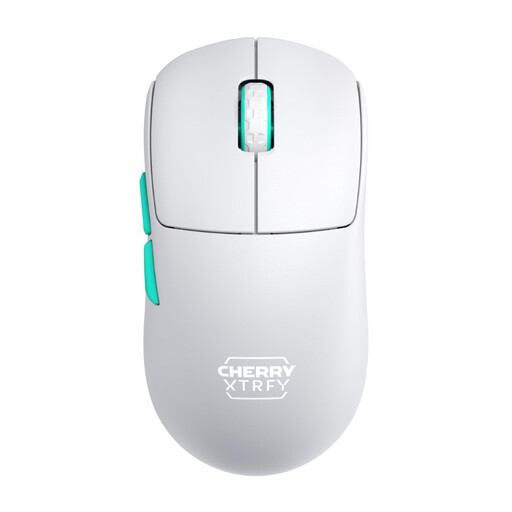
CHERRY XTRFY M68 Wireless, 53 g, White
For a wireless setup without a mouse cable getting in the way; the symmetrical low-front shape should suit your grip.
2.4 GHz wireless; 53 g; three buttons in the primary configuration. It can also be used while charging via cable.
Joybuy
 No image available
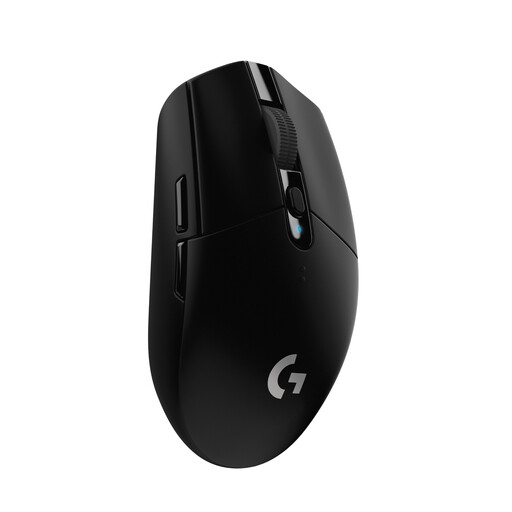
Logitech G305 LIGHTSPEED
For a wireless desk setup, if a USB nano receiver works with your setup.
Compact design; six programmable buttons; powered by one AA battery. The product listing claims up to 250 hours of battery life from a single battery.
Joybuy
 No image available
ATTACK SHARK X11 with RGB charging dock
For a setup where several connection options matter; the charging dock needs extra desk space.
2.4 GHz wireless, Bluetooth and USB-C; 62 g; five programmable buttons.
Joybuy
 No image available
AULA SC620, White
For a setup with several connection options; the included charging dock needs extra space.
Bluetooth 5.0, 2.4 GHz wireless and USB-C; 67 g; seven programmable buttons; 400-mAh rechargeable battery.
Joybuy
 No image available
AJAZZ AJ159 APEX with magnetic charging dock
The description lists a symmetrical shape for small to medium-sized hands; check that it suits your grip. The charging dock needs extra space.
Tri-mode connectivity with 2.4 GHz, Bluetooth and USB-C. The product listing specifies a PAW3950 sensor and up to 42.000 DPI.
Joybuy
Frequently asked questions
Do I absolutely need a gaming mouse to play EA SPORTS FC on PC?
No, not just because of the game title. For FC 27 on PC, Electronic Arts documents mouse and keyboard controls, controller use and mode-specific rules for switching devices. Check the settings for the version you actually play before buying a mouse for it.
How do I set up a wireless mouse on a small desk?
First, check that you have a USB port and a suitable place for the receiver. Razer lists Bluetooth as an alternative to 2.4 GHz wireless for the Orochi V2. For optimal wireless performance with the PRO X SUPERLIGHT 2, Logitech recommends keeping the mouse close to the receiver and away from sources of 2.4 GHz interference. This setup advice applies to this model.
What should I do if a product develops a fault after I buy it in Germany?
If a product is faulty, you have statutory rights against the seller. A manufacturer’s warranty is a separate, voluntary benefit. The Verbraucherzentrale lists repair or replacement as remedies. For a typical online consumer purchase, you will also generally have a 14-day right to cancel, which you must exercise with the retailer.
What should I look for in a wireless mouse to make sure it meets German product requirements?
For electrical and wireless products, the Bundesnetzagentur checks, among other things, correct CE marking, manufacturer details, German-language instructions and declarations of conformity. By applying the CE marking, the manufacturer declares that the product complies with the requirements, taking responsibility for that declaration. It is not an independent gaming performance seal. This alone does not confirm that a specific listing complies.
What should I do with an old mouse?
Old electrical equipment should be taken to the designated return or collection point. Stiftung ear explains that retailers have take-back obligations where the legal requirements are met. Additional conditions apply to small items of old equipment returned without buying a replacement. Check the acceptance conditions at your chosen collection point.


