Choose a gaming mouse for map-making based on the controls you use most in your editor: the scroll wheel and middle click for navigation, or easy-to-reach, programmable buttons for recurring commands. Hand fit and grip also matter during longer sessions. Choose between wired and wireless according to how much freedom of movement you want, which connections you need and how much charging you’re happy to do. For example, the Godot Engine documents zooming with the scroll wheel and panning the view with the middle or right mouse button; Blender offers configurable key bindings.
Which mouse is right for you?
Map-makers who use lots of shortcuts
If you want to assign recurring editor commands to mouse buttons, check that your editor supports those inputs and that the buttons are easy for you to reach. The Godot Engine documents customisable editor shortcuts.
Map-makers who work for long sessions
If you work for long stretches at a time, prioritise shape and grip over high sensor specifications. What matters is whether the particular mouse suits your hand and grip style.
Map-makers who navigate frequently
If you often zoom and pan the view, look for a scroll wheel that’s easy to use and a middle click you can control precisely. The Godot Engine documentation describes these inputs for the TileMap view; the actual controls depend on the editor you use.
What should you look for when buying?
When designing your own game maps, the right features depend on whether you mainly trigger commands, want to reduce strain on your hand, control the view or prefer a clutter-free desk.
| What matters to you |
What to check before buying |
Who will benefit most? |
| Shortcuts within easy reach |
Whether the editor lets you assign controls, and the buttons’ position and accessibility. |
I want to trigger frequently used commands while making maps without having to switch to the keyboard each time. Around 36% of consumers prioritise shortcuts that are quick to reach. |
| Hand fit for longer sessions |
Shape, handedness, grip, and how easy it is to reach the scroll wheel and thumb buttons. |
During long sessions, I want the mouse to suit my hand and grip style, rather than having to adapt to a mouse simply because it has more buttons. Around 29% of consumers pay particular attention to hand fit. |
| Precise view control |
Test the scroll wheel, middle click and adjustable pointer speed in the editor you use. |
If I often pan and zoom the map view, I want to control the wheel and pointer precisely. Around 21% of consumers prioritise navigation. |
| Wireless freedom and convenience |
Check the connection options, the ports you need and the conditions behind advertised battery life. |
At my desk, I’d like to work without a cable getting in the way, as long as charging and connectivity fit my routine. Around 14% of consumers prioritise going wireless. |
Common buying mistakes
-
Using the highest DPI setting as your benchmark for map-making
A mouse’s maximum DPI doesn’t tell you whether you can control the pointer, scroll wheel and middle click effectively in your editor.
Check the sensitivity settings and test the navigation actions you use most in your version of the editor.
-
Buying lots of extra buttons without planning how to use them
A high button count only helps if you can reach the buttons and assign the editor actions you want to them.
First, make a note of a few commands you use often, then check the button positions and configuration software.
-
Comparing wireless battery life without checking the conditions
Manufacturers’ figures may depend on wireless mode and lighting. Corsair quotes up to 150 hours for the SCIMITAR ELITE WIRELESS SE using 2.4 GHz with RGB lighting switched off.
Compare the operating mode, lighting and power supply under the conditions stated for each product. A wired mouse doesn’t need its own battery.
Brands worth considering
Logitech G
The G502 X LIGHTSPEED is designed for users who want wireless connectivity and several configurable controls.
- Logitech G lists 13 configurable controls for the G502 X LIGHTSPEED.
- Logitech G’s German product page lists HERO 44K, while a Logitech comparison lists HERO 25K. Check the exact version of the model you’re considering; specifications for the wired G502 X don’t automatically confirm the connections on the LIGHTSPEED version.
SteelSeries
The Aerox 5 Wireless is a wireless mouse with several extra buttons, arranged in a layout rather than a button grid.
- SteelSeries lists nine programmable buttons, including a side panel with five controls.
- You’ll need to decide whether the side switches and shape suit your editor and thumb, based on how you hold the mouse.
Corsair
The SCIMITAR ELITE WIRELESS SE is an option for users who want to assign commands to a densely packed thumb-button panel.
- Corsair lists 16 programmable buttons and an adjustable side panel with 12 buttons.
- The button count is only useful if you can reach the controls comfortably. According to Corsair, the battery life of up to 150 hours applies to 2.4 GHz with RGB lighting switched off.
HyperX
The wired Pulsefire Haste 2 is a lightweight option with a straightforward button layout.
- HyperX lists a weight of 53 g and six programmable buttons for this wired version.
- This version isn’t the same as a wireless Pulsefire Haste 2; the manufacturer’s weight specification doesn’t prove that the mouse will suit every hand.
ASUS ROG
The ROG Harpe Ace Aim Lab Edition is a lightweight wireless option if you only need a few extra buttons.
- ASUS lists a weight of 54 g, five programmable buttons and three connection options.
- These specifications don’t tell you whether the mouse will fit your hand or whether it has enough buttons for your shortcuts.
Joybuy products for map-making
This Joybuy selection includes wired and wireless gaming mice, with different options for shortcuts and navigation.
 No image available
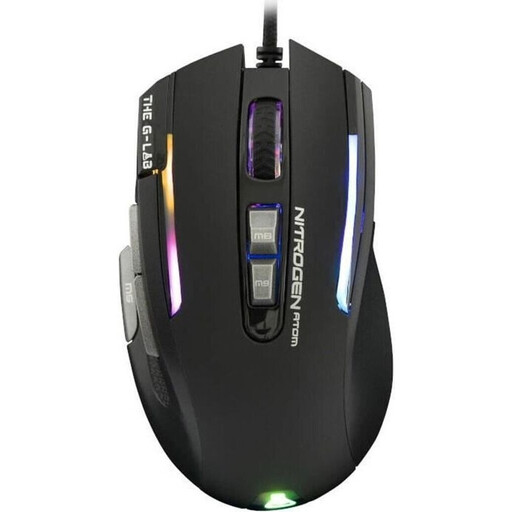
The G-Lab KULT-NITRO-ATOM Gaming Mouse, Wired, RGB, 7200 DPI
This model could be a good fit for recurring editor commands if you can make use of its extra buttons.
The product description lists nine programmable buttons and a weight of 65 g, and says it’s designed for medium to large hands; the product title identifies this as a wired version with RGB and 7200 DPI.
View on Joybuy
 No image available
HyperX Pulsefire Haste 2 Wired Gaming Mouse, White
The wired version suits a workflow where you’d rather not manage a mouse battery.
The product title lists six buttons; HyperX gives the wired Pulsefire Haste 2 a weight of 53 g. The product description lists a 1.8 m cable.
View on Joybuy
 No image available
Logitech G G502 X LIGHTSPEED, wireless gaming mouse, white
If you want to use several commands directly from your mouse, this model offers plenty of programmable controls.
The product description lists 13 programmable buttons and a scroll wheel with free-spin and precision ratchet modes. It also lists a right-handed shape, a weight of 102 g and USB-C charging; the mouse has a built-in battery.
View on Joybuy
 No image available
ATTACK SHARK X11, wireless gaming mouse, black
This mouse is worth considering if you want to assign some editor commands to buttons and choose between several connection options.
The product title lists five programmable buttons, a weight of 62 g, and 2.4 GHz, Bluetooth and USB-C connectivity.
View on Joybuy
 No image available
Razer Naga V2 HyperSpeed, wireless MMO gaming mouse
If you want to assign lots of recurring commands to your mouse, this model offers a large number of programmable buttons.
The product description lists 19 programmable buttons, a scroll wheel with free-spin and tactile modes, and a right-handed shape. The model runs on one AA battery.
View on Joybuy
Frequently asked questions
Do I need a mouse with as many buttons as possible for a map editor?
No. Start with the commands you use regularly and check whether your editor lets you assign them to the buttons you have in mind. A 12-button panel is only useful if you need those inputs and can reach the buttons easily.
Which mouse controls should I test first?
Test selection, the scroll wheel, middle click and view panning in the editor you use. For the TileMap view, the Godot Engine documents panning with the middle or right mouse button and zooming with the scroll wheel; the Blender manual describes configurable mouse and keyboard shortcuts. Check the actual settings in your software.
What cover applies if the mouse is faulty?
For a consumer purchase in the EU, you’re entitled to at least two years of statutory legal protection from the seller, starting from the date you receive the goods. Your Europe, the European Union’s consumer portal, distinguishes these rights from a voluntary manufacturer’s warranty; check the warranty terms separately.


