Choose a mouse that fits your hand and lets you set the sensitivity to a comfortable level for controlling the camera. A particularly high maximum DPI is not essential just because you have a large screen. Extra buttons can make frequent building actions easier to reach, but they need to be comfortably accessible. The main difference between wired and wireless comes down to how you arrange your movement space, connection and power supply at your gaming setup.
Which mouse matters to you
Precise world-builders
If you want to aim accurately when placing and breaking blocks while also looking around the world, choose camera movement that feels easy to control. In Minecraft: Java Edition, you can adjust the camera sensitivity; a large screen alone does not determine the DPI you need.
Builders with lots of commands
If you often perform the same actions, assignable mouse buttons can save you reaching for the keyboard. What matters is whether you can reliably reach the buttons you want to use with your grip, and whether they work as intended in the game.
Players with room to move their mouse
If you want to move your mouse across its surface without a cable getting in the way while you build, check that the receiver connection and charging options suit your setup too. A wired mouse, on the other hand, means you don't need to plan when to recharge it.
Buying criteria and priorities
First, decide what has the biggest impact on how you control the game while building and looking around: camera control, easy-to-reach buttons, comfort or the connection at your gaming setup.
| Priority |
What to check before buying |
Who it's especially important to |
| Camera movement |
Try out the in-game sensitivity and cursor control on your own mouse mat; don't compare maximum DPI alone. |
If I need to make small adjustments when placing blocks and move smoothly when looking around, I want to set the sensitivity to suit me. Around 31% of consumers put controllable camera movement first. |
| Buttons for building actions |
Check the position and reach of the extra buttons, and whether they can be assigned in the game and with the software you need. |
If I want to access frequent building actions without reaching for the keyboard, the right buttons and how I assign them matter. Around 25% of consumers prioritise extra controls for frequently used commands. |
| Shape and comfort |
Check your grip, how easily you can reach the side buttons and scroll wheel, and the shape and weight of the exact model. |
If I'm playing for a long time, I need a shape that suits my hand and buttons I can reach reliably. Comfortable handling is a priority for around 25% of consumers. |
| Connection and freedom of movement |
Consider the distance between your mouse surface and computer, cable routing or receiver connection, and charging options. |
If the cable gets in the way of my movement, I need a wireless option that suits my setup and somewhere to charge it; if a cable works well with my setup, wireless isn't essential. Around 19% of consumers put connection and freedom of movement first. |
Common buying mistakes
-
Assuming screen size means you need a particular maximum DPI
Screen size alone doesn't determine the DPI you need. Minecraft's help explains that sensitivity can be adjusted to affect how quickly the camera responds to mouse movements.
Try the in-game sensitivity and mouse settings with the movements you prefer, rather than choosing based only on the highest figure listed.
-
Choosing lots of buttons without checking where they are
Extra buttons are only useful if you can reach and press them reliably with your grip. In its test of the Logitech G502 HERO, PC-WELT reported occasional misclicks on the extra buttons; its testers also found the tested Razer Basilisk V3 less suitable for small hands.
Check which buttons you can reach comfortably, and start by assigning only the commands you use regularly.
-
Confusing extra features with standard equipment
PC-WELT described wireless charging and an 8,000 Hz polling rate for the Razer Basilisk V3 Pro 35K when used with an optional Razer Mouse Dock Pro. Don't assume these features apply to other models or are included in the box.
Check the exact model to see what accessories are needed for the feature you want and whether they are included.
-
Assuming similarly named models are the same version
The wired Razer Basilisk V3, the wireless Basilisk V3 Pro 35K and the Phantom Green special edition are different variants. A shared part of the name isn't enough to assume they have the same connection, design or accessories.
Compare the full model name, connection, edition and required accessories on the specific product page.
Key brands at a glance
Logitech G
According to Logitech G, the wired G502 HERO has eleven programmable buttons and adjustable weights. The G502 X LIGHTSPEED is a separate wireless range, with 13 configurable controls according to the manufacturer.
- Button assignments and weight adjustment are documented features of the G502 HERO.
- In its G502 HERO test, PC-WELT reported occasional misclicks on the extra buttons and limitations for larger hands. The test results apply to this model.
Razer
According to Razer, the wired Basilisk V3 has 10+1 programmable buttons and a switchable scroll wheel. It is not the same model as the wireless Basilisk V3 Pro 35K.
- The documented button and scroll-wheel features apply to the Basilisk V3.
- PC-WELT found the tested Basilisk V3 less suitable for small hands and noted that it's designed for right-handed users. This assessment applies to the model tested.
Sharkoon
According to the manufacturer, the SKILLER SGM50W can be used wirelessly via 2.4 GHz or while charging with the included USB cable, and has six reassignable buttons.
- A receiver, USB cable and charging dock are documented for this model.
- If you want lots of extra buttons within easy reach, compare its button layout with models that list more controls. The manufacturer's battery-life figures aren't a measurement of performance at your own setup.
SteelSeries
SteelSeries lists the wireless Aerox 5 Wireless as weighing 66 g and having nine programmable buttons.
- Its stated weight and several side controls may be relevant if you have particular preferences.
- Weight and button count don't tell you whether the shape and button positions will suit your hand; these details apply to the Aerox 5 Wireless.
Corsair
The DARK CORE RGB PRO manual describes 2.4 GHz wireless, Bluetooth and charging via USB cable.
- The manual recommends 2.4 GHz for gaming and suggests Bluetooth for everyday computer tasks.
- This is the manufacturer's usage recommendation for this model, not an independent latency comparison or a statement about other Corsair mice.
Joybuy products for different gaming setups
The models below include lightweight wireless mice with programmable buttons, wired mice with multiple buttons, and mice with several connection options.
 No image available
Razer DeathAdder V3 Pro Wireless Esports, 64 g, White
A lightweight wireless option if you prefer freedom of movement without a cable in use.
64 g; 2.4 GHz wireless; five switchable DPI profiles; programmable buttons.
View at Joybuy
 No image available
Razer Viper V3 Pro Wireless Esports, 54 g, White
A lightweight wireless mouse for anyone looking to combine a low stated weight with assignable buttons.
54 g; 2.4 GHz wireless; adjustable DPI settings; six programmable buttons; USB-C.
View at Joybuy
 No image available
Razer Basilisk V3 35K Wired, Black
A wired option if you want to assign frequent building actions to extra mouse buttons and have a suitable way to manage the cable.
USB cable; eleven programmable buttons; adjustable sensitivity; optical sensor with 35,000 DPI.
View at Joybuy
 No image available
ATTACK SHARK X11, 62 g, Black
For anyone who wants to choose between wireless, Bluetooth and USB-C to suit their setup.
62 g; 2.4 GHz wireless, Bluetooth and USB-C; adjustable DPI settings; five programmable buttons.
View at Joybuy
 No image available
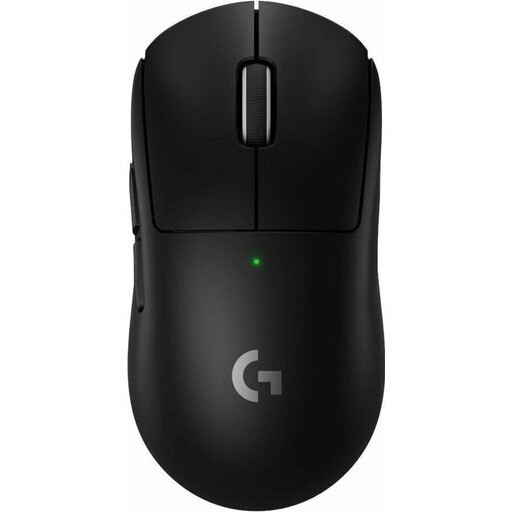
Logitech G PRO X SUPERLIGHT 2 LIGHTSPEED, 60 g, Black
A wireless option for anyone who prefers a low stated weight and customisable buttons.
60 g; wireless; USB-C; DPI adjustment; five programmable buttons.
View at Joybuy
Frequently asked questions
Do I need a mouse with a particularly high DPI because I have a large screen?
No. Screen size alone doesn't determine the mouse DPI you need. In Minecraft: Java Edition, you can adjust how the camera responds using the in-game sensitivity setting, then fine-tune it with your mouse settings to suit the movements you prefer.
How do I set up extra buttons for building?
First decide which commands you use most often, then check whether you can reach the assigned buttons comfortably. Minecraft describes customisable controls, while Logitech explains how to assign buttons on the G502 HERO using G HUB. Check in the game that each assignment works as you want it to.
Can I keep using a wireless mouse while it's charging?
That depends on the exact model. Sharkoon specifically says that the SKILLER SGM50W can be used with the included USB-C-to-USB-A cable while charging; don't assume this applies to other wireless mice.
What happens if there's a fault, and do I need an extra warranty?
When you buy from a trader, your statutory rights are against the seller. According to consumer information from the European Union, these rights last for at least two years from the date you receive the goods. A voluntary guarantee or paid protection plan is separate and isn't required for your statutory rights.
What should I look for when buying a wireless mouse in Germany?
Check the information for the exact model, including the manufacturer's details, product information and any required documentation. For certain electrical and radio products, Germany's Federal Network Agency lists CE marking, German-language instructions and a declaration of conformity among the points to check. A shop description alone doesn't prove that a specific item complies.


