What should you look for when buying?
First check that the shape and sensitivity suit your movements. Then consider whether the buttons are easy to reach and whether the connection works for your desk setup.
| What matters |
What to look for |
Who is it important to? |
| Controlled movement |
Compare the shape, grip and adjustable sensitivity; consider the space available on your desk. |
If you repeatedly aim for points on a map and want to control your turns, the mouse should feel easy to guide with your grip. Around 36% of consumers put controlled movement and sensitivity first. |
| A comfortable fit for repeated play |
Check the contours and dimensions; see whether you can reach the buttons and scroll wheel without changing your grip. |
If you play longer or frequent exploration sessions, it’s important to choose a shape that feels comfortable to use with your grip. Around 29% of consumers prioritise this fit. |
| Shortcuts within easy reach |
Check the commands you need, button placement and whether the game or communications software supports them. |
If you want to trigger frequent in-game or voice commands without changing your grip, the buttons must be easy to reach and the relevant application must support the assignments. Around 21% of consumers prioritise shortcuts like these. |
| Connection and power |
Check the supported connection types, any receiver required, and whether you need to charge or replace batteries. |
If a cable gets in the way of your mouse movements or you’re weighing up the effort of charging and replacing batteries, the connection should suit your desk setup. This is the top priority for around 14% of consumers. |
Gaming mice at Joybuy
These models include wired and wireless gaming mice, as well as versions with extra buttons.
 No image available
Razer Basilisk V3 35K, wired
A good option if you’re looking for extra assignable buttons and adjustable sensitivity.
11 programmable buttons; optical sensor with 35,000 DPI; ergonomic right-handed shape; wired USB connection.
Position the cable so it doesn’t get in the way of your mouse movements.
View at Joybuy
 No image available
HyperX Pulsefire Haste 2, wired, white
A wired option if you’re considering adjustable sensitivity and multiple buttons.
Six buttons; 26,000 DPI; 8,000 Hz polling rate; white model.
Make sure the cable routing on your desk works with your movements.
View at Joybuy
 No image available
ATTACK SHARK X11, black
An option if you want to switch between wireless and USB-C connectivity and use programmable buttons.
2.4 GHz wireless, Bluetooth and USB-C; five programmable buttons; 22,000 DPI; 62 g; charging dock mentioned in the product name.
When using it wirelessly, consider whether the connection and power options suit your needs.
View at Joybuy
 No image available
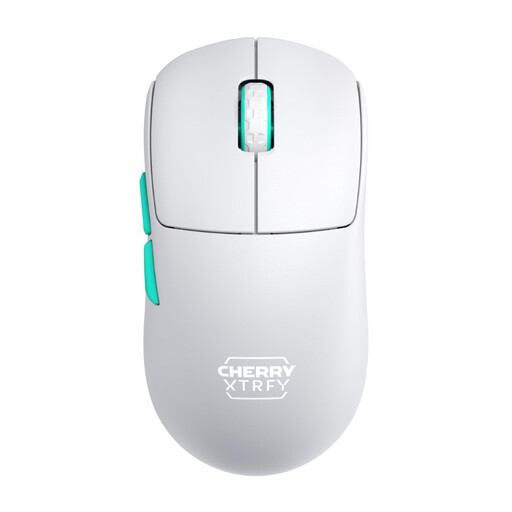
CHERRY XTRFY M68 Wireless, white
A wireless option if you’re considering a symmetrical shape and fewer controls.
53 g; 2.4 GHz wireless; rechargeable; symmetrical design with a low front.
The listed base configuration has three buttons, so there are fewer controls for extensive button assignments.
View at Joybuy
 No image available
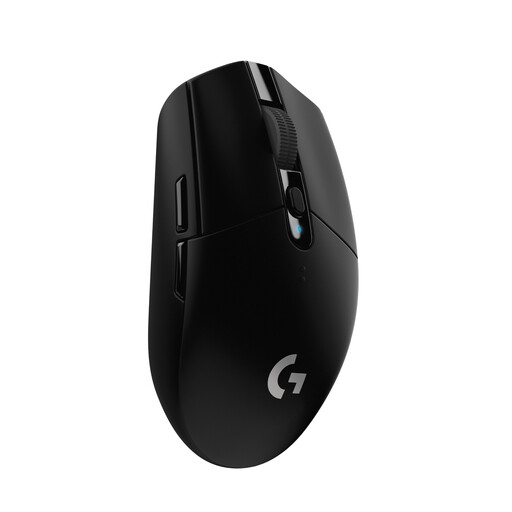
Logitech G305 LIGHTSPEED, black
A wireless option if you’re considering programmable buttons and a USB receiver.
Six programmable buttons; up to 12,000 DPI; powered by an AA battery.
Remember to factor in the power supply if you plan to use it wirelessly.
View at Joybuy
Frequently asked questions
Do I need a particular gaming mouse because I wear headphones?
No. Wearing headphones alone doesn’t mean you need a mouse with any particular feature. If you want to assign a voice command to a mouse button, check that the specific mouse supports button assignments and that your communications software supports the command.
How should I set up my mouse for learning a map?
Choose a sensitivity that lets you turn with control in the game you’re playing, then practise repeating the same movements. Next, assign frequent in-game actions to buttons you can reach comfortably, making sure the game supports them. Logitech G and HyperX provide information on DPI settings and programmable buttons for specific models.
What should I know about the battery, faults and returns?
For a wireless mouse, check how it charges and whether you can use it with a cable while it’s charging. HyperX describes this option for the Pulsefire Haste 2 Wireless. If an item you buy is faulty, you have statutory rights against the seller, regardless of any voluntary guarantee. In Germany, online orders generally come with a 14-day right to withdraw from the contract, starting when you receive the goods, as explained by the Verbraucherzentrale.
Can I put an old mouse in household waste in Germany?
No. The German Environment Agency advises that old electrical equipment should be collected separately. You can take it to a recycling centre free of charge, for example. Removable batteries should be taken out and disposed of separately.


