Who are the different features best suited to?

People who spend long hours at a desk

If you use the same mouse for work and play over long periods, start by looking for a shape that suits you and allows you to hold it comfortably. The Federal Institute for Occupational Safety and Health considers posture an important aspect of working at a screen; a high maximum DPI won’t make up for a poor fit.

Players who use lots of maps and menus

If you often switch between maps, menus and recurring actions, easy-to-reach extra buttons and a suitable scroll wheel may be key considerations. Check your game’s controls to work out which button assignments will actually be useful.

People with a flexible desk setup

If you switch your workstation between work and gaming, weigh up the cable, wireless connection, charging and software support. What matters most will depend on your computer and the specific mouse variant.

What should you look for when buying?

What matters to you What to look for Who will find this especially important?
Fit and comfort Check the mouse’s suitability for your hand size, dominant hand and grip, as well as how easily you can reach the buttons. If I work and play at the same desk for long periods, I want a mouse that feels comfortable to hold and has buttons I can reach without pressing them by accident. Around 36% of consumers prioritise fit and comfort for longer sessions.
Extra buttons and scrolling Count the game commands you need, then check the button positions and scroll modes. If I frequently switch between maps, menus and recurring commands, I only want to assign the functions I actually use to the mouse. Around 29% of consumers prioritise access to commands and scrolling through game interfaces.
Connection and desk setup Check the cable routing, wireless modes, ports required and power supply. If I rearrange my workstation or don’t want a cable on my desk, I need a connection that works with my computer and setup. Around 21% of consumers prioritise this kind of desk flexibility.
Software and ongoing upkeep Check the operating system, profiles, power supply and included accessories. If I want to switch settings between work and play, or avoid extra upkeep for wireless use, the right software matters just as much as the power supply. Around 14% of consumers prioritise setup and ongoing maintenance.

Which buying mistakes can you avoid?

  • Making the maximum DPI the most important buying criterion

    A high maximum sensor rating alone won’t tell you whether the shape, buttons and scrolling suit the way you use the mouse.

    Start by comparing how the mouse feels and which features you need. Treat DPI figures as just one part of a model’s specifications.

  • Choosing lots of extra buttons without checking how easy they are to reach

    A high button count doesn’t guarantee better control. PC-WELT reports that the extra buttons on the Logitech G502 HERO can occasionally lead to misclicks.

    Before buying, assign specific commands from your game and check that the buttons suit your grip and are easy to distinguish from one another.

  • Assuming wireless means maintenance-free

    Power and charging requirements vary by model; some features may also require additional accessories.

    Check the exact variant, its power supply and what’s included rather than relying on the word ‘wireless’ alone.

Key brands to consider

Logitech G

The wired G502 HERO is an option if you’re considering programmable buttons, profiles and adjustable weights. Logitech lists eleven programmable buttons for this model.

  • PC-WELT describes the G502 HERO as having a switchable scroll wheel.
  • PC-WELT also reports occasional misclicks, a material that attracts dirt and limitations for people with large hands. These points don’t necessarily apply to other G502 models.

Razer

According to Razer, the wired Basilisk V3 has programmable buttons and different scroll modes. The Basilisk V3 X HyperSpeed is a different model with two wireless modes. The Basilisk V3 Pro 35K has its own scroll settings.

  • The different models offer a range of combinations of buttons, connections and scrolling options.
  • PC-WELT lists the separately available Mouse Dock Pro for wireless charging and 8,000 Hz HyperPolling with the Basilisk V3 Pro 35K. This accessory isn’t a general requirement for political simulation games.

Sharkoon

According to the manufacturer, the SKILLER SGM30W supports both wireless and wired use and is designed for a Windows workstation.

  • Sharkoon lists seven programmable buttons for this model and says you can continue playing while it charges via cable.
  • The manufacturer’s claim of up to 70 hours of wireless use applies to this model and isn’t based on independent battery-life testing.

SteelSeries

According to SteelSeries, the Aerox 9 Wireless is designed for people who want to assign lots of functions to side buttons.

  • SteelSeries lists 18 programmable buttons, including twelve side buttons.
  • According to the manufacturer, this model has a right-handed shape. Its focus on MMO/MOBA games doesn’t mean it offers a particular advantage in political simulation games.

Gaming mice at Joybuy

This selection includes wired and wireless gaming mice with programmable buttons. Depending on the model, you can also choose between different scroll modes and connection types.

Logitech G502 X LIGHTSPEED, wireless gaming mouse, white, right-handed shape

Logitech G502 X LIGHTSPEED, white

For you if you’re looking for a wireless mouse with programmable buttons and the option to use it with a cable when needed.

LIGHTSPEED wireless and USB-C wired connection; 13 programmable buttons; up to five profiles in onboard memory. This variant is listed as a right-handed mouse.

Joybuy

Razer Naga V2 HyperSpeed, wireless gaming mouse with programmable buttons

Razer Naga V2 HyperSpeed

For you if you want to assign lots of recurring commands to buttons and switch between tactile scrolling and free-spin mode.

19 programmable buttons; 2.4 GHz wireless and Bluetooth; two scroll modes; powered by one AA battery. The shape is designed specifically for right-handed use and may not be suitable for left-handed users.

Joybuy
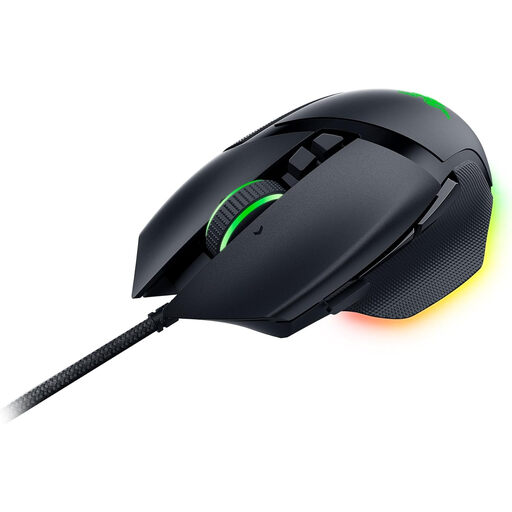
Razer Basilisk V3, wired gaming mouse

Razer Basilisk V3

For you if your mouse stays on your desk and you want to switch between free-spin and tactile scrolling.

USB connection; 11 programmable buttons; up to five profiles in onboard memory. The scroll wheel offers free-spin and tactile scrolling. The shape is listed as right-handed.

Joybuy
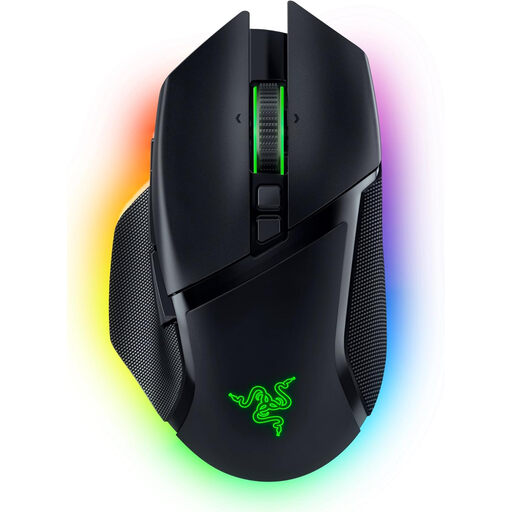
Razer Basilisk V3 Pro, wireless gaming mouse

Razer Basilisk V3 Pro

For you if you want to switch between wireless and wired connections and use different scroll modes.

2.4 GHz wireless, Bluetooth and USB-C wired connection; 10+1 programmable buttons; tactile, free-spin and adaptive scroll modes. The shape is listed as right-handed.

Joybuy

Logitech G G502 HERO, wired gaming mouse

Logitech G G502 HERO

For you if you prefer a wired mouse with programmable buttons and a switchable scroll wheel.

USB connection; 11 programmable buttons; profiles and adjustable weights. PC-WELT reports occasional misclicks and limitations for people with large hands when using the G502 HERO.

Joybuy

Frequently asked questions

How many extra buttons do I need for a political simulation game?

Start by identifying the commands you use most often in the specific game you play, then see which ones would work well on the mouse. A high number of programmable buttons doesn’t prove that a mouse offers an in-game advantage; PC-WELT even reports occasional misclicks with the Logitech G502 HERO.

What should I check before setting up programmable buttons?

Check that the configuration software supports your operating system and whether the mouse can save profiles onboard. Razer lists Windows 10 and 11 for Synapse 4; the Mac version is described as a preview for certain newer Macs. Sharkoon lists Windows as a supported operating system for the SKILLER SGM30W. This doesn’t mean every mouse feature will be available on every system.

What extra costs might come with a wireless mouse?

Depending on the model, you may need to buy replacement batteries or charging accessories separately. Check the power supply and what’s included with the exact variant. For the Basilisk V3 Pro 35K, PC-WELT lists the Mouse Dock Pro as a separate accessory for wireless charging and 8,000 Hz HyperPolling.

What are your rights when buying a mouse online in Germany?

According to the Verbraucherzentrale, consumers generally have a right to cancel a standard online purchase, usually within 14 days of receiving the goods; you must notify the retailer if you wish to cancel. Your statutory rights against the seller are separate from any voluntary guarantee.

Can you put an old mouse in your household waste?

No. The German Environment Agency advises that waste electrical equipment should be collected separately. Take your old mouse to a suitable take-back point or recycling centre.