If you want to speak at the press of a button while gaming, an easy-to-reach, assignable mouse button can be useful – provided you can press it with your usual grip without moving the mouse off course. If you use voice activation or a convenient keyboard key, fit, gaming buttons and connectivity matter more than having as many extra buttons as possible. You’ll still need a microphone to transmit your voice.
Which mouse is right for you?
Gamers who use push-to-talk
If you want to speak without taking a hand off your controls, look for a button that’s easy to reach and can be assigned without clashing with another command. Discord’s separate keybinds are available in the desktop client.
Gamers with several mouse commands
If you want to use your mouse for frequent in-game actions as well as voice chat, compare the actual positions of the extra buttons – not just how many there are.
Gamers who prioritise grip and movement
If you already use a keyboard key or voice activation, a mouse shape that suits you and a connection that won’t get in the way of your movements may matter more than an extra push-to-talk button.
What should you look for when buying?
First, decide how you want to activate voice chat. Then check whether the button layout, mouse shape and connection suit the way you play. Discord Support describes push-to-talk as voice transmission activated by pressing a button; according to Discord, you can set up separate keybinds in the desktop client.
| Consideration |
What should you look for? |
Who is it most important to? |
| Push-to-talk |
Check that you can reach a side button with your usual grip; test its assignment in the Discord desktop client and in your game to check for conflicts. |
If you don’t want to take your hands off the controls to speak, you need a button you can reach reliably. Around 36% of consumers put push-to-talk first. |
| Grip and fit |
Try the mouse shape and side buttons while moving the mouse with your usual grip. |
If you want to hold down the talk button and control the game precisely at the same time, your hand shouldn’t cramp up or lose its grip. Around 29% of consumers prioritise fit and reach. |
| Additional gaming commands |
Make a note of the commands you need and check which buttons can actually be assigned on the specific model. |
If you want to trigger several frequently used actions with your mouse as well as voice chat, you need enough suitable buttons to assign them to. Around 21% of consumers prioritise extra gaming commands. |
| Connectivity and power |
Check whether a cable, 2.4 GHz wireless or Bluetooth suits your devices; if you choose a wireless mouse, consider how it’s powered. |
If a cable gets in the way of your mouse movements or you want to connect to different devices, the right connection matters – and you’ll need to factor in charging too. Around 14% of consumers prioritise flexible connectivity and freedom of movement. |
Common misconceptions
-
More buttons won’t make your voice clearer
A mouse button can control when push-to-talk activates voice transmission. Your voice is still transmitted through a microphone.
Check your microphone and chat settings first. Then assign an easy-to-reach button and test whether it conflicts with your in-game commands.
-
Models with similar names aren’t necessarily identical
A similar model name doesn’t guarantee that the design or features are the same.
Before you buy, check the full model name and the features that matter for your grip and gameplay.
-
Bluetooth, 2.4 GHz wireless and wired connections are different
A wireless model needs a power source, and the connections available vary from mouse to mouse.
Check the connection options on the specific model and make sure they suit your devices. If you’d rather not have to charge your mouse, a wired model is another option.
Key brands and model ranges at a glance
Logitech G
The wired G502 HERO and the PRO Wireless offer different button layouts in their respective models.
- Logitech G lists 11 programmable buttons and adjustable weights for the G502 HERO. According to the manufacturer, you can configure between zero and four side buttons on the PRO Wireless.
- Which buttons you can reach depends on the specific model and how you hold the mouse.
Razer
The wired Basilisk V3 35K is designed for gamers who want configurable controls and different scroll-wheel modes.
- Razer describes this model as having different scroll modes and configurable controls; that alone says nothing about voice clarity.
- COMPUTER BILD describes the Basilisk V3 35K it tested as a right-handed mouse that can’t be adjusted to fit different hand sizes.
SteelSeries
According to the manufacturer, the Aerox 5 Wireless combines a five-button side panel with nine buttons in total.
- The button count and side panel are manufacturer specifications for this model.
- Try using the flick switch as a talk button with your grip and gameplay to see whether it works for you.
CHERRY XTRFY
The M50 Wireless is an option if you want to switch between different connection types.
- CHERRY lists 2.4 GHz wireless, Bluetooth and wired connectivity, as well as five on-board profiles, for this model. The stated battery life of up to 100 hours is a manufacturer claim.
- In its test, COMPUTER BILD noted that the M50 Wireless could make your hand feel cramped in some positions.
Joybuy products
These models are mainly suited to gamers who want to use programmable mouse buttons for voice chat and in-game commands. Depending on the model, you can choose between wired and wireless connectivity, as well as different button layouts.
 Image unavailable
Razer Basilisk V3 35K Wired
A wired option if you want to assign several in-game commands to your mouse alongside push-to-talk.
11 programmable buttons; wired; specified as a right-handed model.
Joybuy
 Image unavailable
Logitech G502 X LIGHTSPEED
A wireless option if you want to assign push-to-talk and other in-game commands to your mouse.
13 programmable buttons; described as offering wireless LIGHTSPEED connectivity and wired USB-C connectivity; specified as a right-handed model.
Joybuy
 Image unavailable
Razer Naga V2 HyperSpeed
An option if you want to assign several in-game commands to your mouse and choose between wireless connection types.
19 programmable buttons; 2.4 GHz wireless and Bluetooth; powered by one AA battery; specified as a right-handed model.
Joybuy
 Image unavailable
Logitech G G502 HERO
A wired option if you want to assign mouse commands and avoid charging.
11 programmable buttons; wired USB connection; adjustable weight system.
Joybuy
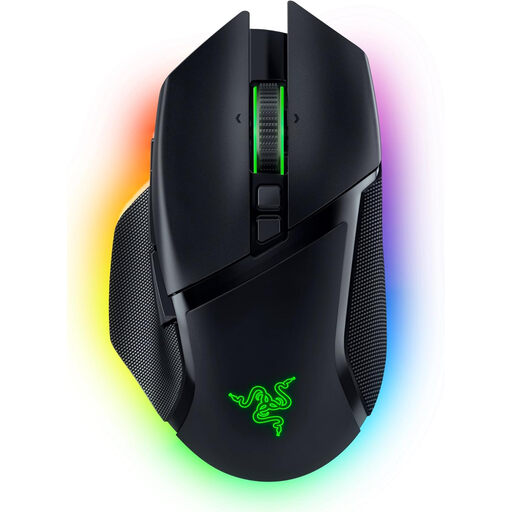 Image unavailable
Razer Basilisk V3 Pro
An option if you want to switch connections depending on your device or gaming situation.
10+1 programmable buttons; 2.4 GHz wireless, Bluetooth and wired USB-C connectivity; rechargeable battery; specified as a right-handed model.
Joybuy
Frequently asked questions
Can the gaming mouse transmit my voice to the team on its own?
No. You need a microphone to transmit your voice; push-to-talk controls when transmission is activated. A mouse button can serve as the control, but it can’t replace the microphone.
How do I set up push-to-talk in Discord?
Select push-to-talk in the Voice & Video settings and set up the button you want to use. According to Discord Support, separate keybinds can only be set up in the desktop client, not in the mobile or browser client. Also check that your mouse software sends the button press you want and that the game isn’t already using the same input.
What should I do if my mouse is faulty or an online purchase doesn’t fit?
If a product is faulty, your statutory rights apply against the seller and are separate from any voluntary guarantee. In Germany, consumer contracts made online generally come with a 14-day right to cancel. According to the Verbraucherzentrale, you must inform the retailer or contracting party that you wish to cancel. Check the terms of your specific purchase.
How do I dispose of an old gaming mouse in Germany?
Take old electrical equipment to an authorised collection point, such as a local authority recycling centre or a retailer required to take it back. Retailers’ take-back obligations depend on the legal requirements that apply.


