What should you look for when buying?
For extended use, desk space for your mouse and hand matters just as much as gaming features. The German Federal Institute for Occupational Safety and Health recommends arranging your mouse and keyboard flexibly.
Wired gaming mouse
A good fit if: you’ll mainly use the mouse with one desktop PC and want to avoid charging or changing batteries. Logitech says the Logitech G502 HERO has programmable buttons; the Razer Basilisk V3 35K has a scroll wheel with both notched and free-spinning modes.
Worth considering: The cable needs space and a suitable route. Extra buttons and scrolling modes vary by model.
Wireless gaming mouse
A good fit if: you switch between devices or want to keep your desk cable-free. CHERRY says the XTRFY M50 Wireless supports Bluetooth, 2.4 GHz wireless and wired operation; the SteelSeries Rival 3 Wireless supports Bluetooth and 2.4 GHz wireless.
Worth considering: Check whether your device supports the required receiver or Bluetooth, and whether the mouse is rechargeable or battery-powered.
A quiet office mouse as an alternative
A good fit if: quiet clicks matter more to you than specialist gaming controls. CHERRY describes the GENTIX SILENT as an office mouse with quiet buttons.
Worth considering: Check that the mouse supports the actions you need in the game you’re playing.
| Criteria |
What to check before buying |
Who should pay particular attention |
| Fit and hand position |
Consider your hand size, grip style, how easily you can reach the buttons and the space beside your keyboard. |
If you use the same mouse for work and gaming for long periods, it should suit your hand. Around 31% of consumers say fit is their top priority. |
| Clicks and scroll wheel |
Check that the game supports the actions you want and that you can reach the buttons without shifting your grip. |
If you click and scroll often or repeat commands, how easily you can perform these actions matters. Around 25% of consumers say these controls are their top priority. |
| Connection |
Check the connection options for the exact model, the ports available on your devices and whether you need a receiver. |
If you switch between a mouse and different devices, or want to keep your desk cable-free, the connection should suit your setup. Around 19% of consumers say connection flexibility is their top priority. |
| Click noise |
Look for noise information about the specific model and check that it still offers the gaming features you need. |
If other people work within earshot or you prefer a quiet environment, click noise could be a deciding factor. Around 13% of consumers say the quietest possible clicks are their top priority. |
| Power supply |
Check the battery type or charging port for the exact model, as well as any accessories you may need. |
If you want to minimise the hassle of charging or replacing batteries, make sure the power supply suits your routine. Around 12% of consumers say ease of use is their top priority. |
Joybuy product selection
This selection includes wired and wireless mice for puzzle adventures and for use at both your work and gaming setups.
 No image available
Razer Basilisk V3 35K, wired
For a fixed desktop setup, if you want a switchable scroll wheel and extra buttons.
The product description lists 11 programmable buttons, plus notched and free-spinning scroll wheel modes. The shape is designed for right-handed users; the description says Razer Synapse is required for full customisation.
View at Joybuy
 No image available
Logitech G PRO X2 SUPERSTRIKE LIGHTSPEED
For wireless gaming if you want to use programmable extra buttons.
The product description lists LIGHTSPEED wireless, USB-C charging, a built-in LiPo battery and five programmable buttons. The battery isn’t user-replaceable, according to the description; Logitech G HUB is listed for customising the buttons.
View at Joybuy
 No image available
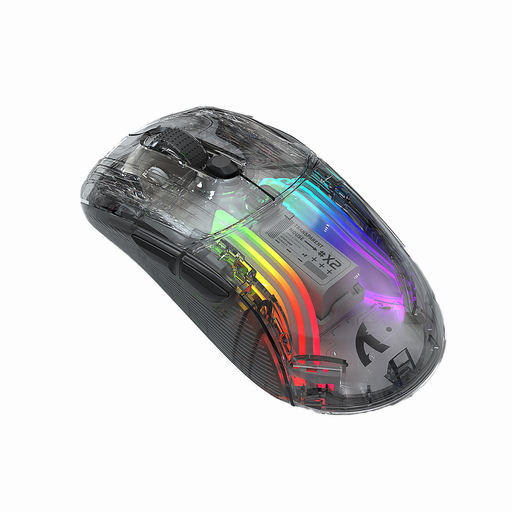
KINSI X2 Wireless Bluetooth Mouse
For a workspace where you want to choose between Bluetooth and 2.4 GHz wireless.
The product description lists both connection options, a rechargeable battery and quiet clicks. Before buying, check that it’s compatible with your devices.
View at Joybuy
 No image available
NAXSIR 3-in-1 Gaming Mouse
For you if you want to switch between wired, 2.4 GHz and Bluetooth connections.
The product description lists seven programmable buttons, a rechargeable battery and quiet microswitches. Driver software is listed for macros and button customisation; the shape is designed for right-handed users.
View at Joybuy
 No image available
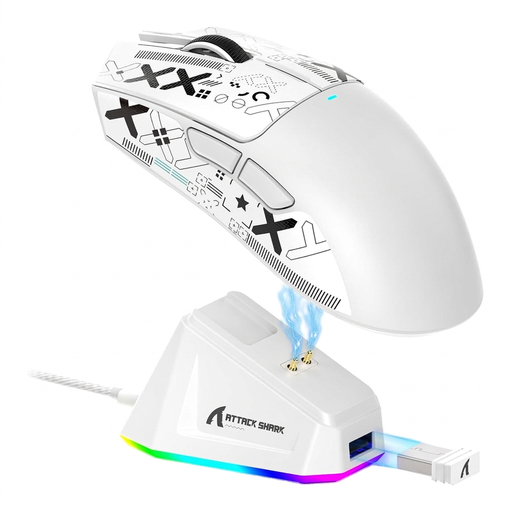
ATTACK SHARK X11 Wireless Gaming Mouse, White
For you if you want to switch between Bluetooth, 2.4 GHz wireless and USB-C operation.
The product description lists a charging dock and five programmable buttons. Check that the connection options and included dock suit your setup.
View at Joybuy
Frequently asked questions
How can I tell whether extra buttons will help with a puzzle game?
Start by checking the controls for the specific game and the actions you perform often. Then see whether buttons you can reach comfortably support those actions and can be customised if needed. A high button count alone doesn’t guarantee they’ll be useful.
What do I need to use a wireless mouse with my work and gaming PCs?
Check which connection works with each device and whether you need a receiver. CHERRY says the XTRFY M50 Wireless supports Bluetooth, 2.4 GHz wireless and wired operation. The SteelSeries Rival 3 Wireless supports Bluetooth and 2.4 GHz wireless and uses AAA batteries.
How should I clean and dispose of a mouse and its batteries?
Clean the sensor and gliding surfaces according to the instructions for the specific model. The German Environment Agency recommends disposing of electrical equipment separately from household waste and, where possible, removing batteries and taking them to a battery collection point.
What are my rights when buying online in Germany?
Consumers who buy online generally have a 14-day right to cancel, subject to statutory conditions and exceptions. The German consumer advice centre distinguishes the right to cancel from claims for faulty goods: the seller is responsible for putting a fault right, while a voluntary manufacturer’s guarantee is separate.
Which EU rules apply to wireless mice?
The European Commission’s Radio Equipment Directive sets the framework for placing radio equipment on the market. Germany’s Federal Network Agency explains that products covered by relevant EU harmonisation legislation must carry the CE marking. The marking is a declaration by the manufacturer, not an assessment of a particular product listing.


