What should you look for when buying?
Start by checking pointer control and fit. The scroll wheel, extra buttons and connection matter when they suit the way you play at your desk.
| What matters to you |
What to check |
Who is it important to? |
| Controllable pointer movement |
Adjustable pointer speed; test the setting at your own resolution and on your mouse surface. |
If I want to navigate a large map quickly while selecting small controls precisely, I’m looking for a setting I can control. Around 33% of consumers prioritise pointer control. |
| Comfort over longer sessions |
Shape and feel of the mouse; check whether you can reach the scroll wheel and side buttons comfortably with your hand. |
For longer gaming sessions, I want to hold the mouse naturally and reach important buttons without an uncomfortable change of grip. Around 27% of consumers put fit first. |
| Map navigation and buttons |
Scroll wheel modes and middle-click; check whether you can assign the commands you want in the game you play. |
If I often switch between the overview and detailed work, I want suitable scrolling options and inputs that are easy to reach. Around 27% of consumers prioritise navigation and assignable commands. |
| Wired or wireless |
Distance from your computer and the connection you need; check the battery or charging requirements for the specific version. |
If a cable gets in the way on my mouse surface, a suitable wireless connection matters. At a fixed setup, a cable may fit in well. Around 13% of consumers mainly value freedom of movement without an obstructive cable. |
Gaming mice at Joybuy
This selection includes wired and wireless gaming mice, with different options for pointer control, extra buttons and flexible setup.
 No image available
Razer DeathAdder V3 Pro Wireless, White
A wireless option if a cable gets in the way on your mouse surface and you want to change pointer speed directly on the mouse.
The product listing gives a weight of 64 g, 2.4 GHz wireless connectivity and five DPI profiles. This version is shaped for right-handed use.
View at Joybuy
 No image available
Razer Basilisk V3 35K, wired
A wired option if you want extra inputs and an adjustable scroll wheel at a fixed gaming setup.
The product listing gives a 35,000 DPI sensor, eleven programmable buttons and a scroll wheel with adjustable resistance and tilt-click. This version is designed for right-handed use; make sure the USB cable suits your setup.
View at Joybuy
 No image available
Razer Naga V2 HyperSpeed
A wireless option if you want plenty of programmable inputs and different scrolling options.
The product listing gives 19 programmable buttons, 2.4 GHz wireless connectivity, Bluetooth and a scroll wheel with tactile and free-spin modes. The mouse takes an AA battery and is designed for right-handed use.
View at Joybuy
 No image available
AULA SC620, White
A wireless option if you want to compare different connection types and programmable extra inputs.
The product title lists Bluetooth 5.0, 2.4 GHz wireless, USB-C, a 12,000 DPI sensor and seven programmable buttons.
View at Joybuy
 No image available
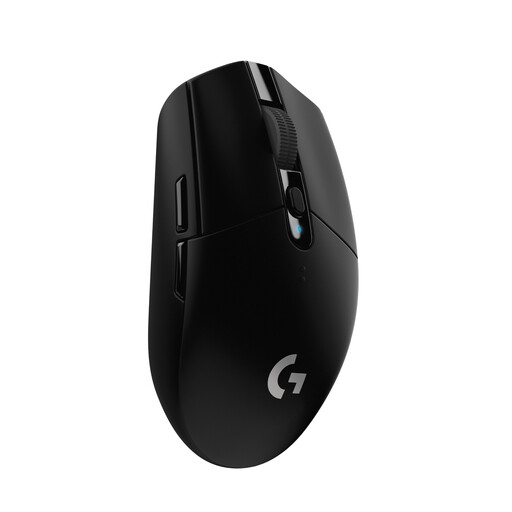
Logitech G305 LIGHTSPEED
A wireless option with a USB receiver if you need room to move your mouse and are happy to use an AA battery.
The product title lists a 12,000 DPI sensor and six programmable buttons. Logitech gives the G305 a battery life of up to 250 hours on one AA battery; actual battery life depends on how you use it.
View at Joybuy
Frequently asked questions
Do I automatically need the highest DPI for a large screen?
No. Try the pointer speed at your actual resolution, on your mouse surface and with the game’s controls. An adjustable DPI setting lets you tailor the movement, but it doesn’t mean there’s a universal minimum for this type of gaming.
Can I assign game commands to the side buttons?
With a programmable mouse, you can assign commands to buttons using the relevant software. Then check in the game itself, with your settings, that the command works as intended.
What should I check when connecting a wireless mouse?
Check which connection types the specific model supports and whether your computer has the required receiver or Bluetooth. Remember to allow for charging or battery replacement, too. According to CHERRY, the M50 Wireless offers several connection types, while the G305 runs on an AA battery according to Logitech.
What are my rights when buying online in Germany?
When buying online from a trader, you generally have 14 days from receiving the goods to cancel your order. Exceptions may apply, and you may have to pay the return costs. Your Europe also explains that goods are covered by a minimum two-year legal guarantee across the EU. These rights against the seller are separate from any additional voluntary manufacturer’s warranty.
Can I put an old gaming mouse in the household bin?
No. The Federal Ministry for the Environment notes that waste electrical equipment must be collected separately and returned through the appropriate channels. Remove any removable old batteries for separate collection.


