What should you look for when buying?
First compare the shape and scroll wheel with the way you’ll use the mouse. Then decide whether you need extra buttons and whether wired or wireless will work better at your desk. In the Transport Fever 2 manual, the scroll wheel and middle-click control the camera; other games may use different settings.
| What matters |
What to look for |
Who is it most important for? |
| Shape and comfort |
Check that you can reach the right button, middle-click and side buttons without having to adjust your grip awkwardly. |
If I work and play for long periods, I want the mouse to feel comfortable in my hand. Around 36% of consumers are likely to see fit as their top priority. |
| Scroll wheel and camera controls |
Test the wheel’s notches, middle-click and, where available, the option to switch between scroll modes in your game. |
If I zoom and move around the map often, I want to use the wheel and middle-click with confidence. Around 29% of consumers are likely to prioritise map controls. |
| Easy-to-reach extra buttons |
Check the button positions, assignment software and profile features of the specific model. |
If I want to trigger frequent commands quickly, buttons that are easy to reach and assign are important to me. Around 21% of consumers are likely to give command assignments the most weight. |
| Connectivity and power |
Compare your computer’s ports, the connection types and the charging or battery setup for each version. |
If I want to keep my desk as clear as possible, the right connection matters; with wireless models, I also need to plan for power. Around 14% of consumers are likely to prioritise connectivity. |
Joybuy product selection
This selection includes wired models with switchable scroll wheel modes, as well as wireless gaming mice with extra buttons.
 No image available
Razer Basilisk V3 35K, wired
For a fixed desk setup, if you want to switch between notched and free-spinning scroll modes and use extra buttons.
The product name lists 11 programmable buttons and an optical sensor with 35,000 DPI. The wired connection needs room for the cable.
Joybuy
 No image available
Razer Naga V2 HyperSpeed, wireless
An option if you want to go wireless and have extra buttons for frequently used commands.
The product name lists 19 programmable buttons, as well as 2.4 GHz wireless and Bluetooth. According to the product information, it requires one AA battery; battery life is listed as up to 250 hours over HyperSpeed or up to 400 hours over Bluetooth.
Joybuy
 No image available
Logitech G G502 Hero
A wired option for a fixed desk setup, if you want to consider a model with scroll wheel modes and extra controls.
It connects via USB using a cable, which takes up space on your desk.
Joybuy
 No image available
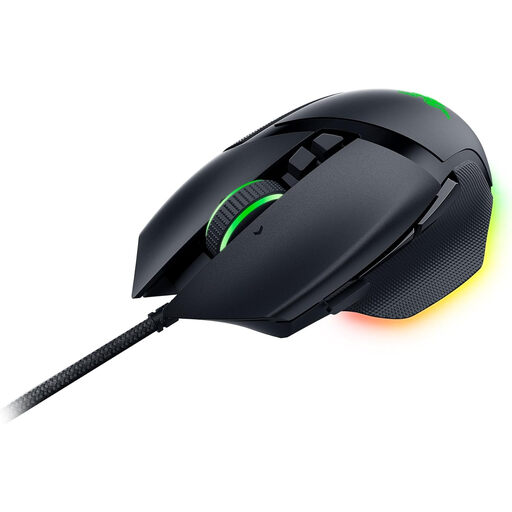
Razer Basilisk V3, wired, RGB
For a fixed desk setup, if you want a switchable scroll wheel and assignable extra buttons.
The product name lists 11 programmable buttons and an optical sensor with 26,000 DPI. The wired USB connection needs room; compatible Razer software is specified for button assignments and profiles.
Joybuy
 No image available
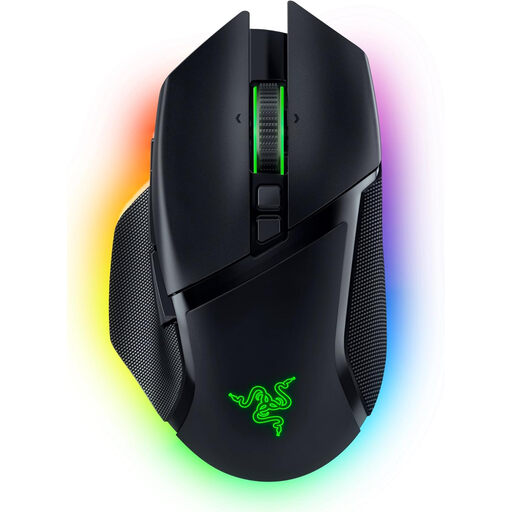
Razer Basilisk V3 Pro, wireless
A wireless option if you want a tilt wheel and assignable buttons for work or play.
The product name lists 10+1 programmable buttons and a tilt HyperScroll wheel. The battery needs charging; the product information lists up to 110 hours over HyperSpeed with the lighting off.
Joybuy
Frequently asked questions
Do I need lots of side buttons for Transport Fever 2?
Not necessarily. The Transport Fever 2 Wiki manual describes mouse controls, keyboard shortcuts and customisable settings. First, think about which commands you use often and want to assign to easy-to-reach mouse buttons.
How can I test a mouse in the game once it’s connected?
In Transport Fever 2, try zooming with the scroll wheel, rotating and tilting with middle-click, and moving the view by holding down the right button. If you have a programmable mouse, then check that your chosen button assignments work as expected.
How do I keep a wireless mouse ready to use?
Before buying, check whether the specific model uses a rechargeable battery or replaceable batteries, and which connection mode works with your computer. CHERRY lists Bluetooth, 2.4 GHz wireless and wired connections for the M50 Wireless; SteelSeries describes Bluetooth and 2.4 GHz wireless for the Aerox 5 Wireless.
What are the rules in Germany on returns and faulty goods when buying online?
Consumers generally have a right to cancel a distance-selling contract; § 355 BGB sets a 14-day period, although when it starts and the legal exceptions depend on the contract. Under § 438 BGB, the German Federal Ministry of Justice states that the limitation period for ordinary goods is generally two years from delivery. Claims against the seller for faulty goods are separate from a voluntary guarantee.
Can you put an old gaming mouse in your household rubbish?
No. The German Environment Agency advises that waste electrical and electronic equipment should be collected separately. Where possible, remove any batteries and dispose of them separately through a battery collection point.


