Who should consider which mouse features

Players with a particular mouse grip

If you often reposition your mouse, its shape needs to suit your grip and the movements you make when aiming. Symmetrical FPS mice and models with different contours give you shapes to compare, but none is automatically right for every hand. PC Games Hardware highlights ergonomics as an important buying consideration.

Players with a wireless headset

If you use a wireless headset as well as your mouse, you’ll want to avoid dropouts in ranked matches. Whether the headset’s wireless connection is a factor depends on your particular setup and where you position your devices.

Players who don’t want another wireless mouse device

If you’d rather not have another wireless receiver or a mouse battery to manage, a wired mouse could be a good fit. You’ll need to route its cable across your desk so that it doesn’t get in the way of your movements.

What to look for when buying

Lightweight symmetrical wireless mouse

A good fit if: you prefer a symmetrical shape and have a spare port for the receiver.

The trade-off: Going wireless also means keeping the battery charged and making room for an extra receiver.

Wireless mouse with a well-positioned receiver

A good fit if: you want to play wirelessly and your headset also uses 2.4 GHz wireless. BenQ ZOWIE describes the U2-DW’s receiver as optimised.

The trade-off: This doesn’t rule out interference with every headset setup; BenQ ZOWIE lists other nearby 2.4 GHz devices as potential sources of interference.

Wired mouse

A good fit if: you don’t want an additional wireless mouse receiver or a mouse battery to manage.

The trade-off: The cable needs to move freely as you aim; HyperX also offers the Pulsefire Haste 2 as a wired model.

Buying priority What to check Who it matters most to
Shape and grip control Compare the shape, side-button positions and space for your fingers with your usual grip. If I often reposition my mouse, I want to be able to hold and control it securely. Around 29% of consumers put shape and grip control first.
Connection alongside a headset Check the headset’s wireless technology, receiver position and how both devices perform when used at the same time. If my headset also uses 2.4 GHz wireless, I want to use both devices without dropouts. Around 22% of consumers prioritise a stable connection alongside their headset.
Freedom of movement and weight Compare the weight of the specific model with its shape and the space available on your mouse pad. When making repeated aiming movements, I want a mouse that feels comfortable to hold and move. For around 21% of consumers, freedom of movement is the main priority.
Wired rather than wireless Check the USB connection and cable routing, and make sure the cable won’t limit your range of movement. If I don’t want another wireless receiver, I can plan for a cable on my desk. Around 14% of consumers prioritise avoiding a wireless mouse connection.
Settings and model variant Compare the full model name, connection type, receiver and settings you need. If I need a particular model or setup, I want to be sure the model and connection are right before I buy. Around 14% of consumers also prioritise settings and clarity about model variants.

Common buying mistakes

  • Using two 2.4 GHz receivers without testing them together

    If both your mouse and headset use 2.4 GHz wireless, nearby devices could contribute to connection problems, according to BenQ ZOWIE. That doesn’t mean every wireless headset causes interference.

    Check which wireless technology your headset uses, then test both devices at the same time with their receivers positioned sensibly.

  • Assuming similarly named mouse variants are the same

    Models with similar names can differ in connection type and polling rate. CHERRY lists different polling rates for the CHERRY XTRFY M68 Wireless and M68 Pro Wireless; wired and wireless models aren’t interchangeable either.

    Before you buy, compare the full model name, connection type and specifications for the exact version.

  • Choosing headline specifications over a comfortable fit

    A high DPI or polling rate indicates a technical capability, but it doesn’t tell you whether the mouse suits your grip or will improve your matches.

    Check the grip, button positions and freedom of movement before deciding between a wired and wireless mouse.

Brands to consider

ZOWIE

BenQ ZOWIE describes the U2-DW as a symmetrical wireless mouse designed for a claw grip and movements from multiple angles.

  • BenQ ZOWIE lists driver-free setup and an optimised receiver among its features.
  • The manufacturer notes that nearby 2.4 GHz devices can be potential sources of interference; this doesn’t prove that the connection will be interference-free with every headset.

Razer

The Viper V3 Pro is a lightweight, symmetrical wireless option. Compare its shape and design with your grip.

  • For the black version, Razer lists a weight of 54 g and a maximum polling rate of 8,000 Hz.
  • These manufacturer specifications alone don’t prove an advantage in a match; also check the specific colour and version on offer.

Logitech G

The PRO X SUPERLIGHT 2 is another lightweight wireless option to compare for shape and settings.

  • Logitech lists a weight of 60 g and a polling rate of up to 8 kHz for this model.
  • The maximum polling rate alone doesn’t tell you whether the shape suits your hand; check similarly named special editions separately.

CHERRY XTRFY

The M68 Pro Wireless is a symmetrical mouse with a low front, giving you a chance to compare different grip positions.

  • CHERRY lists a weight of 55 g and a polling rate of 8,000 Hz for the Pro model; the manufacturer lists 1,000 Hz for the M68 Wireless.
  • Its low front is a specific design choice and won’t suit every grip.

HyperX

The wired Pulsefire Haste 2 is a lightweight alternative for players who don’t want an additional wireless mouse receiver.

  • HP lists a weight of 53 g and a Paracord cable for the wired version.
  • The cable needs to suit your desk setup. The Pulsefire Haste 2 Wireless is a different model.

Joybuy products

The products below include both wireless and wired gaming mice. For each one, compare the exact model name and connection type with your setup.

Razer Viper V3 Pro Wireless Esports gaming mouse, white

Razer Viper V3 Pro Wireless Esports, White

A wireless option if you’d like to compare symmetrical mouse shapes. Joybuy Germany lists this version with 2.4 GHz wireless and USB-C.

View at Joybuy

HyperX Pulsefire Haste 2 wired gaming mouse, white

HyperX Pulsefire Haste 2, wired

A wired option if you don’t want an additional wireless mouse receiver. Before you buy, check that this particular version is wired and that its cable suits your range of movement.

View at Joybuy

Logitech G PRO X2 SUPERSTRIKE LIGHTSPEED wireless gaming mouse

Logitech G PRO X2 SUPERSTRIKE LIGHTSPEED

A wireless gaming mouse to compare with other shapes and connection options. If your headset also uses 2.4 GHz wireless, test both devices together and pay attention to where you position their receivers.

View at Joybuy
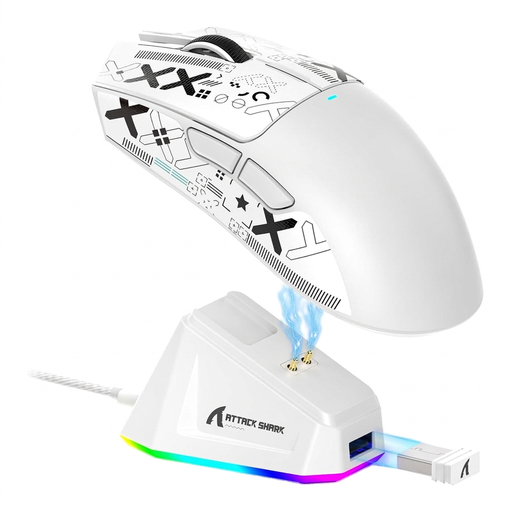
ATTACK SHARK X11 wireless gaming mouse, white

ATTACK SHARK X11, wireless gaming mouse

The listed tri-mode connection includes Bluetooth, 2.4 GHz wireless and USB-C. If you use wireless mode alongside a wireless headset, check how both devices perform in your setup.

View at Joybuy

AJAZZ AJ200 AI MC wireless gaming mouse

AJAZZ AJ200 AI MC

The listed tri-mode connection gives you USB-C, 2.4 GHz wireless and Bluetooth to compare. Choose based on the connection you want, and check that the shape and settings suit your grip.

View at Joybuy

Frequently asked questions

Are high DPI or polling rate figures enough to choose a mouse?

No. The first thing to consider is whether you can hold and move the specific mouse with control. High figures from the manufacturer alone don’t prove you’ll get better results in your matches.

What can I check if my mouse and headset keep dropping out?

If your headset uses 2.4 GHz wireless, test it alongside your mouse and reposition the receivers if needed. BenQ ZOWIE also recommends checking nearby 2.4 GHz devices as potential sources of interference when troubleshooting connection problems. This is a troubleshooting tip, not a guarantee for every setup.

What are my rights when buying a gaming mouse online?

For eligible distance purchases from a business seller in the EU, you generally have a 14-day right to cancel from the date of delivery; exceptions and possible return costs should be taken into account. Your Europe’s consumer information states that faulty goods are covered by a legal guarantee of at least two years from receipt. This is separate from any additional manufacturer’s warranty.

What should I look for in a wireless mouse in Germany?

Check the information for the specific product and version. When carrying out market surveillance of electronic and radio equipment, Germany’s Federal Network Agency lists factors including CE marking, product traceability and accurate manufacturer details; a product name alone doesn’t prove compliance.