Start by choosing a mouse that feels comfortable to use throughout a whole match, then adjust the pointer speed to suit the game and your screen resolution. Lots of thumb buttons can be useful if you regularly assign commands to them and can reach them reliably; otherwise, a simpler layout may suit you better. With wireless models, consider the connection and power supply too.
Which mouse suits which player
Players with lots of commands
If you want to assign frequently used commands to thumb buttons, check that you can reach them reliably with your grip and remember where they are. Razer describes the Naga V2 HyperSpeed as having a fixed 12-button thumb grid.
Players using a large screen
If you need to move across the game area while selecting small targets accurately, test the pointer speed with your resolution and in-game settings. Logitech notes that a higher DPI setting makes the pointer move faster.
Players who enjoy longer sessions
If you play for long periods, consider how the shape and grip feel in your hand. Compare weight and power supply alongside the layout and how you play; the RTINGS review of the Naga V2 HyperSpeed lists a weight of 122.3 g and AA batteries for this specific model.
What to consider when buying
| Priority |
What to look for |
Who it matters most to |
| Commands within easy reach |
Think about how many commands you really want to assign and whether the side buttons are comfortable to reach. |
If I want to trigger frequently used commands directly with my thumb, the button layout needs to suit my grip. Around 31% of consumers prioritise access to commands. |
| Pointer control |
Test the DPI setting alongside your game and operating system settings on your screen. |
If I’m navigating a large screen and want to select small targets accurately, I need a speed I can control in-game. Around 31% of consumers say pointer control is their top priority. |
| Comfort in the hand |
Compare the shape and grip with your hand, and check whether you can reach the side buttons without changing your grip. |
For long sessions, I want a mouse that feels comfortable to use with my usual grip; weight alone doesn’t tell me whether the shape is right. Around 23% of consumers prioritise comfort in the hand. |
| Connection and power supply |
Check the connection type and whether the model takes batteries or needs charging. |
If I want to play wirelessly, I also need to factor in replacing batteries or charging; a wired mouse doesn’t need a separate power supply, but the cable stays on my desk. Around 15% of consumers prioritise connection and power supply. |
Common buying misconceptions
-
The highest DPI is automatically the right choice
A higher setting moves the pointer faster, but can make it harder to select small targets.
Check whether the DPI can be adjusted, and test your mouse, game and screen settings together rather than choosing based only on the highest quoted figure.
-
Only the total number of programmable controls matters
For the Naga V2 HyperSpeed, Razer lists 19 buttons as well as 21 programmable controls. The figures may include scroll-wheel functions; what matters is which commands you can actually reach comfortably.
Compare the side-button layout and grip on the specific model, and think about which commands you want to assign.
-
With a wireless mouse, you only need to consider the connection
The Naga V2 HyperSpeed uses AA batteries rather than an internal battery that can be recharged via USB. Replacing the batteries may mean ongoing costs.
Before buying, check the battery type and what’s included, then consider whether replacing batteries or recharging would suit the way you use your mouse.
Key brands at a glance
Razer
Naga models are worth considering if you want to control lots of commands with thumb buttons.
- Razer describes the Naga V2 HyperSpeed as having a fixed 12-button thumb grid, while the Naga V3 Pro has interchangeable side panels.
- According to the RTINGS review, the Naga V2 HyperSpeed uses AA batteries and weighs 122.3 g. These test figures do not automatically apply to the Naga V3 Pro.
Logitech G
The G502 X range includes models with a less crowded button layout, including wired and wireless versions.
- Logitech lists a weight of 89 g and a HERO 25K sensor for the wired G502 X. For the G502 X LIGHTSPEED, the manufacturer lists 13 configurable controls and a HERO 44K sensor.
- The details for weight, sensor and features refer to different versions and should not be assumed to apply across the range.
SteelSeries
According to the manufacturer, the Aerox 9 Wireless combines a 12-button side panel with a stated weight of 89 g.
- SteelSeries lists 18 programmable buttons in total.
- Weight and button count don’t prove that the mouse will feel more comfortable for every hand. Check the shape and how easy the side buttons are to reach.
Corsair
The Scimitar Elite Wireless is a multi-button option with a sliding 12-button side panel.
- Corsair lists 16 programmable buttons and wired, 2.4 GHz wireless and Bluetooth connectivity.
- The information referenced applies to a US version and does not confirm the features or availability of a German variant.
Joybuy product options
This selection includes wired and wireless gaming mice with programmable buttons for ranked play on a large screen.
 No image available
Razer Basilisk V3 35K, wired
A wired option if you want programmable buttons and don’t need a wireless connection.
11 programmable buttons; optical sensor with 35,000 DPI; ergonomic right-handed shape; USB cable.
View at Joybuy
 No image available
Razer Naga V2 HyperSpeed
A wireless option for players who want to assign multiple commands to programmable buttons.
19 programmable buttons; 2.4 GHz wireless and Bluetooth; powered by an AA battery.
View at Joybuy
 No image available
AULA SC620, white
A wireless option if you’re looking for extra programmable buttons and a choice of connection types.
7 programmable buttons; Bluetooth 5.0, 2.4 GHz and USB-C; 67 g; 12,000 DPI.
View at Joybuy
 No image available
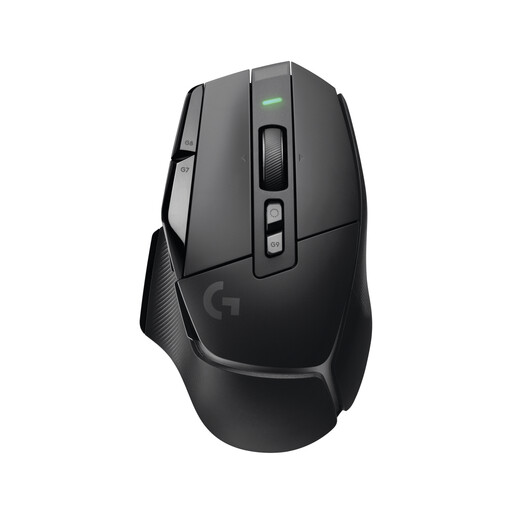
Logitech G G502 X LIGHTSPEED
A wireless alternative if you prefer configurable controls to a fixed 12-button thumb grid.
13 programmable controls; built-in battery charged via USB-C; adjustable DPI switch.
View at Joybuy
 No image available
Logitech G G502 HERO
A wired option if you want programmable buttons and adjustable pointer settings.
11 programmable buttons; adjustable DPI range from 200 to 25,600; USB cable; weight system with up to five 3.6 g weights.
View at Joybuy
Frequently asked questions
What DPI do I need for a large screen?
You can’t determine a specific DPI setting based on screen size alone. Choose an adjustable sensitivity and test it in the strategy game you play to see whether you can reach distant areas quickly and select small targets accurately.
How should I set up extra buttons?
Start with a few commands you use often and are allowed to use in the game, then check whether you can reach the buttons without changing your grip. Razer describes customisation via Synapse for the Naga V3 Pro; this is a feature of that model, not a requirement for all mice.
Does a wireless mouse need charging?
It depends on the model: the Naga V2 HyperSpeed uses AA batteries. Check whether the specific version uses batteries or a rechargeable battery, and how it is powered.
What are my rights when buying online in Germany if the mouse doesn’t fit or is faulty?
When you buy online from a business seller, you generally have a 14-day right to cancel, starting from the day you receive the goods. Who pays the return costs depends, among other things, on whether the seller told you about them in advance. If goods are faulty, you have statutory rights against the seller for at least two years; a voluntary manufacturer’s warranty does not replace these. This information refers to EU consumer rules.
What should I know about wireless mice and disposing of them?
Wireless devices placed on the EU market must meet the requirements of the Radio Equipment Directive. A CE mark is the manufacturer’s declaration, not an independent quality seal. Don’t put an old mouse in household waste; removable batteries should be disposed of separately, following guidance from the German Environment Agency.


