Limited room to move your mouse
If your desk offers little room to move, check the available space and cable routing first. Then adjust the sensitivity to suit the movement range you have.


The key things are a shape that lets you reach the buttons with your grip, enough clear space and a suitable sensitivity setting – not the highest DPI or polling rate. A compact wireless mouse can keep a cable out of your way; a wired mouse saves you from charging, but needs a clear cable route. HyperX describes the Haste 2 Mini as smaller than the standard wireless version. High specification figures alone are no proof of better training results.
If your desk offers little room to move, check the available space and cable routing first. Then adjust the sensitivity to suit the movement range you have.
If you prefer a smaller mouse, check whether you can reach the main and side buttons with your grip. A compact shape will not automatically suit every hand.
If you want to adjust sensitivity or button assignments, check the available settings and software compatibility. Top specifications alone are no proof of a training benefit.
| What matters to you | What to look for | Who it matters to |
|---|---|---|
| Room to move | Measure the space you can actually use and test the sensitivity with your training programme. Check whether a cable gets in the way of your movements. | If you practise in a confined space, you’ll want to move with control without knocking into anything. Around 33% of consumers prioritise having room to move for this reason. |
| Fit and buttons | Compare the dimensions and check that you can reach the main and side buttons with your grip. | If a smaller shape matters to you, what counts is whether it suits your hand and grip. Around 27% of consumers focus on fit and accessible buttons. |
| Connection and charging | Check the supported connection types, what’s included in the box and how the cable can be routed. Compare battery life figures only under the conditions specified by each manufacturer. | If a cable gets in the way as you move, wireless may suit you; if you want to avoid charging, a wired mouse could be the right choice. Around 20% of consumers prioritise connection type and charging requirements. |
| Settings | Check the adjustable DPI settings, button assignments and compatibility with the software you need, rather than comparing only the maximum DPI or Hz rating. | If you want to customise inputs for training, the available settings should suit your programme. Around 20% of consumers focus primarily on customisable settings. |
DPI and polling rate are device specifications. They do not prove that your personal reaction time will improve.
Start by checking the fit, the usable space for movement and the settings you actually need.
Wireless can keep a moving cable out of your way while gaming, but it raises its own questions about connectivity and charging.
Check the supported modes and what’s included for the specific model, and plan for how you’ll charge it.
A AAA battery instruction on a Joybuy product page for the ROG Harpe Ace Aim Lab Edition conflicts with ASUS’s specification for part number 90MP02W0-BMUA00, which lists a Li-ion battery.
Before buying, check the model number and the technical details that matter to you, rather than treating product names as interchangeable.
The Pulsefire Haste 2 range includes a compact wireless option and a wired version to suit different space and charging priorities.
The PRO X SUPERLIGHT 2c is a compact wireless option for those who prefer a smaller shape.
According to ASUS, the ROG Harpe Ace Aim Lab Edition supports USB, 2.4 GHz wireless and Bluetooth, and includes the optional Aim Lab Settings Optimizer.
The Aerox 3 Wireless is an option if you want Bluetooth as well as a wireless connection.
According to Razer, the Viper V3 Pro is a symmetrical wireless option with a specified polling rate of 8,000 Hz.
The Joybuy options shown here are wireless mice for gaming or for work and gaming. Connection types, buttons and settings vary by model, so check the details for the specific version.
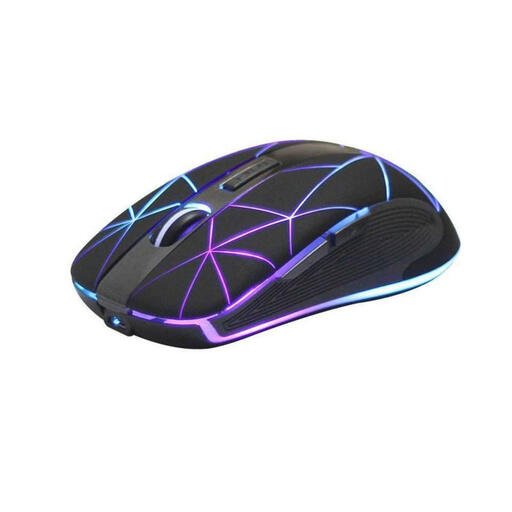 No image available
Could suit you if you want to avoid a moving cable and customise the controls.
Optical sensor; 5 buttons; rechargeable battery with USB charging.
 No image available
Could suit you if you want to choose between wireless, Bluetooth and USB-C, and programme the buttons.
62 g; PAW3311 sensor; 22,000 DPI; 2.4 GHz, Bluetooth and USB-C; 5 programmable buttons; charging dock and grip tape included.
 No image available
Could suit you if you want to adjust sensitivity and buttons, and switch between several connection types.
63 g; PAW3311 sensor; USB-C, 2.4 GHz wireless and Bluetooth; adjustable DPI, remappable buttons and macros; magnetic charging dock.
The product description says the shape is designed for medium to large hands; check whether it suits your grip.
 No image available
Could suit you if you want to train wirelessly and use several programmable buttons.
67 g; PAW3311 sensor; Bluetooth 5.0, 2.4 GHz wireless and USB-C; 7 programmable buttons.
 No image available
Could suit you if you’re looking for a symmetrical shape for smaller to medium-sized hands and several connection types.
56 g; PAW3950 sensor; up to 42,000 DPI; Bluetooth, 2.4 GHz wireless and USB-C; software customisation for buttons and settings.
No. Adjust the sensitivity to suit the space you have and the movements you can control. The maximum sensor figures for the models listed do not prove that you’ll personally get better training results.
First, check the connection types supported by your specific model. HyperX says the Pulsefire Haste 2 Mini supports 2.4 GHz wireless and Bluetooth, and charges via a USB-C cable. You can adjust DPI and buttons using compatible software.
For a faulty product, statutory consumer rights against the seller are separate from a voluntary guarantee. Germany’s consumer advice centre says the statutory warranty period is generally two years. For online purchases, you usually have a 14-day right to cancel, subject to the terms and exceptions that apply to the specific purchase.
Electrical waste must not go in household rubbish. The Federal Environment Agency lists local collection points and retailer take-back schemes among the available options. Used batteries and rechargeable batteries must also be disposed of separately.