First, choose a mouse that suits your hand and the space available for movement on your desk. For time-critical exercises, compare the click latency of the specific model in the connection mode you intend to use. In its tests, RTINGS typically finds wired connections and proprietary USB receivers to have lower latency than Bluetooth, but that doesn’t mean there’s a fixed result for your setup. A mouse alone cannot prove that your human reaction time has improved.
Who should consider this type of mouse?
Players doing time-critical click exercises
You want to assess input delay during repeated exercises and understand the differences between wired, USB wireless and Bluetooth connections. RTINGS outlines typical latency differences between these connection types.
Players who spend long days working at a PC
You use the same desk for work and practice, so mouse fit, arm support and enough room to move all matter. The Federal Institute for Occupational Safety and Health recommends arranging your mouse, keyboard and hand and arm support flexibly.
Players sharing a desk
You switch between practice and office tasks, and want to plan for the cable, receiver or charging in your workspace setup. The connection modes and power supply of the specific model will determine which setup works for you.
What should you look for when buying?
Wired mouse
A good fit if: You practise at a fixed PC, don’t want to manage a battery and can route the cable away from your movement area.
Consider: The cable needs space, and fit and click latency vary by model.
2.4 GHz wireless with a USB receiver
A good fit if: You don’t want a cable on your desk and have a suitable USB port free.
Consider: You’ll need to account for the receiver and power supply in your setup; wireless alone doesn’t guarantee a particular click latency.
Bluetooth on a multi-mode mouse
A good fit if: You want to use the same mouse for less time-critical office tasks, or with another compatible computer without a USB receiver.
Consider: In the tests described by RTINGS, Bluetooth typically has higher click latency than wired connections and proprietary USB receivers.
| What matters |
What to check before buying |
Who it matters most to |
| Click latency |
Independent tests of the exact model in the connection mode you actually intend to use; don’t confuse polling rate with click latency. |
If I do time-critical click exercises, I want to assess the delay in the specific mode I use. Around 31% of consumers would make click latency their most important buying criterion. |
| Consistent control |
Adjustable sensitivity, saved profiles and the software requirements of the exact model. |
For repeatable target practice, I want to keep my settings under control and avoid changes to pointer behaviour. Around 25% of consumers would place a consistent feel high on their list of priorities. |
| Fit and support |
Mouse dimensions, button reach, preferred grip style, and space for your hand and forearm. |
If I use the same mouse for work and practice, it needs to suit my hand and desk setup. Around 19% of consumers would make hand fit their top priority; the Federal Institute for Occupational Safety and Health highlights the importance of a flexible workspace layout. |
| Room to move |
Clear desk space, possible cable routes, and suitable ports for your computer and receiver. |
At a shared workstation, I want to move the mouse without the cable getting in the way or finding that I don’t have a port for the receiver. Around 13% of consumers would focus on room to move and desk connectivity. |
| Power |
The model’s power source, charging port and whether you can use it while it charges; assess stated battery life in light of the conditions given. |
If I work at the same PC for long periods, I want to avoid or plan for interruptions to charge. Around 12% of consumers would see power and ongoing upkeep as their main concern. |
Avoid common misconceptions
-
Assuming 8,000 Hz or a high DPI means faster human reactions
Polling rate and DPI describe different features from independently measured click latency; neither proves that training has been effective.
Check tests of the exact model and choose a sensitivity setting you can control. Keep your settings and practice conditions consistent when making your own comparisons.
-
Treating Bluetooth as equivalent to 2.4 GHz receiver mode
A mouse may offer several connection modes, and click latency can vary between them. In its tests, RTINGS typically finds Bluetooth to have higher latency than wired connections and proprietary USB receivers.
Compare test results for the mode you intend to use, and check that the required receiver is included and can be connected to your PC.
-
Relying on the product title alone to identify the right variant
For the HyperX Pulsefire Haste 2, the title on a Joybuy product page contradicted the description, which referred to the wireless version with a battery and receiver. Choosing the wrong variant could mean the mouse doesn’t offer the connection you want.
Before buying, check the model number, connection, weight and what’s included against the manufacturer’s information.
Key brands at a glance
HyperX
The Pulsefire Haste 2 range includes wired and wireless variants.
- HyperX lists the wired Pulsefire Haste 2 at 53 g, with a polling rate of up to 8,000 Hz.
- The wireless version is a different model: HyperX lists it at 61 g, with 2.4 GHz and Bluetooth connectivity. The manufacturer’s polling rate figure is not a measurement of overall reaction time.
ASUS ROG
According to ASUS, the ROG Harpe Ace Aim Lab Edition supports wired, 2.4 GHz and Bluetooth connections.
- ASUS lists a weight of 54 g and settings that can be adjusted using Aim Lab or directly on the mouse.
- Its advertised suitability for esports doesn’t replace checking the shape and controls for yourself.
CHERRY XTRFY
The M50 Wireless is designed for switching between gaming and PC work, with several connection modes.
- CHERRY lists 2.4 GHz, Bluetooth and wired connectivity, as well as five onboard profiles.
- According to the manufacturer, the stated battery life of up to 100 hours depends on the settings; an ergonomic shape doesn’t guarantee a good fit for everyone.
Razer
The Viper V3 Pro is a lightweight wireless mouse for esports.
- Razer lists the Viper V3 Pro at 54 g, with a polling rate of up to 8,000 Hz.
- These are manufacturer specifications for this model, not measured training effects or features shared by all Razer mice.
SteelSeries
The Aerox 5 Wireless combines wireless connectivity with extra programmable buttons.
- SteelSeries lists this model at 66 g, with nine programmable buttons.
- These specifications alone don’t tell you whether the extra buttons will be useful for simple reaction exercises or whether the shape will suit you.
Joybuy products for PC exercises
This selection includes wired and wireless gaming mice for PC exercises, including models with a 2.4 GHz receiver.
 No image available
Razer Viper V3 Pro Wireless Esports Gaming Mouse, White
For cable-free practice, you can use the 2.4 GHz mode with a USB receiver. For your own comparisons, the mode you actually use is what matters.
54 g; adjustable DPI; six programmable buttons; 2.4 GHz wireless and USB-C wired connectivity. According to the product description, 8,000 Hz requires the separate HyperPolling Wireless Dongle.
View at Joybuy
 No image available
ATTACK SHARK X11 Wireless Gaming Mouse
This model offers several connection types, so you can choose the mode you need for practice and other PC tasks.
2.4 GHz, Bluetooth and USB-C; 22,000 DPI; five programmable buttons; 62 g; RGB charging dock and grip tape included.
View at Joybuy
 No image available
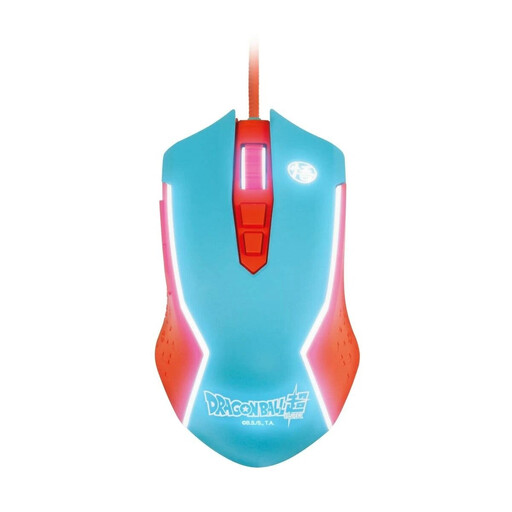
Blade Dragon Ball Goku Gaming Mouse, wired for PC
The wired version suits a fixed PC setup if you can make room for a cable in your movement area.
USB cable connection; adjustable DPI up to 8,000.
View at Joybuy
 No image available
Razer Naga V2 HyperSpeed
This mouse offers several wireless modes. For time-critical exercises, consider the mode you intend to use and look for relevant test results.
2.4 GHz wireless and Bluetooth; 19 programmable buttons; adjustable DPI. According to the product description, it’s designed for right-handed users and uses an AA battery.
View at Joybuy
 No image available
AJAZZ AJ200 AI MC Wireless Gaming Mouse
The different connection modes and charging dock could be useful at a shared PC workstation. Choose the mode you want to use for your exercises.
2.4 GHz, Bluetooth and USB-C; PAW3311 sensor; 24,000 DPI; 63 g; according to the description, up to 1,000 Hz in wired and 2.4 GHz modes; magnetic charging dock.
View at Joybuy
Frequently asked questions
Which connection should I use for time-critical exercises?
For the specific model, compare wired mode with the intended 2.4 GHz USB receiver; Bluetooth is better suited when convenient connectivity matters more. In its tests, RTINGS typically finds wired connections and proprietary USB receivers to have lower latency than Bluetooth. Your PC and monitor are also part of the input chain.
How should I set up my mouse for comparable practice sessions?
Choose a sensitivity setting you can control, and keep the connection mode and settings consistent when making comparisons. Check whether your model lets you change settings directly on the mouse or through compatible PC software; according to CHERRY, the M50 Wireless stores five customisable onboard profiles.
What should I consider when setting up my home office desk?
Allow enough space for your mouse, keyboard and hand and arm support. The Federal Institute for Occupational Safety and Health recommends a flexible layout; with a wired mouse, you’ll also need to consider where the cable will run.


