Which mouse is right for you?

For training that demands quick reactions

If you practise clicking quickly in response to visual cues, consider mouse latency and the delay from your big screen separately. RTINGS.com treats mouse click latency and TV input lag as distinct measurements.

For aim training and longer sessions

If you make frequent movements and clicks, a comfortable shape, easy-to-reach buttons and sensitivity you can control all matter. CHIP highlights comfort alongside technical specifications such as polling rate and DPI as important factors when choosing a mouse.

For a flexible screen setup

If you want to move around without a cable getting in the way, you’ll need to weigh up a USB receiver, Bluetooth and charging requirements. According to RTINGS.com, wired mice and wireless models with a proprietary USB receiver generally have lower latency than Bluetooth mice.

What should you look for when buying?

Wired

A good fit if: You want to train without worrying about the mouse battery, and the cable won’t restrict your movement.

Keep in mind: Make sure you have a suitable cable route and USB port. A quoted polling rate of up to 8.000 Hz doesn’t prove that overall latency is equally low.

2,4-GHz wireless with USB receiver

A good fit if: You want freedom to move without a cable and can connect the receiver.

Keep in mind: Check the charging requirements and latency of the specific model. RTINGS.com says this type of wireless connection generally has lower latency than Bluetooth, but performance varies by model.

Bluetooth

A good fit if: You’d rather connect without a USB receiver and the lowest possible click latency isn’t your top priority.

Keep in mind: RTINGS.com describes Bluetooth as generally having higher latency than a wired connection or proprietary USB receiver. Battery life alone therefore tells you little about whether a mouse is suitable for time-critical click exercises.

What matters when buying What to look for Who it matters most to
Click and screen lag Compare click latency for the connection you plan to use with the TV’s input lag and Game Mode at your chosen resolution and refresh rate. If you want visual cues and clicks to line up as closely as possible, check both types of delay separately. Around 33 % of consumers put this concern first.
Fit and consistent movement Consider the shape, dimensions, reach of the main and side buttons, and the space available for your mouse. If possible, try out the shape before buying. For longer sessions, I want to hold the mouse comfortably and reach the buttons securely without constantly having to correct my movements. Around 27 % of consumers prioritise fit and controlled movement.
Connection and power Check the USB ports, receiver, supported connection modes and battery life quoted for each mode. If a cable getting in the way or unexpected charging breaks could disrupt my setup, I compare the receiver, cable routing and power requirements. Around 20 % of consumers put connection options first.
Adjustable controls Check the DPI settings, button mapping and software compatibility of the specific model, then try the settings in your own training. If you want to tailor clicks or sensitivity to your training routine, make sure you can actually use the settings you need. For around 20 % of consumers, adjustable controls are the most important buying consideration.

Common buying mistakes

  • Blaming the mouse for a laggy display

    Mouse click latency and TV input lag are different things. Changing your mouse won’t fix an unsuitable picture mode.

    Before replacing your mouse, check the display’s Game Mode and input lag.

  • Assuming high Hz or DPI figures will improve your training

    Polling rate doesn’t measure the entire response chain. High figures on a spec sheet also don’t tell you whether the shape and grip will suit repeated exercises.

    Compare the fit and measured click latency in the connection mode you plan to use, rather than just comparing the highest figures.

  • Confusing wired and wireless versions with similar names

    A Joybuy listing for the HyperX Pulsefire Haste 2 contains conflicting information: the title describes a wired 8.000-Hz version, while the description and specifications give details for a wireless 1.000-Hz version.

    If the connection or polling rate details don’t match, confirm the exact model number and version before buying.

Relevant brands to consider

HyperX

The wired Pulsefire Haste 2 is an option for training without worrying about a mouse battery.

  • HyperX lists a weight of 53 g and a polling rate of up to 8.000 Hz for this wired version.
  • Claims about speed and reduced fatigue come from the manufacturer and don’t prove better training results.

Logitech G

The PRO X2 SUPERSTRIKE is aimed at buyers who want to adjust the actuation and reset points of the main buttons.

  • Logitech G describes its HITS system as a way to customise click actuation.
  • In its review of the PRO X2 SUPERSTRIKE, TechPowerUp notes its power requirements and a button layout that is only partly ambidextrous, with side buttons on the left. These points apply to this model, not every Logitech mouse.

Razer

The Viper V3 Pro is a wireless model with adjustable sensitivity.

  • Razer lists a weight of 54 g for the black version and describes how to change the DPI setting.
  • The manufacturer’s specifications alone don’t prove that the shape will suit your hand or improve your training.

SteelSeries

According to the manufacturer, the Aerox 3 Wireless Gen 2 offers 2,4-GHz wireless and Bluetooth, plus adjustable sensitivity.

  • SteelSeries quotes up to 120 hours of battery life over 2,4 GHz and up to 200 hours over Bluetooth.
  • These battery life figures refer to different modes and don’t indicate how suitable each one is for time-critical clicks. Latency claims on the product page come from the manufacturer.

Joybuy products for reaction training

The Joybuy models below cover wired connections and 2,4-GHz wireless. Some models also list Bluetooth or USB-C.

Razer Basilisk V3 35K wired gaming mouse, black

Razer Basilisk V3 35K, wired, black

A wired connection may suit you if you can train without a mouse battery and the cable won’t get in the way of your movements.

The product name lists an optical sensor with 35.000 DPI, 11 programmable buttons and an ergonomic right-handed shape.

A USB connection, adjustable DPI and customisable scroll wheel are listed.

View at Joybuy

Logitech G502 X LIGHTSPEED wireless gaming mouse, white

Logitech G502 X LIGHTSPEED, white

This wireless model may suit training where you want to move around without a cable getting in the way and can use a USB receiver.

The product details list a right-handed shape, an optical sensor and LIGHTSPEED wireless with a USB receiver.

DPI settings, 13 programmable controls and LIGHTFORCE switches are listed.

View at Joybuy

Logitech G PRO X2 SUPERSTRIKE LIGHTSPEED wireless gaming mouse

Logitech G PRO X2 SUPERSTRIKE LIGHTSPEED

The wireless connection with receiver is an option if you want to train without a cable getting in the way and customise the main buttons.

The product details list a weight of 61 g, LIGHTSPEED wireless and five programmable buttons.

HITS offers ten actuation levels and five reset levels. These are adjustment options, not proof of improved training results.

View at Joybuy
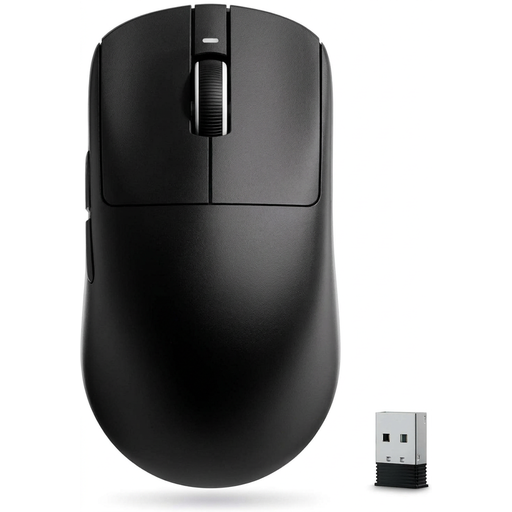
VXE Dragonfly R1 SE+ wireless gaming mouse, black

VXE Dragonfly R1 SE+, black

According to the product description, the symmetrical shape is designed for small and medium-sized hands. Check whether it suits your grip.

Listed features include 2,4-GHz wireless, Bluetooth and a wired USB connection, as well as a polling rate of up to 1.000 Hz.

The stated DPI range is from 10 to 18.000.

View at Joybuy

ATTACK SHARK X11 wireless gaming mouse, black

ATTACK SHARK X11 wireless gaming mouse, black

The three listed connection options let you choose between wireless, Bluetooth and USB-C. Check which mode suits your screen setup.

The product details list a PAW3311 sensor, 22.000 DPI, a weight of 62 g and five programmable buttons.

The polling rate and button mapping are described as adjustable. Grip tape and an RGB charging dock are also listed.

View at Joybuy

Frequently asked questions

Will a higher polling rate automatically make my reaction training on a TV faster?

No. Polling rate doesn’t describe overall click or screen latency. Compare mouse measurements for your connection with the TV’s input lag in the mode you actually use.

Which connection is best for time-critical click exercises?

Start by checking a wired connection or the mouse’s proprietary USB receiver. RTINGS.com finds that these connections generally have lower click latency than Bluetooth, but performance still depends on the specific model.

What should I check when using a wireless mouse?

Check the connection mode you’ve selected, the receiver and the battery level. Compare battery life figures only under the conditions specified: SteelSeries quotes different figures for Bluetooth and 2,4 GHz on the Aerox 3 Wireless Gen 2.

What are my rights when returning an online purchase in Germany?

For a standard distance contract with a consumer, there is generally a statutory right of withdrawal; § 312g BGB sets out the exceptions. The withdrawal period is generally 14 days and, for a typical purchase of goods, starts when you receive the goods, not automatically when you place the order. A retailer’s voluntary returns policy is separate from this.

How should I dispose of an old gaming mouse in Germany?

An old mouse is electrical waste and should be taken to a separate collection point, not put in household rubbish. The Federal Environment Agency lists local collection points and retailer take-back options. Check the relevant conditions for a specific return.