What should you look for when buying a mouse for replay analysis?
First, check which commands your replay software supports, then look at the button layout and scroll wheel. Next, decide whether a wired mouse will suit your fixed analysis spot or whether wireless would make positioning easier.
| Buying priority |
What to look for |
Who is it important to? |
| Navigation and commands |
Check whether your replay software accepts the button assignments you want and whether the scroll wheel modes suit the way you work. |
If I often jump between replay scenes, I want frequently used commands to be easy to reach. Around 31% of consumers put navigation and commands first. |
| Cursor control |
Look for adjustable sensitivity and check whether it lets you select controls in your software accurately. |
When I’m selecting small buttons on a big screen, a pointer I can control accurately matters more to me than a high maximum rating. Around 25% of consumers prioritise cursor control. |
| Wireless positioning |
Check the receiver connection, distance from your computer and power supply; some models can be used while charging. |
If my computer isn’t right beside my workstation, I want to position the mouse freely and connect the receiver where it suits my setup. Around 25% of consumers put positioning first. |
| Fit and grip |
Compare the shape and button reach with your grip and the commands you actually want to use. |
When I’m analysing for longer, I want to reach the buttons I need without changing the way I hold the mouse. Around 19% of consumers prioritise fit and reach. |
Joybuy product selection
This selection includes wireless gaming mice and a wired model with assignable buttons and switchable scroll wheel modes.
 No image available
ATTACK SHARK X11 wireless gaming mouse
The five programmable buttons may be useful for repeated inputs; check that the assignments work with your replay software.
Connections: 2.4 GHz, Bluetooth and USB-C.
Joybuy
 No image available
AJAZZ AJ200 AI MC wireless gaming mouse
If you want to use macros and custom button functions, check whether you can set up your replay commands in the accompanying software.
Connections: Bluetooth, 2.4 GHz and USB-C; the product description mentions a magnetic charging dock.
Joybuy
 No image available
AULA SC620 wireless gaming mouse
The seven programmable buttons may be useful for repeated inputs, provided your replay software supports the assignments you want.
Connections: Bluetooth 5.0, 2.4 GHz and USB-C.
Joybuy
 No image available
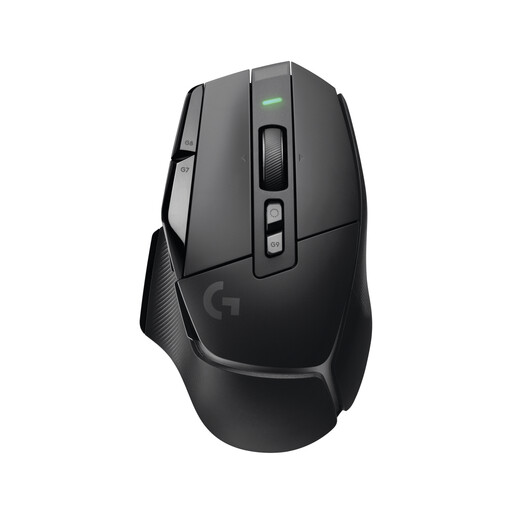
Logitech G G502 X LIGHTSPEED wireless gaming mouse
The product description lists 13 programmable controls for additional inputs; assigning replay commands still depends on the software you use.
The scroll wheel has free-spin and ratchet modes. A USB-A receiver is listed for wireless use, and USB-C is used for charging.
Joybuy
 No image available
Logitech G G502 HERO High Performance gaming mouse
If you work at a fixed analysis station, the 11 programmable buttons and two-mode scroll wheel offer extra control options; check that the software lets you assign them for your replay application.
Wired USB connection with a 2.1 m cable. The cable needs to reach your computer and be easy to position around your seat.
Joybuy
Frequently asked questions about gaming mice for replay analysis
Does a higher DPI rating make replay details visible?
No. The DPI rating describes an aspect of mouse control, not the image quality of a replay. Check whether you can adjust the pointer speed to suit your screen and software interface; the maximum DPI rating alone does not give you an advantage when analysing replays.
How do I set up extra mouse buttons for analysis?
First, find out which keyboard commands your replay software uses, then check whether you can assign them in the mouse software. Razer lists programmable buttons and profiles for the Basilisk V3; that doesn’t mean it’s compatible with every replay application.
What can I do if the battery runs out during a session?
It depends on the model. Sharkoon says the SKILLER SGM50W can be used with the supplied USB cable while charging. Check separately whether this is possible with other mice.
What are my rights when buying online if the mouse doesn’t fit or is faulty?
According to the Verbraucherzentrale, online purchases generally come with a 14-day right of withdrawal; you must notify the seller that you wish to withdraw. If a product is faulty, statutory consumer rights are separate from a voluntary manufacturer’s warranty.
Can I put an old mouse in general waste in Germany?
No. The Umweltbundesamt advises that old electrical equipment must be collected separately; local collection points generally accept it free of charge. Used batteries must also be handed in separately.


