What to look for when buying
Wired mouse
A good fit if: you play at a fixed PC setup and don’t want to factor in a mouse battery or wireless receiver.
Consider: The cable needs a suitable port and a clear route across your desk.
Wireless mouse
A good fit if: a mouse cable gets in your way and you want to use extra buttons that are easy to reach.
Consider: Depending on the model, you’ll need to allow for a receiver and a plan for batteries or charging.
Minecraft Help describes the scroll wheel in Minecraft: Java Edition as a way to control the hotbar. Check the commands and button assignments in the game you actually play.
| Priority |
What to look for when buying |
Who it matters to |
| Comfort during longer sessions |
Check the shape and grip; make sure there’s enough room for the mouse and your forearm. |
When I’m building for a long time, I want a mouse that suits my hand and moves freely without forcing me into a cramped position. Around 37% of consumers put comfort during longer sessions first. |
| Scroll wheel and building actions |
Compare the feel and modes of the wheel; check whether the game supports the button assignments you want. |
When I’m switching tools often, I want to reach the right commands quickly. Around 27% of consumers prioritise the scroll wheel and accessible commands for recurring actions. |
| Connections alongside headphones |
Check for free USB ports, a receiver, and the charging or battery requirements of the specific model. |
When I use headphones with the same PC, I want to keep cables and connections tidy. Around 18% of consumers focus mainly on keeping their setup’s connections organised. |
| Ease of use and power |
Consider whether extra software is needed; for wireless models, check the battery or charging requirements. |
If I want to play without extra setup or planning when to charge, ease of use matters most to me. Around 18% of consumers put simplicity and power first. |
Joybuy product selection
This selection includes wired and wireless gaming mice for frequent tool switching, programmable commands and different desk setups.
 No image available
Razer Basilisk V3 35K – wired gaming mouse
For frequent tool switching and recurring commands, as long as the wheel modes and button assignments suit your game.
Optical sensor with 35,000 DPI; 11 programmable buttons; right-handed shape; wired USB connection.
View at Joybuy
 No image available
Razer Naga V2 HyperSpeed
An option if you want plenty of commands within easy reach and wireless operation, and can use the button assignments in your game.
19 programmable buttons; 2.4 GHz wireless and Bluetooth; up to 250 hours according to the product name. A USB receiver is used for 2.4 GHz wireless; an AA battery is required for operation.
View at Joybuy
 No image available
AJAZZ AJ159 APEX – tri-mode with Magnetic Charging Base Set
An option if you want to consider a symmetrical shape and several connection types; check whether the size and button positions suit your hand.
Symmetrical shape; 2.4 GHz wireless, Bluetooth and wired USB-C operation according to the product details; up to 42,000 DPI and a PAW3950 sensor according to the product name.
View at Joybuy
 No image available
Logitech G G502 Hero
For recurring commands and tool switching, if the button assignments are useful in your game.
Wired operation requires a suitable USB port and a clear cable route across your desk.
View at Joybuy
 No image available
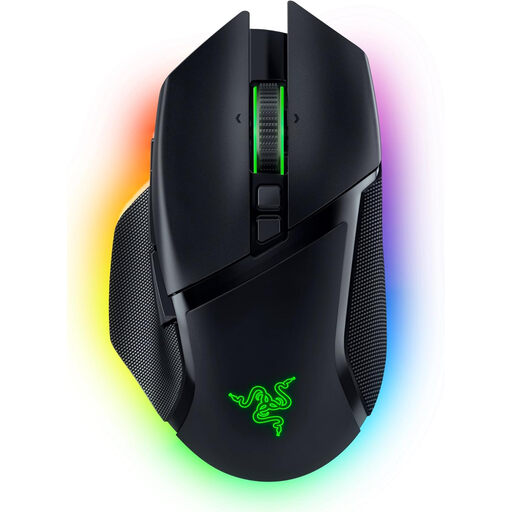
Razer Basilisk V3 Pro
For wireless gaming with programmable controls, provided the extra commands can be used in your game.
10+1 programmable buttons; HyperScroll tilt wheel; Focus Pro 30K optical sensor. Connection options: 2.4 GHz wireless, Bluetooth and USB-C wired operation. For wireless use, you’ll need to plan for charging and, depending on the connection, a USB receiver.
View at Joybuy
Frequently asked questions
Do I need lots of mouse buttons for a sandbox world?
No, extra mouse buttons aren’t essential. Minecraft: Java Edition already offers different assignments for the scroll wheel and the left, right and middle mouse buttons. Whether extra buttons help depends on your game and the mouse software it supports.
What should I check when connecting a mouse alongside my headphones?
Check which ports are free on your PC and how your headphones connect. A wired mouse needs a suitable USB port; with a wireless mouse, consider the receiver and the charging or battery requirements of the specific model. Headphones alone don’t require any special mouse compatibility.
What if the mouse is faulty or I change my mind after buying it online?
For an ordinary online purchase from a trader, you generally have 14 days from delivery to cancel; exceptions and rules on return costs apply. Separately, if the goods are faulty, you have a statutory right to a remedy from the seller for at least two years. The EU’s consumer information explains these rights and the conditions that apply.
What should I know about product safety and disposing of the mouse later?
The German Federal Network Agency lists CE marking, product identification and manufacturer details among the criteria it checks when monitoring products on the market; this does not confirm that any specific mouse complies. Dispose of old devices through the designated take-back schemes, and don’t put used batteries or rechargeable batteries in general waste.


