If someone else sleeps in your bedroom, explicitly quiet switches are a sensible place to start: CHERRY describes the GENTIX SILENT as having click-free buttons, while Razer says the Pro Click Mini has quiet mechanical switches. If you need more readily accessible actions for exploration games, gaming models such as the Basilisk V3 35K offer more programmable buttons; that doesn’t, however, prove that they click quietly.
Which mouse is right for you?
Gamers with someone else asleep in the room
If you want to avoid disturbing someone who’s asleep, look for explicit information about the switches on the exact model rather than relying on the word “gaming”. CHERRY says the GENTIX SILENT has click-free buttons; Razer describes the Pro Click Mini as having quiet mechanical switches.
Explorers with lots of in-game actions
If you want to trigger frequent actions directly from your mouse, check that the extra buttons, profiles and scroll wheel suit your game. Razer lists eleven programmable buttons for the Basilisk V3 35K; CHERRY lists five on-board profiles and a tilt wheel for the M50 Wireless.
Gamers with long or varied sessions
If you play for longer stretches or move between desks, grip, button reach and connectivity all matter. In its test on 13 September 2026, COMPUTER BILD praised the CHERRY XTRFY M50 Wireless for its smooth gliding, but also noted that it made the hand feel a little cramped.
What should you look for when buying?
| What matters |
What to check |
Who it matters most to |
| Click and operating noise |
Explicit information about the switches on the exact model, as well as the sound of the main buttons and scroll wheel. |
If someone is sleeping nearby, I’d first look for explicitly quiet switches and check the scroll wheel too. Around 36% of consumers put consideration for someone seeking peace and quiet first. |
| Accessible buttons and scrolling features |
Whether you can reach the buttons comfortably with your grip and use their assignments in your game. |
For frequent in-game actions, I want to assign buttons directly on the mouse without losing sight of the noise level. Around 29% of consumers prioritise easily accessible in-game actions. |
| Comfort during long gaming sessions |
Palm support, grip style and reach to the extra buttons. |
For longer sessions, it matters to me that the shape suits my hand and grip. Around 21% of consumers focus first on fit and accessible controls. |
| Wired, wireless and power options |
The connection you need, power or battery requirements, and cable management. |
If a cable gets in the way at a shared desk or I switch between devices, the right connection matters to me. Around 14% of consumers put connection type and cable management first. |
Common buying mistakes
-
Assuming a quiet office mouse is the same as a gaming mouse
CHERRY lists three buttons and no thumb buttons for the GENTIX SILENT. Quiet clicks alone don’t tell you whether the mouse can handle the in-game actions you need.
First, work out which functions you need in your game, then compare them with the buttons on the exact model.
-
Assuming similarly named models are identical
The names G502 LIGHTSPEED and G502 X LIGHTSPEED don’t automatically refer to the same model. Differences in connectivity and key specifications could affect your buying decision.
Check the full model name and the details for the specific version before making your choice.
-
Comparing weight figures without checking the conditions
Logitech lists the G309 LIGHTSPEED at 86 g with an AA battery and 68 g when used without an AA battery with POWERPLAY. These figures apply to different configurations.
Only compare the weight that applies to the power setup you plan to use.
The stated configuration requires POWERPLAY to operate without an AA battery, so factor this system into your setup plans.
Key brands to consider
CHERRY / CHERRY XTRFY
The GENTIX SILENT is an explicitly quiet office mouse, while the M50 Wireless is a gaming mouse with several connection options and profiles. Each model has a different focus.
- CHERRY describes the GENTIX SILENT as having click-free buttons. For the M50 Wireless, the manufacturer lists five on-board profiles and a tilt wheel.
- The GENTIX SILENT’s quiet design doesn’t prove that the M50 Wireless clicks quietly. In its test on 13 September 2026, COMPUTER BILD noted that the hand felt a little cramped, despite the mouse’s smooth gliding.
Razer
Razer describes the Pro Click Mini as a quiet productivity mouse; the Basilisk V3 35K is a wired gaming mouse with extra controls.
- Razer describes the Pro Click Mini’s switches as quiet and lists seven programmable buttons. For the Basilisk V3 35K, the manufacturer lists eleven programmable buttons and scroll modes.
- The information about the Pro Click Mini doesn’t prove that the Basilisk V3 35K clicks quietly. Check the noise level and how easy the controls are to reach on the specific model.
Logitech G / Logitech
The G309 LIGHTSPEED is a gaming mouse with wireless and Bluetooth connectivity. The MX Master 3S Bluetooth Edition is designed for a different kind of use.
- Logitech lists Bluetooth and wireless connectivity for the G309 LIGHTSPEED. The manufacturer’s weight figures vary according to whether you use a battery or POWERPLAY.
- Logitech’s claim that the MX Master 3S Bluetooth Edition makes less clicking noise doesn’t apply to the G309 LIGHTSPEED.
ASUS
ASUS describes the MW203 as a quiet productivity mouse that can also be used for gaming sessions. It isn’t listed as a dedicated gaming mouse.
- ASUS advertises Quiet-Click technology, Bluetooth and 2.4 GHz wireless connectivity for this model.
- The manufacturer’s noise claim is no substitute for comparing the mouse in the conditions of a shared bedroom.
Joybuy product selection
This selection includes wired and wireless gaming mice, as well as a model with “Silent” in its product title. That name alone doesn’t prove that it clicks quietly in a shared bedroom.
 No image available
Razer Basilisk V3 35K wired gaming mouse
If you want to control in-game actions directly from your mouse, the product title lists eleven programmable buttons.
35,000 DPI optical sensor; wired USB connection; right-handed shape.
View at Joybuy
 No image available
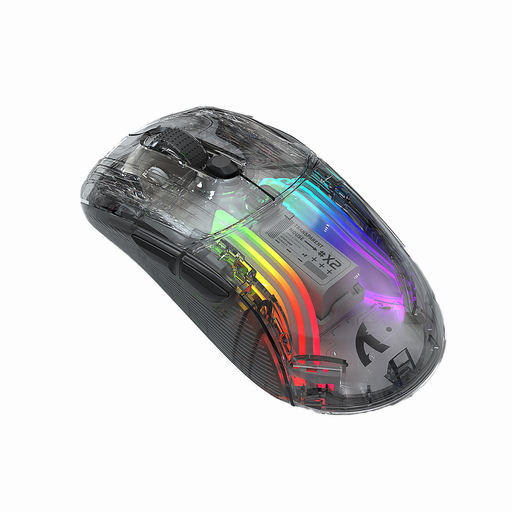
KINSI X2 wireless Bluetooth mouse, 3 modes
The product title describes this model as “Silent” and suitable for gaming; still, check whether the click and scroll-wheel noise will suit your bedroom.
Features listed in the title: three modes, Bluetooth, RGB, 2,400 DPI, rechargeable and transparent.
View at Joybuy
 No image available
NAXSIR 3-in-1 gaming mouse
If you want to assign frequent actions directly to your mouse, the product title lists seven programmable macro buttons.
Features listed in the title: up to 12,800 DPI and a wired connection, 2.4 GHz wireless or Bluetooth.
View at Joybuy
 No image available
ATTACK SHARK X11 wireless gaming mouse
If you want to switch between connections depending on your desk and assign in-game actions, the product title lists three connection types and five programmable buttons.
PAW3311 sensor with 22,000 DPI; 2.4 GHz wireless, Bluetooth and USB-C; charging dock; 62 g.
View at Joybuy
 No image available
AJAZZ AJ200 AI MC wireless gaming mouse with charging dock
If you want to switch between connection types on a gaming mouse, the product title lists Bluetooth, 2.4 GHz and USB-C.
PAW3311 sensor with 24,000 DPI; 63 g; charging dock.
View at Joybuy
Frequently asked questions
Is “gaming” enough to guarantee a quiet bedroom?
No. The label doesn’t prove that the mouse clicks quietly. Look for explicit information about the switches on the exact model and, if possible, check the main buttons and scroll wheel under your own usage conditions too.
How do I set up extra buttons for an exploration game?
First, check which actions your game lets you assign and which buttons you can reach comfortably. Razer lists programmable buttons for the Basilisk V3 35K; CHERRY lists five on-board profiles for the M50 Wireless. This doesn’t mean there’s a specific default button layout for any game.
What should I bear in mind when cleaning the mouse and powering it?
Keep the mouse and its surface clean, and follow the instructions for the specific model. Remember to charge the M50 Wireless; using the Logitech G309 without an AA battery, as described by Logitech, requires POWERPLAY.


