If someone else sleeps in the same bedroom, start by checking the sounds made by the main buttons, scroll wheel and side buttons. A lightweight mouse isn’t necessarily quiet. Next, choose a shape that suits your grip, then check whether a wired or wireless connection works with your available space and devices. A manufacturer’s description of a mouse as “quiet” is no substitute for listening to it in your own room.
Who this decision matters to
Gamers sharing a room with someone who’s asleep
If someone else wants to sleep in the same room, assess the clicks, scrolling and side buttons separately. be quiet! describes the Dark Perk’s main buttons as quiet, while a PC Guide hands-on test found the Ergo sounded different.
Tactical gamers who want a precise grip
If you often make small aiming adjustments, the mouse’s shape and weight need to suit your hand and grip. A high DPI figure alone won’t tell you that. Logitech G, Razer and SteelSeries list the weights of individual models, but you’ll still need to decide for yourself whether one feels right.
Gamers who switch between devices
If you want to use the same mouse with several devices, check that its connection options and any required receiver are compatible with them. CHERRY lists several connection types for the M50 Wireless, while Razer describes the Basilisk V3 35K as a wired mouse.
What to consider when buying
First, check how much noise the mouse makes in your room. Then see whether it suits your grip, and finally make sure its connection and design work for your gaming setup.
Main buttons described as having a soft click
Best for: If you often play while someone else in the room is asleep, manufacturer descriptions like these can be a starting point for your own listening test.
Consider: be quiet! describes the Dark Perk’s main buttons as quiet, while PC Guide found the Ergo’s clicks clearly audible. That doesn’t guarantee a quiet experience.
A lightweight mouse for frequent aiming adjustments
Best for: If you move your mouse around the pad often, compare its stated weight and, above all, its shape with your grip.
Consider: A manufacturer’s weight specification doesn’t prove that a mouse will give you better control or make less noise when clicked.
Multiple connection options or extra controls
Best for: If you switch between devices or want extra inputs, check the connection options and button layout on the specific model.
Consider: Connection options and extra buttons don’t tell you how loud the scroll wheel or buttons will sound in a bedroom.
| Priority |
What to check when buying |
Who this matters most to |
| Click and operating noise |
Listen to the main buttons, scroll wheel and side buttons separately, ideally in the room where you’ll use the mouse. |
If I play while someone sleeps next to me, I want to know whether the scroll wheel and side buttons might disturb them too. Around 42% of consumers put click and operating noise first. |
| Fit and control |
Compare the shape and weight of the specific model with your hand and grip; a low weight alone doesn’t guarantee better control. |
If I often make aiming adjustments, I want a mouse that fits my hand rather than simply choosing one with a high DPI figure. Around 33% of consumers prioritise fit and aiming movements. |
| Connectivity and power |
Check which connections your device supports, along with the cable routing or charging requirements. |
If I switch between devices, I need a compatible connection and want to plan for any receiver or cable I’ll need. Around 17% of consumers focus mainly on connectivity and power. |
| Risk of choosing the wrong mouse |
Check the fit and noise before buying, and review the applicable returns policy. |
If I’m unsure whether the shape and noise will suit a bedroom, I want to know the purchase terms in advance. Around 8% of consumers put avoiding an unsuitable choice first. |
Avoiding common buying mistakes
-
Assuming “soft clicks” means complete silence
be quiet! describes the main buttons as having a quiet sound profile. PC Guide, however, found the Dark Perk Ergo’s clicks clearly audible. These assessments don’t prove that the mouse will sound equally quiet in every room.
Assess the main buttons, scroll wheel and side buttons separately, ideally in the conditions you’ll be gaming in.
-
Choosing a high DPI figure over the right shape
A DPI figure won’t tell you whether the mouse suits your hand and grip, or whether you can move it with control when adjusting your aim.
First compare the specific model’s shape and feel in your hand. Then consider sensor specifications as a separate factor.
-
Assuming the highest polling rate means the longest battery life
be quiet! states that the Dark Perk Ergo lasts for up to 110 hours at 1,000 Hz. Don’t assume this figure applies at a different polling rate.
Always read battery life claims alongside the operating conditions specified.
Brands worth considering
be quiet!
The Dark Perk Ergo and Dark Perk Sym have different shapes: ergonomic and symmetrical, respectively.
- be quiet! lists both models at 55 g, with optical Omron main button switches and up to 110 hours of battery life at 1,000 Hz.
- be quiet! describes the main buttons as quiet, while PC Guide found the Ergo’s clicks clearly audible. Claims about the main buttons don’t tell you how loud the scroll wheel and side buttons are.
CHERRY XTRFY
According to CHERRY, the M50 Wireless offers several connection options, while the M42V2 comes with two interchangeable rear shells.
- CHERRY lists 2.4 GHz wireless, Bluetooth and wired connectivity for the M50 Wireless, as well as two rear shells for the M42V2.
- These connection and design features don’t prove that either model has particularly quiet clicks.
Razer
The Viper V3 Pro and Basilisk V3 35K cater to different design and control preferences.
- Razer lists the black Viper V3 Pro at 54 g and gives the Basilisk V3 35K several scroll modes.
- These features aren’t independent proof of quiet clicks.
Logitech G
The PRO X SUPERLIGHT 2 is a wireless option for comparing lightweight designs.
- Logitech G lists this model at 60 g and with LIGHTFORCE hybrid switches.
- The click feel described by the manufacturer isn’t a sound-level measurement, nor does it prove that the mouse is suitable for use next to someone who’s asleep.
SteelSeries
The Aerox 3 Wireless is a wireless mouse with Bluetooth as an option.
- SteelSeries lists the model at 68 g, with 2.4 GHz wireless and Bluetooth.
- Its weight and connection options don’t tell you how loud the clicks will sound in a bedroom.
Joybuy products for tactical games
The Joybuy products below include wired and wireless gaming mice. Their stated shape, weight and connectivity don’t prove that they’ll be quiet when clicked in a bedroom.
 No image available
Razer Viper V3 Pro Wireless Esports Gaming Mouse, White
A wireless option to compare if you often make aiming adjustments in tactical games. The product name states a weight of 54 g, but that doesn’t prove it will suit your hand or make quiet clicks.
Joybuy
 No image available
Razer Basilisk V3 35K Wired Gaming Mouse
A wired option if you want to set up your gaming space without wireless connectivity. Plan the cable route and check that the shape suits your hand; the model description doesn’t prove that its clicks are quiet.
Joybuy
 No image available
Logitech G502 X Lightspeed Wireless Gaming Mouse, White
A wireless gaming mouse to compare if you want to play without a cable. The product name describes it as a right-handed mouse; check that its shape suits your grip.
Joybuy
 No image available
Logitech G PRO X2 SUPERSTRIKE LIGHTSPEED Wireless Gaming Mouse
A wireless gaming mouse to compare based on the way you prefer to use your mouse. The model name alone doesn’t tell you how loud the main buttons, scroll wheel or side buttons are.
Joybuy
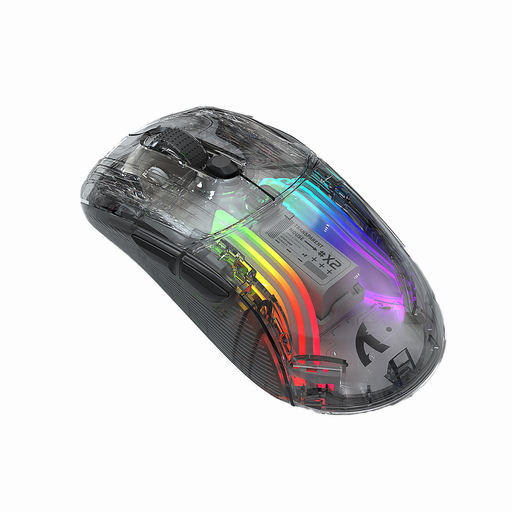 No image available
KINSI X2 Wireless Bluetooth Mouse
The product name lists Bluetooth, three modes and 2,400 DPI; check that the connection type you need works with your device. “Silent” is a product description, not proof that the mouse will be quiet in a bedroom.
Joybuy
Frequently asked questions
Is a “quiet” description enough if someone is sleeping next to me?
No. A description like this doesn’t guarantee silence. be quiet! describes the Dark Perk’s main buttons as pleasantly quiet, while PC Guide found the Ergo’s clicks clearly audible. Check the scroll wheel and side buttons in your own room too.
How do I set up a mouse with several connection options?
Choose a connection type supported by both the specific mouse and your device. CHERRY lists 2.4 GHz wireless, Bluetooth and wired connectivity for the M50 Wireless. Check whether you need a receiver for wireless use.
How should I dispose of an old wireless mouse in Germany?
Take electrical waste to an authorised collection point instead of putting it in your general rubbish. Germany’s Federal Environment Ministry explains how to return waste electrical equipment. Removable used batteries and rechargeable batteries should be taken separately to a suitable collection point, as described by the Federal Environment Agency.
What return and fault rights apply to online purchases in Germany?
For online purchases, the statutory right to cancel usually lasts 14 days from receipt of the goods; you must notify the retailer that you wish to cancel. If an item is faulty, statutory rights against the seller are separate from any voluntary guarantee, as explained by Germany’s consumer advice centre.


