If clicking might disturb someone in the same room, look for buttons specifically described as quiet and check the sound of the mouse and scroll wheel for yourself. Easily accessible extra buttons may be more important for frequently used abilities, but the number of buttons tells you nothing about how quiet they are. You should also check the fit in your hand, connection options and whether the lighting can be switched off on the specific model.
Who these mice may suit
Considerate late-night gamer
You play while someone else in the room needs peace and quiet, and want to keep clicking sounds to a minimum. CHERRY describes the GENTIX SILENT as having quiet clicks; however, it’s an office mouse with three buttons and no thumb buttons.
Player with lots of abilities
You want to trigger frequently used actions in a fantasy MMO with your thumb. SteelSeries and Razer list plenty of buttons on their respective models; check that their layout suits your grip.
Player sharing a desk
You need a mouse whose shape and connection options suit a shared space. According to CHERRY, the CHERRY XTRFY M50 Wireless offers 2.4 GHz wireless, Bluetooth and wired connectivity.
What to look for when buying
First decide whether quiet clicks or easily accessible in-game commands matter more. Then check the fit in your hand, connectivity and lighting.
| Consideration |
What to check before buying |
Who is this important to? |
| Clicking sounds |
Look for buttons specifically described as quiet; if possible, listen to the clicks and scroll wheel yourself. |
When I’m playing while someone in the room needs peace and quiet, I want to avoid disruptive clicks and can do without extra buttons. Around 33% of consumers put clicking sounds first. |
| Ability buttons |
Check the number, position and programmability of the buttons, and think about which commands you actually need in your game. |
I want to reach frequently used game commands with my thumb without having to keep repositioning my hand. Around 25% of consumers prioritise easy access to lots of in-game abilities. |
| Fit in your hand |
Check that the grip and reach to the side buttons suit your hand. |
During longer gaming sessions, I want a secure grip and to be able to reach all the buttons I need comfortably. Around 25% of consumers put a suitable shape and easy access first. |
| Connectivity and lighting |
Check the connection options and power supply; for the model you’re considering, look specifically for an option to switch off the lighting. |
When I share a desk, I don’t want an inconvenient cable in the way or lights unnecessarily disturbing the sleeping area. Around 17% of consumers prioritise space and connectivity. |
Common buying misconceptions
-
“Gaming” doesn’t automatically mean “quiet”
Having lots of buttons or a gaming sensor doesn’t prove that a mouse clicks quietly. There are no comparable noise measurements available for the gaming mice considered here.
Check how noisy the mouse is separately from its gaming features. A mouse specifically described as quiet may have fewer buttons; the CHERRY GENTIX SILENT has three and no thumb buttons.
-
Having as many buttons as possible won’t suit every grip
A large panel of side buttons is only useful if you can reach the buttons you need comfortably.
Before deciding, check the button layout and whether the mouse suits the way you hold it.
-
Wireless doesn’t mean you can ignore the power supply
With wireless models, you’ll need to consider how they’re powered; a wired mouse doesn’t need a mouse battery.
Compare the connection options and charging or battery arrangements for the specific model.
Brands worth considering
CHERRY / CHERRY XTRFY
The models mentioned illustrate the difference between an office mouse specifically described as having quiet clicks and a gaming mouse with several connection options.
- CHERRY describes the GENTIX SILENT as having quiet clicks. For the XTRFY M50 Wireless, the manufacturer lists 2.4 GHz wireless, Bluetooth and wired connectivity.
- The GENTIX SILENT has three buttons and no thumb buttons. There’s no evidence that the M50 Wireless is quiet.
Logitech G
The G502 HERO and G502 LIGHTSPEED are wired and wireless gaming options, respectively, with extra buttons.
- Logitech G lists 11 programmable buttons for the G502 HERO. The manufacturer also describes its weight as adjustable.
- There’s no evidence here that either model has particularly quiet clicks. Extra buttons and lighting tell you nothing about how noisy a mouse is.
SteelSeries
The Aerox 9 Wireless is aimed at players considering a side button panel for extra commands.
- SteelSeries lists 18 programmable buttons, including a 12-button side panel.
- The number of buttons proves neither that the clicks are quiet nor that the shape will suit every hand.
Razer
The Naga V2 HyperSpeed is a wireless MMO mouse for players who want to keep lots of commands on the mouse.
- Razer lists 19 buttons for the Naga V2 HyperSpeed and up to 250 hours of battery life using HyperSpeed Wireless; this battery life is a manufacturer claim.
- These specifications don’t prove that the mouse is quiet. Also check that the button panel suits your hand and the shortcuts you want to assign.
Corsair
The SCIMITAR ELITE WIRELESS is another MMO-style mouse with a side button panel.
- Corsair lists 16 programmable buttons and a sliding 12-button panel.
- The button specifications prove neither that the clicks are quiet nor that the buttons will be within easy reach for every hand.
Joybuy products for gaming and shared spaces
This selection includes gaming mice with different button layouts and connection options, including one model described as “Silent” in its product title. The name alone isn’t a substitute for checking how noisy it is for yourself.
 No image available
RAZER Viper V3 Pro Wireless
A wireless gaming mouse with six programmable buttons for multiple mouse commands, handy if a cable gets in the way on a shared desk.
USB-C charging; listed as White in the product title.
View at Joybuy
 No image available
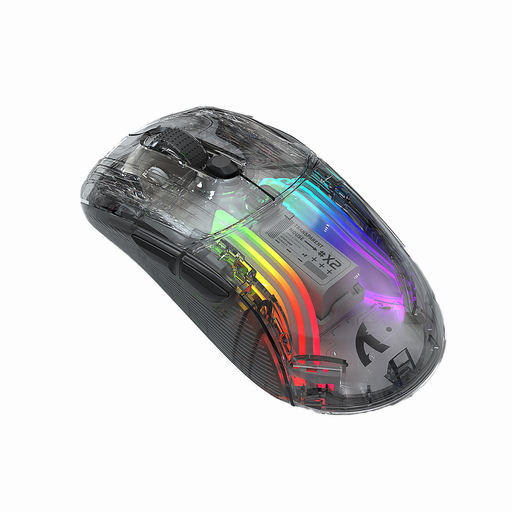
KINSI X2 Wireless Bluetooth Mouse
The product title describes this model as “Silent”; check the clicks and scroll wheel for yourself before relying on it for late-night gaming.
Three modes, Bluetooth, RGB lighting, 2400 DPI and rechargeable, according to the product title.
View at Joybuy
 No image available
NAXSIR 3-in-1 Gaming Mouse
The product title lists seven programmable macro buttons, which could be useful for frequently used game commands; check that they’re easy to reach and that macros are allowed in your game.
Wired, 2.4 GHz wireless and Bluetooth; up to 12800 DPI and RGB lighting, according to the product title.
View at Joybuy
 No image available
Razer Naga V2 HyperSpeed
For keeping lots of MMO commands on the mouse, the product description lists 19 programmable buttons. Check that you can comfortably reach the panel with your usual grip.
2.4 GHz wireless and Bluetooth; two-step scroll wheel, according to the product description.
View at Joybuy
 No image available
AJAZZ AJ200 AI MC Wireless Gaming Mouse
Several connection options may suit you if you want flexibility when organising a shared space. The description lists programmable button functions.
Bluetooth, 2.4 GHz and USB-C, plus a magnetic charging dock, according to the product description; PAW3311 sensor and 24000 DPI, according to the product title.
View at Joybuy
Frequently asked questions
Is a silent office mouse a suitable alternative for fantasy games?
It may be worth considering if quiet clicks matter more to you than extra mouse commands. CHERRY describes the GENTIX SILENT as having quiet clicks; it has three buttons and no thumb buttons, so check that its controls are enough for your game.
How should I set up extra buttons?
Start by assigning commands you use frequently in your game, then check that you can reach the buttons without shifting your grip. Logitech G describes the G502 HERO as having programmable buttons; SteelSeries lists a 12-button side panel for the Aerox 9 Wireless. Whether macros are allowed depends on your game’s rules.
What should I consider when switching between wired and wireless?
For a wireless mouse, consider how it’s powered and check which connection accessories come with the specific model. According to CHERRY, the CHERRY XTRFY M50 Wireless can connect via 2.4 GHz wireless, Bluetooth or cable. Old batteries and rechargeable batteries must not go in household waste; the German Environment Agency provides information on disposing of electrical waste separately.
What are my rights if the mouse doesn’t fit my hand?
Online purchases generally come with a right to cancel, usually within 14 days of receiving the goods; you must notify the retailer that you wish to cancel. The consumer advice centre also distinguishes between your statutory rights for faulty goods and a voluntary manufacturer’s guarantee.


