If someone else is sleeping in the same bedroom, first check which buttons are specifically described as quiet, and whether the scroll wheel and side buttons make a noise too. Then choose based on your hand shape and the game controls you need. A productivity mouse advertised as quiet may suit a relaxing puzzle game, while a gaming mouse with the right controls offers a different compromise. Manufacturers’ claims about quiet clicks are not an independent measurement of noise levels in your room.
Who are the different options for?
Gamers sharing a bedroom
If someone else is sleeping in the same room, the noise from the main buttons may be your top priority. Check whether the manufacturer’s claim actually refers to these buttons, rather than assuming it applies to every control.
Puzzle gamers who value comfort
If you spend a long time looking for clues and navigating menus, the shape should suit your hand and grip. The CHERRY XTRFY M42V2 has two interchangeable rear shells, but this does not mean its clicks are quiet.
Gamers who use controls frequently
If you like assigning actions to extra mouse buttons, check that they’re easy to reach and can be configured as needed. Claims about programmable buttons do not, by themselves, tell you how noisy they are.
What should you consider when buying?
First compare the noise made by the buttons you actually use, then consider fit, controls and connectivity.
Gaming mouse with main buttons described as quiet
Suitable if: you want gaming controls and are mainly concerned about the primary clicks. be quiet! describes the main switches on the Dark Perk Ergo as quiet.
The trade-off: This claim applies to the left and right mouse buttons; it doesn’t establish how noisy the scroll wheel or side buttons are. This model is designed for right-handed users.
Productivity mouse advertised as quiet
Suitable if: for quieter puzzle games, minimising clicking noise matters more to you than dedicated gaming features. ASUS advertises Quiet-Click on the SmartO MD200 Silent Plus.
The trade-off: Check that the shape, button layout and connectivity suit your game; the manufacturer’s claim is not a measurement taken in your bedroom.
Gaming mouse with an adjustable shape or extra buttons
Suitable if: you want to adjust your hand position or trigger game commands frequently using extra buttons.
The trade-off: No quiet-click claim has been confirmed for the models listed here. Check the scroll wheel and extra buttons too, rather than assuming that gaming features mean a particular sound profile.
The figures below relate to consumers choosing a mouse for mystery games in a shared bedroom.
| Buying priority |
What to look for |
Who is it particularly important to? |
| Clicking and control noise |
Check which buttons the quiet-click claim refers to, and consider the scroll wheel and side buttons separately. |
If you play while someone else is sleeping in the room, you’ll want to keep distracting input noises to a minimum. Around 42% of consumers put clicking and control noise first. |
| Fit during longer puzzle sections |
Compare the shape, handedness and grip, and check whether the side buttons are easy to reach. |
During longer gaming sessions, a comfortable shape matters more to you than having as many extra features as possible. Around 25% of consumers prioritise fit. |
| Access to game commands |
Check which buttons are easy to reach and programmable, and whether your game supports the layout you want. |
If you trigger the same actions frequently, easy-to-reach extra buttons may matter more to you than a simpler button layout. Around 17% of consumers prioritise game commands. |
| Wireless use |
Check the connectivity and power supply for the specific model; wireless mice may need batteries replaced or recharging. |
If you want to use your mouse without a cable, remember to factor in its power requirements too. Around 16% of consumers prioritise a cable-free setup. |
Which buying mistakes should you avoid?
-
Assuming quiet main clicks mean the whole mouse is silent
For the Dark Perk Ergo, the manufacturer’s claim applies to the left and right mouse buttons. It does not confirm how noisy the scroll wheel or side buttons are.
Check the noise made by each control you use frequently in your game.
-
Choosing a productivity mouse for gaming just because it says “Silent”
A mouse advertised as quiet won’t necessarily have the game controls, shape or connectivity you need.
Before making click noise your only deciding factor, compare the button layout, grip and connectivity you need with your game.
-
Comparing weight or battery life without considering how the mouse is used
The weight quoted for the Logitech G309 depends on its power supply: Logitech lists 86 g with an AA battery and 68 g without a battery when used with POWERPLAY. be quiet! quotes the Dark Perk Ergo’s battery life based on a 1,000 Hz polling rate.
Only compare figures for the setup and settings you actually plan to use.
Which brands offer suitable options?
be quiet!
The Dark Perk Ergo combines gaming features with a right-handed shape that the manufacturer describes as quiet.
- be quiet! specifies optical Omron switches for the left and right buttons, as well as five reprogrammable buttons.
- The sound-profile claim applies to the main buttons; it does not confirm the noise level of every control or provide a measurement taken in a bedroom.
ASUS
The SmartO MD200 Silent Plus is advertised as a productivity mouse with Quiet-Click, and could be worth considering for quieter puzzle games.
- ASUS specifies six programmable buttons, as well as 2.4 GHz wireless and Bluetooth connectivity.
- The Quiet-Click claim does not confirm that the shape and button layout will suit every game, or that the mouse will be inaudible in your room.
CHERRY XTRFY
The M42V2 has an adjustable, symmetrical shape, while the M64 Wireless is another gaming range with a right-handed design.
- CHERRY specifies two interchangeable rear shells and a USB-A cable for the M42V2.
- The shape and connection type do not indicate whether the buttons are quiet.
Logitech G
The G309 LIGHTSPEED is a wireless gaming mouse with several connectivity options.
- Logitech specifies LIGHTSPEED, Bluetooth and LIGHTFORCE hybrid switches with mechanical actuation feedback.
- The manufacturer’s claims do not confirm that the G309 has quiet clicks. Its stated weight depends on the power supply.
Razer
The Basilisk V3 35K is a wired gaming mouse, while the Pro Click V2 is a separate range designed for work and gaming.
- Razer specifies 11 buttons for the Basilisk V3 35K.
- The listed features do not confirm that it is quiet. The Pro Click V2 is a different model from the Basilisk V3 35K.
Joybuy products for mystery games
This selection includes gaming mice with different priorities, from clicking noise and extra buttons to wireless use. For each model, check which details matter for the way you play and the room you share.
 Image unavailable
Razer Viper V3 Pro Wireless Esports, White
Consider this model if you’re looking for a wireless gaming mouse with the switches and sensor features listed in the product title; this does not indicate how loud its clicks are.
The product title lists a weight of 54 g, the Focus Pro 35K sensor, 8,000 Hz HyperPolling and Optical Switches Gen-3.
View at Joybuy
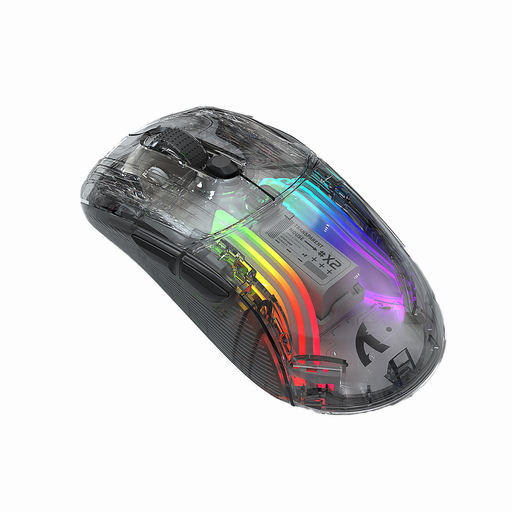 Image unavailable
KINSI X2 Wireless Bluetooth Mouse, 3 Modes
Consider it if you’re looking for a mouse marketed for gaming, with clicks described as quiet and wireless connectivity. The description is no substitute for checking how noisy it is in your own room.
The product title lists three connection modes, a rechargeable battery and RGB lighting.
View at Joybuy
 Image unavailable
NAXSIR 3-in-1 Gaming Mouse, Black
Consider this model if you’re looking for a gaming mouse with several connection options and extra buttons; don’t assume its gaming features mean it will be quiet in a shared bedroom.
The product title lists wired use, 2.4 GHz wireless, Bluetooth, 12,800 DPI and seven programmable macro buttons.
View at Joybuy
 Image unavailable
ATTACK SHARK X11 Wireless Gaming Mouse, Black
Consider it if you want a wireless gaming mouse with multiple connection options and programmable buttons. The product title does not confirm that its clicks are quiet.
The product title lists 2.4 GHz wireless, Bluetooth, USB-C, five programmable buttons and a weight of 62 g.
View at Joybuy
 Image unavailable
AJAZZ AJ200 AI MC Wireless Gaming Mouse
Consider this model if you want to switch between different connection types and customise button layouts. This does not indicate that its clicks are quiet.
The product title lists 24,000 DPI, a PAW3311 sensor, a weight of 63 g and tri-mode connectivity via Bluetooth, 2.4 GHz or USB-C.
View at Joybuy
Frequently asked questions
Is a “Silent” label enough for a shared bedroom?
No. The label alone doesn’t tell you how noisy all the controls will be in your room. be quiet!’s specific claim for the Dark Perk Ergo applies to the left and right mouse buttons; check the scroll wheel and side buttons as well.
What should I look for in extra mouse buttons?
Check that the buttons are comfortable to reach and that your game supports the layout you want. be quiet! specifies five reprogrammable buttons for the Dark Perk Ergo; the Razer Basilisk V3 35K is described as having 11 buttons. These details don’t tell you how noisy they are.
What should I consider when choosing a wireless mouse?
Compare the connection options and power supply for the specific model. According to Logitech, the Logitech G309 supports LIGHTSPEED and Bluetooth and uses an AA battery in the described setup; be quiet! says the Dark Perk Ergo has a built-in rechargeable battery.
Could a productivity mouse work for mystery games?
Yes, if its shape, connectivity and button layout suit your game. ASUS advertises Quiet-Click on the SmartO MD200 Silent Plus; still, check that the game commands you need are easy to reach and that you’re happy with the clicking noise in a shared bedroom.


