What to look for when buying
In a shared bedroom, quiet operation, customisable commands, fit, connectivity and power can all be priorities when choosing a mouse.
| Priority |
What to check when buying |
Who it matters most to |
| Click noise |
Look for quiet-button claims for the exact model; assess the scroll wheel and side buttons separately where you’ll actually use the mouse. |
If I play while someone is asleep, I want to keep click noise to a minimum. That’s why around 33 % of consumers put quiet buttons first. |
| In-game commands |
Check how easy the buttons are to reach, what software is required and which controls you can assign in your game. |
If you want to trigger recurring in-game actions with ease, customisable inputs are especially important. Around 27 % of consumers prioritise these commands. |
| Fit |
Check your hand size, whether you’re left- or right-handed, your grip and how easy it is to reach the side buttons on the exact version. |
For longer sessions, my first concern is whether the mouse suits my hand and grip. Around 20 % of consumers choose a mouse primarily for its fit. |
| Connectivity and power |
Check the USB ports and receiver, as well as the specific charging or battery type. |
If I want to avoid cables, wireless connections or changing batteries, the right connectivity and power option is what matters. Around 20 % of consumers look at these things first. |
Joybuy products
The Joybuy products below relate to quiet clicks and customisable in-game commands.
 No image available
Razer Viper V3 Pro Wireless Esports Gaming Mouse, White
It may be worth considering if you use recurring in-game commands; check that you can assign the inputs you need in your particular game.
Listed in the product name: 54 g, Focus Pro 35K sensor, 8000 Hz HyperPolling and Optical Switches Gen-3.
Joybuy
 No image available
ATTACK SHARK X11 Wireless Gaming Mouse, Black
If you want to assign recurring commands to your mouse, check the options in your particular game and make sure the buttons are easy to reach.
Listed in the product name: Tri-Mode 2.4 GHz, Bluetooth and USB-C, five programmable buttons and 62 g.
Joybuy
 No image available
HOFOTEK M308 2.4G Silent Office Mouse, Black
If keeping click noise down matters to you, this version, described as a Silent Office Mouse, could be worth considering. Check how loud it is where you’ll actually use it.
Listed in the product name: 2.4 GHz connectivity and adjustable DPI settings.
Joybuy
 No image available
HOFOTEK M311 2.4G+BT Silent Office Mouse, White-Grey, 1xAA Battery
If you’re looking for a mouse described as silent that offers several connection options, check whether this version suits your connectivity and noise requirements.
Listed in the product name: 2.4 GHz and Bluetooth connectivity, plus one AA battery.
Joybuy
 No image available
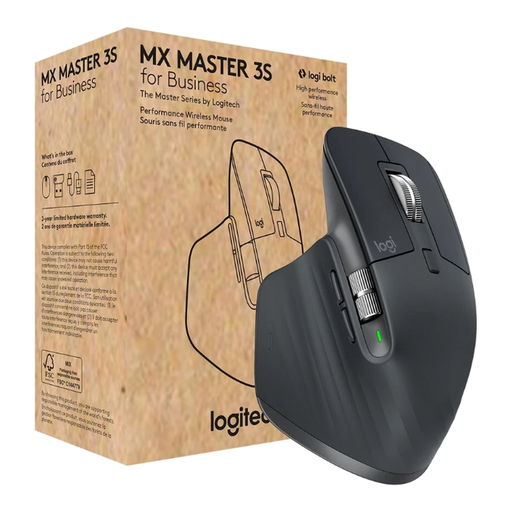
Logitech MX Master 3S for Business, Graphite
If you’re considering quiet clicks and customisable buttons, check that the shape and button layout suit your hand and the game you play.
Listed in the product name: Quiet Clicks, Bluetooth and Logi Bolt USB, 8000 DPI, MagSpeed Scroll and Multi-Device.
Joybuy
Frequently asked questions
Is a high DPI rating enough for a mouse for farming simulators?
No. Start by checking click noise, how easy the buttons are to reach and how well the mouse fits your hand. A sensor specification describes tracking, not how loud the clicks are.
How do I set up extra mouse buttons for my game?
First check the control options in the game you play, then see which buttons you can assign using the mouse software. Logitech lists configurable controls for the G502 X LIGHTSPEED; GIANTS Software points Farming Simulator players to manuals covering controls and settings. This doesn’t guarantee that the buttons can be assigned in every farming simulator.
What should I know about powering a wireless mouse?
It depends on the model: Razer lists one or two AA batteries for the Pro Click Mini, while CHERRY specifies a rechargeable battery for the XTRFY M50 Wireless, with cable use as an alternative. In Germany, used batteries should be taken to a collection point, not put in household waste.
What are my rights if the shape or click feel isn’t right after an online purchase?
According to the Verbraucherzentrale, consumers buying online generally have 14 days from receiving the goods to cancel their purchase; you must notify the retailer that you wish to cancel. The Verbraucherzentrale published this information on 13 August 2026. If a product is faulty, statutory consumer rights against the seller are separate from a voluntary guarantee. Check the terms of your specific purchase.
How do I dispose of an old mouse in Germany?
Electrical waste should be collected separately rather than put in general waste. If you can remove the batteries or rechargeable battery easily, take them out before handing in the device and drop them off at a battery collection point. The Umweltbundesamt lists local collection points and retailer take-back options.


