Players with limited mouse space
If you share a small desk with your keyboard and other accessories, a cable can get in the way as you explore the map. Even with a wireless mouse, check that its shape suits your grip.


First, consider how much room you have to move your mouse beside your keyboard, then choose a shape you can grip securely. If a cable gets in the way, a lightweight wireless mouse may be worth considering. For commands you use frequently while exploring a map, extra buttons could be more important – as long as you can reach them comfortably and are happy with any trade-offs in shape, weight or space.
If you share a small desk with your keyboard and other accessories, a cable can get in the way as you explore the map. Even with a wireless mouse, check that its shape suits your grip.
If you’re not sure which shape feels comfortable during repeated mouse movements, a symmetrical design or interchangeable back shells may be useful to compare. They don’t guarantee a perfect fit for you.
If you want to trigger certain commands directly from your mouse, consider where the buttons are and whether you can reach them comfortably. Extra buttons may come with a cable or a particular shape, so take those into account too.
A good fit if: A cable gets in the way of your keyboard or accessories on a small desk.
Keep in mind: You’ll also need to make room for the receiver and charging, and the shape must suit your grip.
A good fit if: You don’t want to make room for a wireless receiver or mouse battery, and you can keep the cable out of your movement area.
Keep in mind: The cable can get in the way in a tight space if you can’t find a suitable route for it.
A good fit if: You want to assign frequently used map commands to mouse buttons and can reach them comfortably with your grip.
Keep in mind: The buttons are only useful if you actually use them and their position suits your hand.
| Priority | What to look for | Who is it important to? |
|---|---|---|
| Freedom of movement | Clear mouse space beside the keyboard; with wireless models, check the connection and whether a receiver is needed. | If I want to move my mouse in a tight space, I don’t want a cable getting in the way. Around 36% of consumers would make freedom of movement their top priority. |
| Shape and grip | Compare the mouse shape with your grip; check that you can reach the side buttons. | If I move my mouse frequently while exploring, I want to be able to grip it securely. Around 29% of consumers would put grip comfort first. |
| Programmable commands | Make a note of the commands you need and check the button positions and any software requirements. | If I want to trigger certain map commands repeatedly, the relevant mouse buttons should be easy to reach. Around 21% of consumers would make button customisation their top buying priority. |
| Ease of use | Check the cable routing and the basic settings you want; with wireless models, consider charging requirements. | If I want to avoid dealing with a receiver and battery, a wired mouse could be right for me. Around 14% of consumers would make straightforward operation their main priority. |
A high adjustable DPI setting doesn’t tell you whether you can grip and move the mouse comfortably on your desk.
Start by checking the available space and how the mouse feels in your grip. Then choose a sensitivity that suits the way you play, rather than focusing only on the maximum setting.
Programmable buttons are only useful for map exploration if you assign the commands you need and can reach the buttons securely with your grip.
Make a note of the commands you want and check where the buttons are. With the Logitech G502 HERO, you should also consider how its fixed cable will run across your desk.
Similar model names don’t mean the connection, features or shape are the same.
Before you buy, compare the full model name, connection, features and specific product page.
The M42V2 is a wired mouse with two interchangeable back shells. For the M42 RGB Wireless, CHERRY XTRFY lists a symmetrical shape and interchangeable back shells too.
SteelSeries lists the Aerox 3 Wireless as weighing 68 g and offering 2,4-GHz wireless and Bluetooth.
According to Logitech G, the wired G502 HERO has eleven programmable buttons, while the PRO 2 LIGHTSPEED is a symmetrical wireless mouse with interchangeable side buttons.
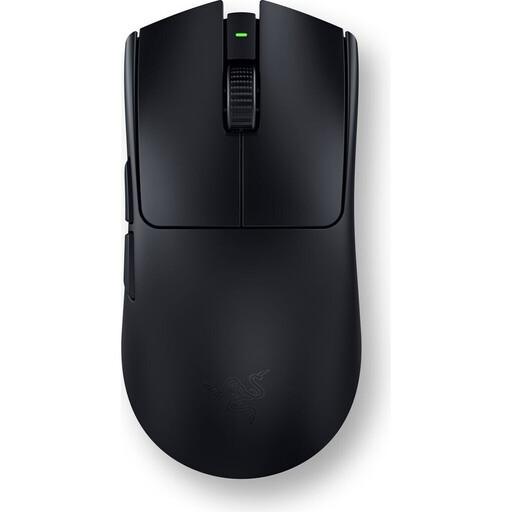
Razer lists the Viper V3 Pro as weighing 54 g in black and 55 g in white.
Wireless gaming mice with different features in terms of weight, connection and programmable buttons.
 No image available
A wireless option if you want to keep a cable out of your movement area and the shape suits your grip.
54 g for the black version, according to Razer; six programmable buttons, according to the product description. Remember to make room for the wireless receiver and charging.
 No image available
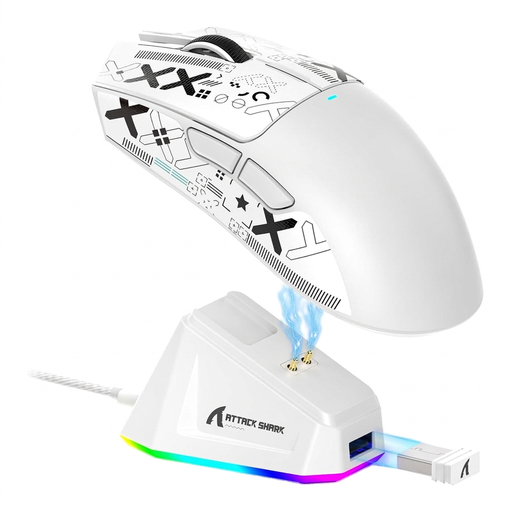
A wireless option if you want to keep a mouse cable out of your movement area and use programmable buttons.
Tri-mode connection, five programmable buttons and 62 g according to the product name. The charging dock takes up desk space, and wireless use means you’ll need to charge the mouse.
 No image available
A wireless option if you want to assign lots of game commands to mouse buttons and a right-handed shape suits you.
19 programmable buttons, plus 2,4-GHz wireless and Bluetooth, according to the product description. You’ll need the receiver for 2,4-GHz wireless, and the mouse uses an AA battery. The product description says you can customise the buttons using Razer Synapse.
 No image available
A wireless option if you want to avoid a mouse cable and customise buttons or macros.
Tri-mode connection via Bluetooth, 2,4 GHz or USB-C, and 63 g according to the product name. A charging dock is included and takes up desk space.
 No image available
A wireless option if you want to keep a cable out of your movement area and compare different connection options.
Bluetooth, 2,4 GHz and USB-C, plus seven programmable buttons according to the product name; it also lists a weight of 67 g and a 400-mAh battery. Remember to factor in charging.
Make room for a 2,4-GHz receiver and keep the charging area clear. SteelSeries lists both 2,4 GHz and Bluetooth for the Aerox 3 Wireless; check the specific product to see which receiver and charging cable are included.
Test the mouse movement with your keyboard in its intended position, and route the cable away from your immediate movement area. CHERRY describes the M42V2 as having a flexible cable; whether you can route it effectively depends on your desk layout.
Your statutory rights against the seller are separate from any voluntary manufacturer’s warranty. Online purchases generally come with a 14-day right to cancel, and you must notify the other party to the contract that you wish to cancel. Check the terms that apply to your specific order.
Devices covered by the relevant EU harmonisation legislation must meet the applicable conformity requirements, including CE marking where required. The German Federal Network Agency lists marking and the declaration of conformity among the points it checks during market surveillance. This does not confirm that any individual product listing is compliant.