What should you look for when buying?
Compact wireless mouse with few extra buttons
A good fit if: You mainly want to avoid a troublesome mouse cable and prefer to control most commands from the keyboard.
Consider: Going wireless doesn’t reduce the space needed for your hand and mouse. If the model has a replaceable battery, you’ll also need to change it from time to time.
Wired mouse with extra controls
A good fit if: You want to use the scroll wheel or an easy-to-reach thumb button, and can route the cable without it getting in the way.
Consider: You’ll need room for the cable on your small desk. Weight alone doesn’t tell you whether a mouse will suit you.
Wireless mouse with lots of buttons
A good fit if: You want to assign several regularly used commands to thumb buttons you can reach.
Consider: A large array of buttons takes time to set up, and doesn’t remove the need to check that they’re within reach and that the mouse fits your hand.
First, measure the available space and allow room to rest your hand and arm. Then decide whether cable management, button assignments or power supply matters most for your setup.
| Priority |
What to check when buying |
Who is it most relevant to? |
| Space and cable management |
Compare the mouse dimensions with the available room to move it. For wired mice, plan the cable route; for wireless mice, allow for the receiver to be plugged in. |
If there’s little room beside my keyboard, I need enough space to move the mouse and a practical place to rest my arm. Around 36% of consumers prioritise space and cable management. |
| Commands within reach |
Make a note of the commands you use most and check that you can reach the relevant buttons with your grip. |
If I want to trigger recurring commands directly from the mouse, how easy the buttons are to reach matters more than having lots of them. Around 29% of consumers prioritise button assignments. |
| Fit during longer sessions |
Compare the mouse shape and button placement with your hand and grip. Remember to consider the space available to rest your hand and arm, too. |
If I play for longer, I want to hold the mouse comfortably without forcing my hand into an awkward position, while still being able to reach the buttons I need. Around 21% of consumers prioritise fit. |
| Batteries, charging and connections |
Check whether the specific version uses a battery or rechargeable battery, how it charges, what’s included and which ports are available. |
If I want to avoid changing batteries or taking charging breaks, the power supply is an important part of my decision. Around 14% of consumers prioritise power requirements and connections. |
These figures refer to consumers choosing a gaming mouse for historical strategy games on a small desk. Each person’s most important buying priority is counted.
Joybuy products for wireless gaming
The following Joybuy products are wireless mice. They differ in features such as the number of programmable buttons and their power supply.
 No image available
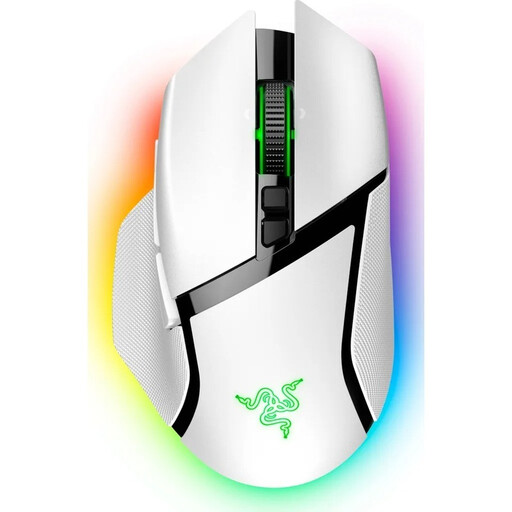
Razer Basilisk V3 Pro, wireless, white
An option if you want to assign several in-game commands to mouse buttons.
The product name lists 11 programmable buttons and a HyperScroll tilt wheel.
Joybuy
 No image available
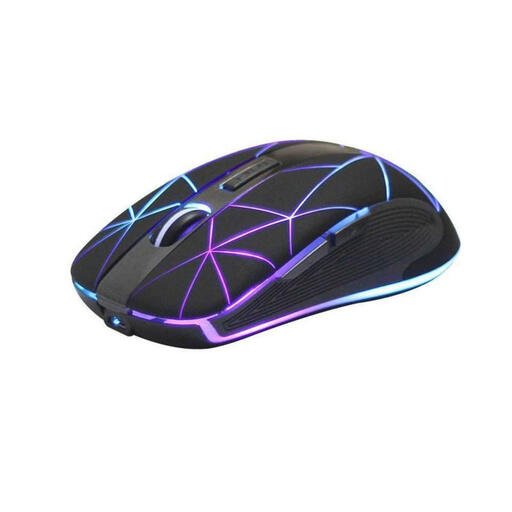
RM200 wireless optical mouse, 5 buttons
A simple button layout may suit you if you only want to use a few extra controls.
The product name lists five buttons and a rechargeable battery with USB charging.
Joybuy
 No image available
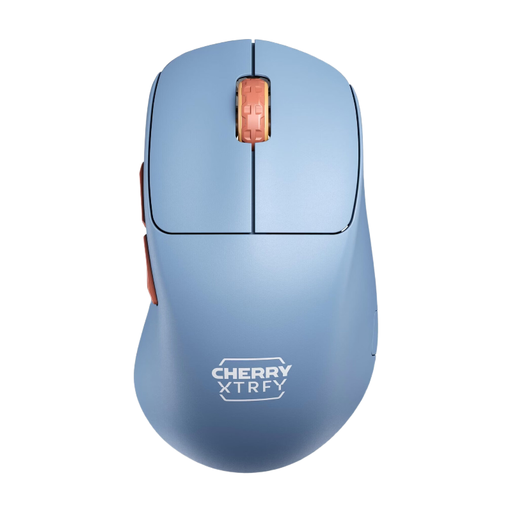
CHERRY XTRFY M64 Wireless, blue
A wireless option if you’re looking for a model with a low weight, as stated in the product name.
The product name lists a weight of 53 g and 2.4 GHz wireless. The product description says the lithium-ion battery isn’t replaceable and recommends charging via a computer’s USB port.
Joybuy
 No image available
Razer Naga V2 HyperSpeed
An option if you regularly want to assign several commands to mouse buttons and can reach a large thumb panel.
The product name lists 19 programmable buttons, 2.4 GHz wireless and Bluetooth. The mouse requires an AA battery.
Joybuy
 No image available
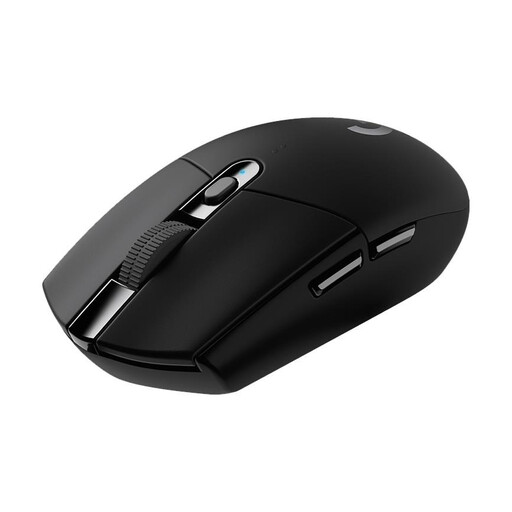
Logitech G305 LIGHTSPEED
A compact wireless option if you want to avoid a mouse cable and assign some commands to buttons.
The product name lists six programmable buttons. Logitech gives the dimensions as 116.6 × 62.15 × 38.2 mm and the weight as 99 g with an AA battery. LIGHTSPEED uses a USB receiver.
Joybuy
Frequently asked questions
Do I need twelve thumb buttons for Age of Empires IV?
No, twelve thumb buttons aren’t essential: Age of Empires Support explains that keyboard hotkeys can be reassigned. A thumb panel is another option if you want to assign specific, frequently used commands to it and can reach the buttons with your grip.
How should I set up my mouse on a small desk?
Allow room beside your keyboard to move the mouse and somewhere suitable to rest your hand and arm. The BAuA highlights this need for space when working at a computer. Then check whether the cable route or wireless receiver will work with your setup.
What should I expect in terms of maintenance and power?
It depends on the specific version. The G305 uses an AA battery, while the SCIMITAR ELITE WIRELESS SE product description says it can be charged via USB while in use. For wireless mice, check the battery type or charging method, as well as the receiver you’ll need.
What are my rights when shopping online in Germany?
When you buy goods online, you generally have 14 days from receiving them to exercise your right to cancel, as explained by the German consumer advice centre. For faulty goods, the statutory warranty is separate from a voluntary manufacturer’s guarantee. For new goods, the retailer is generally responsible for ensuring they were free from defects when delivered for two years.
Can I put my old mouse and its battery in the household bin?
No. The German Environment Agency advises that old electrical equipment should be collected separately. Where possible, remove any removable batteries before handing in the mouse and take them to a separate battery collection point.


