Who should consider which mouse?

Players with limited room to move their mouse

In tactical ranked matches, it matters whether there’s enough space between your keyboard, the edge of your desk and your mouse pad to move the mouse and lift and reposition it. A shorter mouse may help, but you’ll still need to check the space you need for your own movements.

Claw-grip players looking for the right shape

If you hold your mouse with your fingers curled, you could compare a mini shape with a pronounced rear hump against a medium-sized shape with indented sides. The right support for your hand depends on your grip.

Players choosing between wired and wireless

A cable can get in the way when desk space is limited. A wireless mouse removes the cable from your movement area, but needs charging and may require a receiver, depending on the model.

What to look for when buying

Compact 2.4 GHz wireless mouse

A good fit if: A cable is the main thing getting in the way on your small desk, and a shorter shape suits your claw grip.

The trade-off: You’ll need to charge it and use a receiver; the pronounced rear hump also needs to suit your hand.

Lightweight wired mouse

A good fit if: You can route the cable freely across your desk and don’t want to charge a battery. According to the manufacturer, the Endgame Gear OP1 8k v2 weighs 49,5 g and is approximately 118,2 mm long.

The trade-off: The 180-cm cable could catch on objects in a tight space; 8.000 Hz isn’t a proven advantage in a match.

Medium-sized wireless mouse with a claw shape

A good fit if: A mini mouse doesn’t provide enough support and you want to play wirelessly. ZOWIE describes the U2-DW as a medium-sized mouse with inward-curving sides.

The trade-off: The shape of the sides needs to suit your hand; a manufacturer’s claims about control don’t guarantee a good fit.

Other lightweight wireless shapes

A good fit if: You want to compare a different hand position with mini or heavily contoured shapes. Logitech G lists the PRO X SUPERLIGHT 2 at 60 g; Razer lists the Viper V3 Pro at 54 g in black and 55 g in white.

The trade-off: Low weight and high technical maximums don’t determine which shape suits you or how much room you need to move.

Buying priority What to check Who it matters most to
Room to move Check the clear space beside your keyboard and the full range of your mouse movements; the dimensions of the mouse alone don’t tell you how much room you need to sweep and reposition it. If I need room beside my keyboard and the edge of my desk for wide sweeps, having enough space to move comes first; around 36 % of consumers prioritise this.
Grip shape and hold Compare the hump, side shape and size of the mouse while holding it in your usual claw or palm-claw grip. If I’m looking for a mouse that suits the way I normally hold it, fit matters more to me than having the smallest shell; around 29 % of consumers put grip shape first.
Wired or wireless For wired models, check the cable’s route and the USB connection; for wireless models, check the receiver, charging requirements and the conditions for the stated battery life. If a cable might cross the mouse area on my cramped desk, I weigh that against charging and using a receiver; around 21 % of consumers prioritise the connection type.
Settings and use Check the DPI and polling settings you need, the exact model version and switch specifications; consider statutory rights and voluntary guarantees separately. If I’m weighing up the settings and the terms after purchase, I want to know which features I’ll actually use; around 14 % of consumers put these factors first.

Common buying mistakes

  • Choosing a mouse based only on its small dimensions

    The dimensions describe the mouse, not the space you need to sweep and reposition it.

    Measure the clear area and watch how you move your mouse separately; then decide whether a mini or medium-sized shape suits your grip.

    Trying a different mouse shape or changing your desk layout may take extra time and effort.

  • Assuming 8.000 Hz or maximum DPI guarantees an advantage in ranked matches

    Technical maximums alone don’t prove that you’ll personally aim more accurately.

    First, choose a shape that suits you and a clear route for your mouse; then compare technical settings based on what you actually want to use.

  • Overlooking the receiver and battery-life conditions of wireless mice

    Pulsar’s stated battery life for the X2H Mini applies at 1.000 Hz and may vary depending on the environment.

    Before buying, check the exact variant, what’s included and the battery life at the setting you plan to use.

Key brands at a glance

Pulsar

The X2H Mini is a short 2.4 GHz wireless option for players who want to compare claw and palm-claw shapes.

  • Pulsar lists dimensions of 115,6 × 62 × 38 mm and a weight of 52 g, with a variation of ±1 g.
  • The manufacturer states a battery life of up to 100 hours at 1.000 Hz; conditions in your surroundings may affect it.
  • The pronounced rear hump needs to suit your hand.

Endgame Gear

The OP1 8k v2 is a short, lightweight wired mouse for desks where you can route the cable freely.

  • Endgame Gear lists a weight of 49,5 g, dimensions of approximately 118,2 × 60,5 × 37,2 mm, a USB-A connection and replaceable main switches.
  • The 180-cm cable needs space; the 8.000 Hz specification doesn’t prove better results in a match.

ZOWIE

The U2-DW is a medium-sized wireless alternative for players who find a mini shape doesn’t provide enough support.

  • ZOWIE Germany lists a 4K receiver and driver-free plug-and-play.
  • The inward-curving sides need to suit your hand; the manufacturer’s claims about control don’t guarantee a personal fit.

Logitech G

The PRO X SUPERLIGHT 2 is a lightweight wireless shape to compare with more compact mice.

  • Logitech G lists a weight of 60 g, LIGHTSPEED wireless technology and adjustable sensor calibration.
  • High advertised maximum DPI and polling rates alone don’t prove you’ll hit your targets more often; check that the shape and variant suit you.

Razer

The Viper V3 Pro is a lightweight wireless shape to compare, but it isn’t automatically the most space-saving choice.

  • Razer lists a weight of 54 g for the black version and 55 g for the white version, along with a rechargeable USB-C connection.
  • The stated weights come from Razer’s US product page. Check the model and colour variant separately.

Gaming mice at Joybuy

This selection features wireless gaming mice for keeping your mouse movement area clear on a small desk; also check that the shape and size suit your hand.

Razer DeathAdder V3 Pro wireless gaming mouse, white

Razer DeathAdder V3 Pro, 64 g, White

Wireless use keeps a mouse cable out of your way; check that the right-handed shape suits your hand.

The product details list a Focus Pro 30K sensor and five onboard DPI profiles.

View at Joybuy

Razer Viper V3 Pro wireless gaming mouse, white

Razer Viper V3 Pro, 54 g, White

The wireless connection keeps a mouse cable out of your way; check that the symmetrical shape suits your grip.

The product details list a Focus Pro 35K sensor, adjustable polling rates, USB-C charging and third-generation optical switches.

View at Joybuy
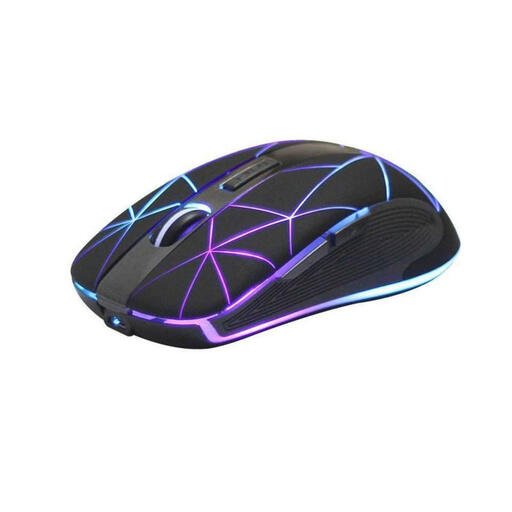
RM200 wireless optical mouse with five buttons

RM200 wireless optical mouse, 5 buttons

Wireless use may suit you if you want to avoid a connected mouse cable; check that the ergonomic shape fits your hand.

The product details list an optical sensor, a rechargeable battery and USB charging.

View at Joybuy

ATTACK SHARK X11 wireless gaming mouse, black

ATTACK SHARK X11, 62 g, Black

This wireless gaming mouse keeps a connected cable out of your way; check which of the listed connection types you want to use.

The product details list a PAW3311 sensor, up to 22.000 DPI, five programmable buttons, and 2.4 GHz, Bluetooth and USB-C connections.

View at Joybuy

AJAZZ AJ200 AI MC wireless gaming mouse

AJAZZ AJ200 AI MC, 63 g

This wireless mouse can keep a connected cable out of your movement area; according to the product description, it’s designed for claw or palm grips and medium to large hands.

The product details list a PAW3311 sensor, up to 24.000 DPI, and Bluetooth, 2.4 GHz and USB-C connections.

View at Joybuy

Frequently asked questions

How can I check whether a mini mouse will fit my desk before I buy?

Measure the clear space beside your keyboard, then see how far you move your current mouse for a typical sweep and where you lift and reposition it. Next, compare the mouse dimensions with your grip; Pulsar’s stated length of 115,6 mm for the X2H Mini describes the shell only, not the space you need to move it.

What should I check on a wireless mouse before a ranked match?

Check that the mouse and receiver are connected, the battery has enough charge and your preferred DPI and polling settings are active. Pulsar states that the X2H Mini offers up to 100 hours at 1.000 Hz; battery life may vary depending on the environment.

What are my rights if a mouse I bought online doesn’t fit or is faulty?

For a qualifying online consumer purchase, you generally have a 14-day right to cancel from the date of delivery; exceptions and possible return costs may apply. Your Europe, the European Union’s information service, also explains that faulty goods are covered by a legal guarantee from the seller for at least two years from receipt. This is separate from any voluntary guarantee.

Can I put an old gaming mouse in household rubbish in Germany?

No. Germany’s Federal Environment Agency says that waste electrical and electronic equipment must be collected separately. Take your old mouse to an appropriate collection point; remove any batteries or rechargeable batteries before handing it in only if you can, and dispose of them separately.